AI agents can now operate desktop applications, navigate screens, enter information, and click buttons. That is a meaningful advance—especially for enterprises with legacy applications that lack modern integration interfaces.
But an agent’s ability to operate an application does not automatically make computer use the right way to integrate with it.
The central architectural principle is simple: Computer use solves an interface problem. It should not create an architecture problem.
For repeatable enterprise operations, typed APIs, governed business capabilities, and coded workflows should generally take precedence over graphical user interface (GUI) automation. Computer use belongs in the architecture, but primarily as a controlled exception layer.
Two AI capabilities, two very different architectural lessons
GitHub’s October 2026 announcements about Copilot dynamic workflows and computer use illustrate an important distinction in enterprise AI architecture.
Dynamic workflows provide a way to coordinate defined execution steps, including deterministic and agent-assisted activities. Computer use enables AI to interact with applications through their graphical interfaces.
Both capabilities can be useful. But they solve different problems.
A coded workflow operates through defined execution paths and interfaces. A computer-use agent interprets an application visually and interacts with controls originally designed for humans.
The first approach can make execution more structured and predictable. The second can extend automation into applications where suitable machine interfaces do not exist.
Neither capability should be judged solely by whether a demonstration succeeds.
The enterprise question is:
Which approach provides the strongest combination of reliability, authorization, validation, observability, and maintainability for the work being performed?
That question matters far more than whether the AI can successfully click a button.
Why computer use is genuinely valuable
Many medium-to-large enterprises and government organizations still operate applications that were never designed for modern automation.
These systems may have been built decades ago. They may use proprietary desktop interfaces, terminal applications, older web technologies, or vendor-controlled platforms with limited integration options.
Replacing them may be prohibitively expensive, operationally disruptive, or simply outside the organization’s control.
Computer-use agents offer another integration option.
An agent may be able to navigate an existing application, enter information, retrieve records, or perform a defined administrative task without requiring the enterprise to replace the underlying system.
Consider an older claims-processing application.
Employees may need to open a customer record, inspect several screens, enter a decision, and update the claim status.
If the application has no supported API or automation interface, computer use may help automate portions of that workflow.
This can create real business value by reducing repetitive manual work and extending automation into previously inaccessible systems.
However, the architectural risks do not disappear simply because the agent can operate the interface.
The application may change its layout. A dialog box may appear unexpectedly. A record may load slowly. A control may move. An error message may require interpretation.
More importantly, the agent may have access to actions that exceed the task it was assigned.
A successful demonstration establishes that the agent can perform the task under the demonstrated conditions. It does not establish that the implementation is reliable, secure, recoverable, or suitable for unattended production execution.
Computer use is therefore valuable—but it needs an appropriate position within the enterprise integration architecture.
The enterprise execution hierarchy
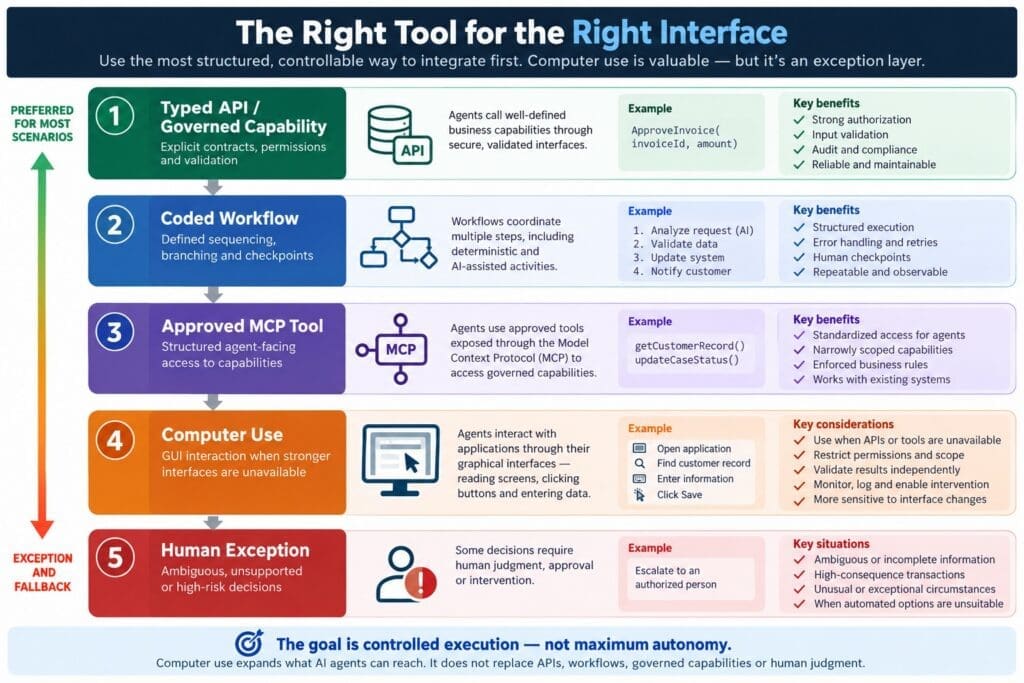
A practical enterprise AI architecture should prefer the most structured, controllable execution mechanism that can perform the work.
Preferred execution hierarchy
1
Typed API / Governed Capability
Explicit contracts, permissions and validation
2
Coded Workflow
Defined sequencing, branching and checkpoints
3
Approved MCP Tool
Structured agent-facing access to capabilities
4
Computer Use
GUI interaction when stronger interfaces are unavailable
5
Human Exception
Ambiguous, unsupported or high-risk decisions
This is an architectural preference order, not a mandatory runtime sequence. A system may combine several mechanisms, and human approval may also be required at any level.
1. Typed APIs and governed capabilities
A typed API provides a defined contract between systems.
The caller supplies structured inputs. The receiving service validates them, applies authorization rules, executes the business operation, and returns a defined result.
For example, an AI agent might request that an invoice be approved.
Instead of navigating a finance application and clicking an approval button, the agent invokes a governed capability such as ApproveInvoice.
That capability can independently determine whether the operation is permitted.
It can enforce approval thresholds, validate invoice status, reject duplicate requests, record the actor and transaction, and require human approval where appropriate.
The agent proposes an action. The capability determines whether that action is authorized.
This distinction is essential. A structured API is not automatically secure, but it provides a clear place to implement and enforce security and business rules independently of the AI model.
2. Coded workflows
Some business operations involve several steps that must occur in a defined order.
A coded workflow can coordinate those steps, including conditional branches, retries, timeouts, verification, and human checkpoints.
AI can still participate.
For example, an agent may classify an incoming support ticket, recommend a routing destination, or analyze an exception. The surrounding workflow can then validate the recommendation and determine the next action.
The model does not need to control the entire process.
This is why GitHub’s dynamic workflows announcement matters. GitHub describes workflows whose execution structure is defined in code, while agents perform the portions requiring analysis or judgment. The feature also supports structured results, parallel activities, cross-checking, and review checkpoints. It was announced in public preview on October 1, 2026.
The larger lesson extends well beyond GitHub:
Use AI where judgment and interpretation add value. Use deterministic execution where business rules and predictable outcomes matter.
3. Approved MCP tools
The Model Context Protocol (MCP) provides a standardized way for AI applications and agents to discover and invoke tools.
That makes MCP useful for connecting agents to enterprise capabilities.
However, MCP should not become an alternative authorization system.
An MCP tool that can modify a customer record should still call a governed business capability that validates the request, checks authorization, and records the result.
A tool description telling an agent not to perform unauthorized actions is not a substitute for enforcing those restrictions.
The preferred design is to expose approved, narrowly scoped capabilities through MCP rather than giving an agent unrestricted access to a database, application, or operating system.
4. Computer use
Computer use becomes appropriate when a suitable machine interface is unavailable or impractical.
The agent may need to navigate a desktop application, inspect a screen, select controls, and enter data.
This introduces dependencies on the application’s interface and state.
It also requires stronger attention to session identity, permitted actions, error recovery, verification, and logging.
Computer use should generally be restricted to the applications and operations required for the task.
5. Human exceptions
Not every enterprise operation should be automated.
Some decisions involve ambiguous records, unusual circumstances, legal responsibilities, financial consequences, or insufficient confidence in the available information.
Those situations may require a human decision.
A properly designed exception process should preserve the work already completed, present the relevant evidence, identify the unresolved question, and allow an authorized person to decide what happens next.
Human involvement should be an intentional architectural control—not simply what happens when an agent gets stuck.
The real problem with GUI-driven execution
The concern with computer use is not that graphical interfaces are inherently unsuitable for automation.
Traditional robotic process automation has demonstrated that GUI automation can be useful in enterprise environments.
The issue is the difference between interacting with a visual interface and invoking a defined business contract.
Consider a customer-service application.
A customer requests a change of mailing address.
Through a governed API, the operation can be represented as structured data:
{
  "customerId": "12345",
  "newAddress": {
    "city": "Raleigh",
    "state": "NC"
  }
}
The application can validate the input, verify authorization, apply business rules, and return an explicit result.
Through computer use, an agent might instead open the customer record, locate an address field, enter information, and click Save.
That can work.
But the agent must correctly identify the record, interpret the interface, distinguish editable fields, handle unexpected dialogs, and determine whether the update succeeded.
The business application may still enforce its normal security rules. The problem is that the automation introduces additional interpretation and interaction steps that require their own controls.
There are several architectural consequences.
Interface changes can break execution. A redesigned form, renamed control, or unexpected modal dialog can invalidate assumptions about the workflow.
Successful clicks do not necessarily mean successful transactions. The agent needs reliable confirmation that the intended business state actually changed.
Session permissions may exceed task permissions. An employee’s application session may expose operations the agent should not perform.
Testing becomes more complicated. The enterprise must account for application state, timing, error conditions, interface changes, and unintended actions.
Audit evidence may be incomplete. Recording what the agent clicked is not the same as recording which business operation was authorized, executed, and verified.
These issues are manageable, but they should be addressed before promoting a computer-use workflow into production.
An agent should not own business authority
This leads to a broader principle within Enterprise AI Architecture.
An AI agent may be capable of interpreting an objective, developing a plan, selecting tools, and recommending actions.
That does not mean the agent should independently decide which consequential operations are permitted.
A useful execution model separates the responsibilities:
Enterprise AI execution and control model
AI-assisted reasoning
Observe
Analyze
Recommend
Independent controls
Authorize
Execute
Verify and Audit
The model can contribute throughout the process, but consequential authority should be enforced by controls outside the model.
The agent can identify what needs to happen.
A governed capability or workflow can determine whether the requested action is valid and authorized.
The execution mechanism performs the operation.
An independent verification step confirms the outcome.
Audit records preserve the evidence.
This separation becomes especially important when agents can operate continuously or combine information and actions across multiple enterprise systems.
A prompt that says do not delete records is not equivalent to a technical control that prevents record deletion.
A prompt specifies intent. Architecture enforces authority.
What GitHub’s announcements actually demonstrate
GitHub’s October 1, 2026 announcements are useful because they show two different approaches becoming available within the same product ecosystem.
| Capability | Dynamic workflows | Computer use |
|---|---|---|
| Primary purpose | Reusable execution processes | Interaction with desktop applications |
| Execution mechanism | Code-defined orchestration | GUI and accessibility interactions |
| AI involvement | Selected analysis and judgment steps | Interpretation and selection of interface actions |
| Strongest use case | Repeatable, structured processes | GUI-only or legacy workflows |
| Key architectural concern | Correct contracts, controls and orchestration | Interface state, permissions and reliable verification |
GitHub says its computer-use feature can read accessible application content and visual context, click controls, enter text, scroll, drag, and navigate across applications. The feature is in public preview for supported macOS and Windows environments.
GitHub also documents application approval settings, the ability to stop an operation, and administrative options for controlling feature availability. These are meaningful safeguards, although they do not by themselves establish that a particular business workflow is ready for unattended production use.
Importantly, GitHub’s own computer-use documentation advises that when a suitable API, MCP server, terminal command, filesystem tool, or dedicated browser tool can perform the task directly, that approach typically provides more structured information and predictable results.
That supports the architectural distinction—not a claim that one feature is universally better than the other.
The announcements do not prove that dynamic workflows are inherently reliable or that computer use is inherently unsafe. Both require evaluation in the context of the specific enterprise task.
When should an enterprise actually use computer use?
A useful decision process starts with the business operation, not the AI product.
Ask whether the application already provides a supported API, SDK, event interface, command-line interface, or other machine integration mechanism.
If it does, evaluate that mechanism first.
If it does not, determine whether a governed adapter or application integration can be built at reasonable cost.
Only then should computer use become a leading option.
Even when computer use is appropriate, the organization should define the agent’s operating boundaries before deployment.
Computer-use production readiness checklist
Application scope
Which applications and environments may the agent access?
Action scope
Which records and operations are explicitly allowed or prohibited?
Identity and authorization
What credentials are used, and how are permissions restricted?
Execution limits
What transaction limits, timeouts and approval checkpoints apply?
Verification
How is the intended business result independently confirmed?
Recovery
What happens after a partial update, failed action or duplicate attempt?
Audit and intervention
What evidence is retained, and how can an operator stop or revoke access?
These controls should be proportional to the consequences of the operation.
Reading information from an internal application is different from modifying customer records. Updating a low-risk administrative field is different from approving a financial transaction or changing a security configuration.
The more consequential the action, the stronger the authorization, verification, and intervention requirements should be.
What this means for Microsoft-centric enterprises
For organizations built around Microsoft technologies, this architectural approach does not require abandoning existing applications or rebuilding every workflow around an AI agent.
Existing ASP.NET Core services, C# business logic, SQL Server applications, Azure-hosted services, and enterprise integration infrastructure can continue to provide the authoritative execution layer.
AI agents can access these capabilities through controlled interfaces.
For example, a .NET service may expose a validated business operation through an API. A coded workflow can coordinate that operation with other services. An approved MCP tool can make the capability accessible to an AI agent without transferring the underlying business rules into a prompt.
Computer use can then address the remaining applications that lack suitable integration mechanisms.
This approach supports incremental modernization.
It also helps preserve existing investments in business logic, data models, security controls, and operational systems.
The enterprise does not need to choose between modern AI agents and its existing technology stack.
It needs to establish a clear boundary between agent reasoning and business execution.
The objective is controlled execution—not maximum autonomy
As AI agents become more capable, it will be tempting to evaluate them by how many applications they can operate and how many tasks they can complete without human assistance.
Those are useful capability measures, but they are not sufficient enterprise architecture measures.
A successful production system must also be secure, reliable, maintainable, observable, and accountable.
Computer use expands the range of applications AI can reach. It does not eliminate the value of APIs, workflow engines, capability contracts, or independent business controls.
For repeatable operations, start with the strongest available machine interface.
Use coded workflows to coordinate defined processes. Expose governed capabilities to agents through approved tools. Reserve computer use for situations where interacting with the GUI is the most practical option. Escalate unresolved or consequential exceptions to authorized people.
The goal is not to give AI the ability to click every button. The goal is to let AI accomplish useful work without surrendering control over enterprise operations.
Computer use is a valuable exception layer.
It is not, by itself, an enterprise AI architecture.
Continue exploring Enterprise AI Architecture
This article supports AInDotNet’s
aindotnet.com, which addresses how people, applications, workflows, and agents safely access validated business capabilities.
For the broader architectural model, explore
aindotnet.com and
aindotnet.com.
Primary sources
- GitHub: Dynamic workflows in Copilot CLI and the Copilot app
- GitHub: Copilot desktop computer use
- GitHub documentation: About computer use
Frequently Asked Questions
What is AI computer use in enterprise architecture?
AI computer use allows an AI agent to interact with software through its graphical user interface, including reading screens, clicking buttons, entering information, and navigating applications. In enterprise architecture, it is particularly useful for integrating legacy applications that lack reliable APIs or other machine interfaces.
Is AI computer use better than traditional APIs?
Generally, no. For repeatable business operations, typed APIs typically provide stronger contracts, input validation, authorization, testing, and auditability. Computer use becomes valuable when suitable APIs or other supported integration mechanisms are unavailable or impractical.
What is the difference between MCP and computer use?
The Model Context Protocol (MCP) provides a standardized way for AI agents to discover and invoke tools. Computer use allows agents to interact directly with graphical interfaces. An MCP tool can expose a governed business capability, while computer use may be needed to operate applications without suitable machine interfaces.
When should enterprises use AI computer-use agents?
Enterprises should consider computer-use agents when legacy applications lack reliable integration interfaces, when replacing those applications is impractical, or when GUI automation provides a reasonable way to complete a defined task. Production implementations should include restricted permissions, reliable verification, error handling, monitoring, and human intervention when appropriate.
Can AI computer-use agents safely perform business transactions?
Yes, under appropriate conditions. However, the ability to execute a transaction does not establish that the operation is authorized or correctly completed. Consequential transactions should have independent authorization, transaction limits, verification, audit records, and appropriate approval or intervention mechanisms.
