
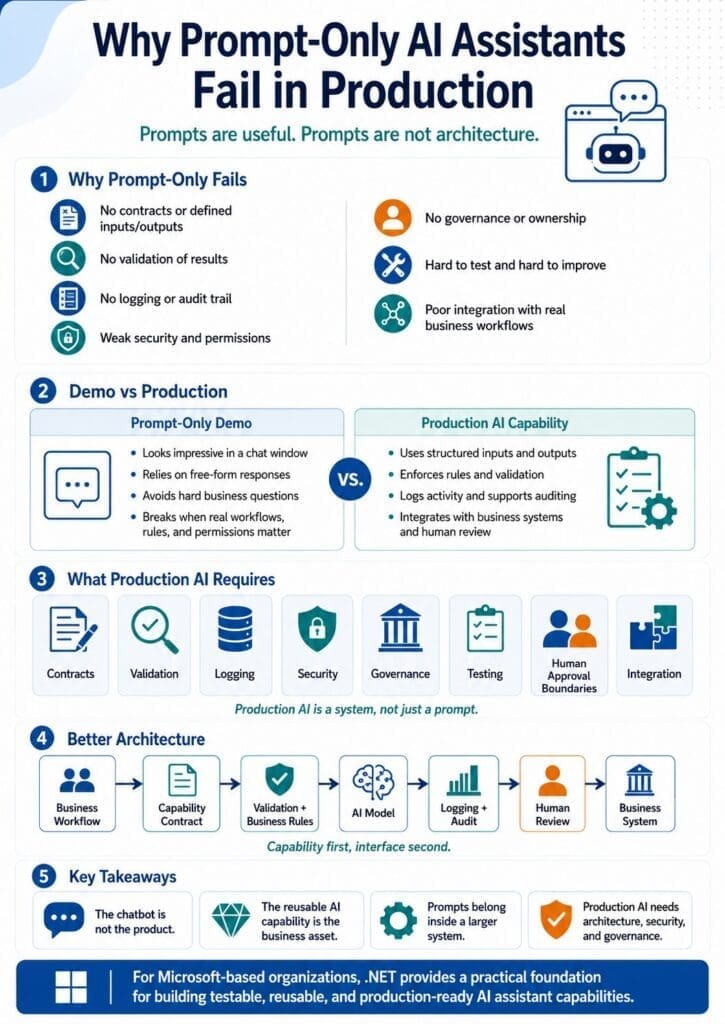
Prompts are useful.
Prompts are not architecture.
That distinction matters because many AI assistant projects begin with a prompt and never grow beyond it. Someone writes a clever instruction. The model responds well in a demo. The output looks impressive. A few people get excited. The organization starts thinking it has an AI assistant.
It does not.
It has a prompt.
A prompt can be part of an AI assistant capability, but it is not the whole system. Production AI requires contracts, validation, logging, security, governance, testing, ownership, monitoring, and integration with real business workflows.
Without those pieces, prompt-only AI assistants usually fail when they leave the demo stage and enter real business use.
The Demo Problem
AI demos are dangerous because they often look better than they really are.
A person types a question into a chat window. The model gives a fluent answer. The answer sounds professional. The team sees the potential. Everyone starts imagining how much time the business could save.
The problem is that the demo usually avoids the hard questions.
Who is allowed to ask this question?
Which documents are approved sources?
What data can the assistant access?
What happens if the answer is wrong?
What if the user asks outside the intended scope?
What if the assistant uses outdated information?
What if the response contains sensitive information?
What if the user needs a structured result instead of a paragraph?
What if the assistant should route the request instead of answering it?
What if the answer requires human approval?
What gets logged?
Who reviews weak answers?
Who maintains the prompt?
Who owns the business rules?
Who supports the system when it breaks?
Those are production questions.
A prompt-only assistant usually cannot answer them.
Prompting Is Not the Same as Engineering
Prompting is an important skill. Good prompts can improve output quality, reduce ambiguity, and help test whether AI can support a task.
But prompting is not the same as software engineering.
A prompt is an instruction.
A production AI assistant capability is a system.
The system needs to define inputs, outputs, rules, boundaries, integrations, permissions, error handling, monitoring, feedback, and human review.
A prompt may say, “Answer this HR policy question using the employee handbook.”
A production capability needs to know which handbook is approved, whether the user is allowed to see the answer, whether the policy varies by location, whether the source is current, whether the answer requires HR review, whether the response should cite the policy section, and whether the user’s question falls outside the assistant’s approved scope.
That cannot be solved by prompt wording alone.
Some logic belongs in prompts.
Some logic belongs in code.
Some rules belong in data.
Some decisions belong to humans.
Some controls belong in security infrastructure.
Prompt-only designs fail because they try to push too much responsibility into the prompt.
Production AI Requires Contracts
A production AI assistant capability needs a contract.
A contract defines what the capability accepts, what it returns, and what behavior other systems can depend on.
For example, an invoice review capability may require:
- Vendor name
- Invoice number
- Purchase order number
- Invoice date
- Due date
- Line items
- Payment terms
- Contract reference
- Discrepancy notes
- Human review status
The output may need to follow a structured format:
- Extracted fields
- Missing information
- Identified discrepancies
- Confidence indicators
- Suggested next step
- Required approval path
- Supporting explanation
A prompt-only assistant often produces free-form text. That may be fine for brainstorming, but it is weak for production workflows.
Business systems need predictable structure.
APIs need schemas.
Databases need fields.
Reports need consistent values.
Approvers need clear summaries.
Automation needs reliable status codes.
A production AI assistant capability should produce outputs that other systems and humans can use consistently.
That requires contracts.
Production AI Requires Validation
AI output should not be trusted just because it sounds confident.
Large language models can produce fluent but incorrect answers. They can omit details. They can overgeneralize. They can misunderstand the workflow. They can produce answers that are plausible but unsupported.
A production system needs validation.
Validation can check whether:
- Required fields are present
- Output follows the expected schema
- The answer cites approved sources when required
- The user has permission to access the referenced information
- The result falls within the allowed scope
- The confidence is high enough for the workflow
- The request should be routed to a human
- The result conflicts with known business rules
- The answer contains unsupported claims
- The proposed action exceeds the assistant’s authority
Prompt-only assistants usually rely on the model to police itself.
That is weak architecture.
A better approach is to surround the model with software controls. Let the model perform the task it is good at, but validate the output before it affects the business process.
Production AI Requires Logging
If an AI assistant gives a bad answer and the organization cannot reconstruct what happened, the system is not production-ready.
Logging is not optional.
A production AI assistant capability should capture enough information to support debugging, improvement, auditability, and trust-building.
Useful logs may include:
- User request
- User role or permission context
- Input data
- Retrieved documents or knowledge sources
- Prompt version
- Model used
- Model response
- Structured output
- Validation results
- Human review decision
- User feedback
- Errors and exceptions
- Latency
- Cost
- Downstream action taken
Without logging, every failure becomes anecdotal.
Someone says, “The AI gave a bad answer.”
That is not enough.
Was the prompt unclear? Was the source document outdated? Did retrieval fail? Did the user ask something outside scope? Did the model ignore an instruction? Was the output actually correct but poorly formatted? Did a business rule change? Was the wrong document used? Did the user lack the required context?
Without logs, you are guessing.
With logs, failures become diagnostic data.
That is how AI assistant capabilities improve over time.
Production AI Requires Security
Security cannot be delegated to a prompt.
A prompt can say, “Do not reveal sensitive information.”
That is not a security model.
Production AI assistants need real authentication, authorization, and data access controls.
The system needs to know:
- Who is the user?
- What role does the user have?
- What department does the user belong to?
- What documents can the user access?
- What records can the user view?
- What actions can the user request?
- What data must be excluded?
- What responses require masking or redaction?
- What requests should be blocked?
- What activity should be audited?
This is especially important for HR, finance, legal, compliance, IT, customer service, healthcare, government, and other sensitive workflows.
Prompt-only systems are risky because they often treat the model as if it can enforce policy by instruction alone.
That is not acceptable for real business systems.
Security belongs in architecture.
Production AI Requires Governance
AI assistant capabilities need governance because they affect how work gets done.
Governance answers questions such as:
- Who owns the capability?
- Who owns the business rules?
- Who approves source documents?
- Who reviews weak outputs?
- Who maintains the prompt?
- Who monitors performance?
- Who decides when the capability changes?
- Who handles user complaints?
- Who validates results after business rules change?
- Who determines whether the capability can be used by an agent later?
Without governance, AI assistants become abandoned experiments.
They may continue running after documents become outdated. They may keep using old rules. They may produce inconsistent results. They may expand beyond their intended purpose. They may become unsupported internal tools that nobody fully owns.
A production AI assistant capability should have both a business owner and a technical owner.
The business owner understands the workflow, rules, risks, exceptions, and acceptable outcomes.
The technical owner understands the architecture, data sources, integrations, security, deployment, monitoring, and maintenance.
Prompt-only assistants usually do not have clear ownership.
That is one reason they fail.
Production AI Requires Human Approval Boundaries
Not every AI-assisted workflow should be autonomous.
In many cases, the best production design is simple:
The assistant drafts. A human approves.
The assistant summarizes. A human verifies.
The assistant classifies. A human corrects.
The assistant recommends. A human decides.
That approach is not anti-AI. It is good engineering.
Human approval boundaries are especially important when the assistant affects customers, employees, money, compliance, legal risk, safety, security, or operational decisions.
A prompt-only assistant often blurs the boundary between suggestion and action.
A production system should make that boundary explicit.
For example:
- The assistant may draft a vendor email, but a finance employee sends it.
- The assistant may summarize an HR policy, but sensitive cases route to HR.
- The assistant may classify a support ticket, but a technician can override it.
- The assistant may recommend an operational next step, but a manager approves it.
- The assistant may prepare a risk summary, but a human signs off.
AI does not need full autonomy to create value.
It needs the right level of autonomy for the workflow.
Production AI Requires Testing
Prompt-only assistants are hard to test because they often lack stable inputs, expected outputs, and clear success criteria.
Production AI assistant capabilities should be testable.
That does not mean every response must be identical every time. AI models can be probabilistic. But the surrounding system can still be tested.
Testing can verify:
- Required inputs are validated
- Output schemas are followed
- Unauthorized data is blocked
- Approved sources are used
- Missing data triggers the correct fallback
- Low-confidence cases route to human review
- Known examples produce acceptable results
- Sensitive requests are handled correctly
- Errors are logged
- Costs stay within acceptable ranges
- Performance meets business expectations
A .NET implementation can support unit tests, integration tests, contract tests, regression tests, and acceptance tests around the AI assistant capability.
The model may not be perfectly deterministic, but the business system should still be engineered.
Production AI Requires Integration
Real business value usually comes from connecting AI assistance to business workflows.
That means integration.
A production AI assistant may need to connect with:
- SQL Server databases
- SharePoint document libraries
- Microsoft 365
- Microsoft Teams
- Power Platform
- Internal web applications
- Existing APIs
- Ticketing systems
- Finance systems
- HR systems
- Document management systems
- Reporting systems
- Approval workflows
A prompt-only assistant usually operates outside the real workflow.
Employees copy information into a chat window. The model responds. Employees copy information back into another system.
That can help individuals, but it does not create a scalable business capability.
A reusable AI assistant capability should be integrated into the systems employees already use.
That is where the value compounds.
Prompt-Only Assistants Create Duplication
When each department builds its own prompt-based assistant, duplication appears quickly.
IT has one prompt.
HR has another.
Finance has another.
Operations has another.
Customer service has another.
Each prompt handles logging differently, or not at all. Each prompt handles source documents differently. Each prompt has different assumptions. Each prompt has different failure modes. Each prompt has different security risks. Each prompt has different owners, if it has owners at all.
This creates a mess.
A better pattern is to build reusable AI assistant capability libraries.
Common capabilities can be reused across departments:
- Summarize document
- Extract key entities
- Classify request
- Draft professional response
- Compare documents
- Generate checklist
- Search approved knowledge sources
- Convert unstructured text to structured data
Domain-specific capabilities can then specialize for IT, HR, finance, operations, sales, compliance, procurement, customer service, and other business areas.
That is how organizations move from scattered prompts to reusable business infrastructure.
Why .NET Is a Better Foundation Than Prompt-Only Design
For Microsoft-based businesses, .NET provides a practical foundation for production AI assistant capabilities.
A .NET-based system can use:
- C# models for structured inputs and outputs
- ASP.NET Core APIs for exposing capabilities
- Shared libraries for reusable business logic
- Dependency injection for modular architecture
- Validation rules for input and output quality
- Microsoft Entra ID for authentication and authorization
- SQL Server for logs, audit trails, feedback, and operational data
- Azure OpenAI or approved model providers for AI reasoning
- Semantic Kernel for orchestration where useful
- SharePoint and Microsoft 365 as governed knowledge sources
- Teams and Power Platform as interface options
- Azure services for hosting, monitoring, and deployment
- DevOps practices for versioning, testing, and release management
This is not about making AI more complicated than necessary.
It is about making AI useful in real business environments.
Prompt-only AI may be enough for personal productivity.
It is not enough for production business systems.
The Better Pattern: Capability First, Interface Second
Many organizations start with the visible interface.
They ask, “Should we build a chatbot?”
That is the wrong starting point.
A better starting point is:
What business capability do we need?
For example:
- Classify support tickets
- Answer HR policy questions
- Extract invoice terms
- Summarize operational issues
- Draft customer responses
- Compare contract clauses
- Generate compliance checklists
- Route procurement requests
Once the capability is defined, the organization can decide how users should access it.
Maybe the best interface is a web app.
Maybe it is Microsoft Teams.
Maybe it is a Power App.
Maybe it is a workflow.
Maybe it is a chatbot.
Maybe it is an API.
Maybe it is eventually an AI agent.
The interface should call the capability.
The capability should not be trapped inside the interface.
That is the key architectural distinction.
Agents Need Stable Capabilities
AI agents are a popular topic, but agents do not remove the need for architecture.
In fact, agents make architecture more important.
An agent that selects and sequences unreliable prompt-only actions is fragile. It may call the wrong prompt, use the wrong data, skip approval, mishandle permissions, or create inconsistent outcomes.
A better approach is to build stable, tested, permission-aware AI assistant capabilities first.
Then future agents can orchestrate those proven capabilities.
Agents should come after stable capabilities exist.
They should not be the starting point.
How to Move Beyond Prompt-Only AI
Organizations do not need to abandon prompts.
They need to put prompts in the right place.
A practical path looks like this:
- Identify one frequent, painful, bounded workflow.
- Define the business outcome.
- Identify required documents, data, systems, and rules.
- Define inputs and expected outputs.
- Create a prototype capability.
- Add validation, logging, and human review.
- Test with real or representative examples.
- Expose the capability through one practical interface.
- Measure value and failure patterns.
- Improve the capability before expanding.
This approach avoids two common mistakes.
The first mistake is treating a prompt as a production system.
The second mistake is trying to build a full AI platform before proving one valuable capability.
Start with one capability.
Make it useful.
Make it testable.
Make it governed.
Then expand.
Final Thought
Prompts are useful.
Prompts are not architecture.
A production AI assistant requires more than a clever instruction and a chat window. It requires contracts, validation, logging, security, governance, testing, ownership, monitoring, integration, and human approval boundaries.
That is the difference between an AI demo and a business system.
The chatbot is not the product.
The reusable AI assistant capability behind it is the business asset.
For Microsoft-based organizations, the practical path is to build AI assistant capabilities with real software engineering discipline using .NET, Azure, SQL Server, Microsoft 365, Teams, Power Platform, and the systems the business already uses.
Prompt-only assistants may be useful for experimentation.
Production AI needs architecture.
Next Step
Before investing in another chatbot or prompt experiment, identify one workflow that is frequent, painful, bounded, valuable, and realistic to prototype.
AInDotNet helps Microsoft-based organizations assess, prototype, and productionize reusable AI assistant capabilities that can power web apps, Teams, Power Apps, chatbot interfaces, workflow automation, APIs, and future AI agents.
Request an AI Assistant Capability Assessment to identify the first reusable capability worth prototyping.
Frequently Asked Questions
Why do prompt-only AI assistants fail in production?
Prompt-only AI assistants fail in production because prompts do not provide enough structure, security, validation, logging, testing, governance, or integration with real business workflows. A prompt can guide an AI model, but it cannot replace software architecture.
Are prompts still useful in production AI assistants?
Yes. Prompts are useful, but they should be one part of a larger system. Production AI assistants need prompts plus contracts, validation, permissions, logging, monitoring, ownership, human review boundaries, and integration with business systems.
What does production AI require beyond prompts?
Production AI requires defined inputs and outputs, structured schemas, validation, authentication, authorization, audit trails, logging, error handling, testing, monitoring, governance, human approval workflows, and clear business and technical ownership.
Why is security a problem for prompt-only AI assistants?
Prompt-only AI assistants often rely on instructions such as “do not reveal sensitive information.” That is not real security. Production systems need authentication, authorization, role-based access, data-level permissions, redaction, and audit controls enforced by software architecture.
How does .NET help build production-ready AI assistants?
.NET helps by supporting typed models, reusable libraries, ASP.NET Core APIs, dependency injection, validation, testing, logging, authentication, authorization, SQL Server integration, Azure OpenAI, Semantic Kernel, SharePoint, Teams, Power Platform, and enterprise deployment practices.
What is the better alternative to prompt-only AI assistants?
The better alternative is to build reusable AI assistant capabilities. Start with one bounded business workflow, define inputs and outputs, add validation and logging, enforce permissions, include human review boundaries, expose the capability through one interface, and expand only after the capability proves value.
