
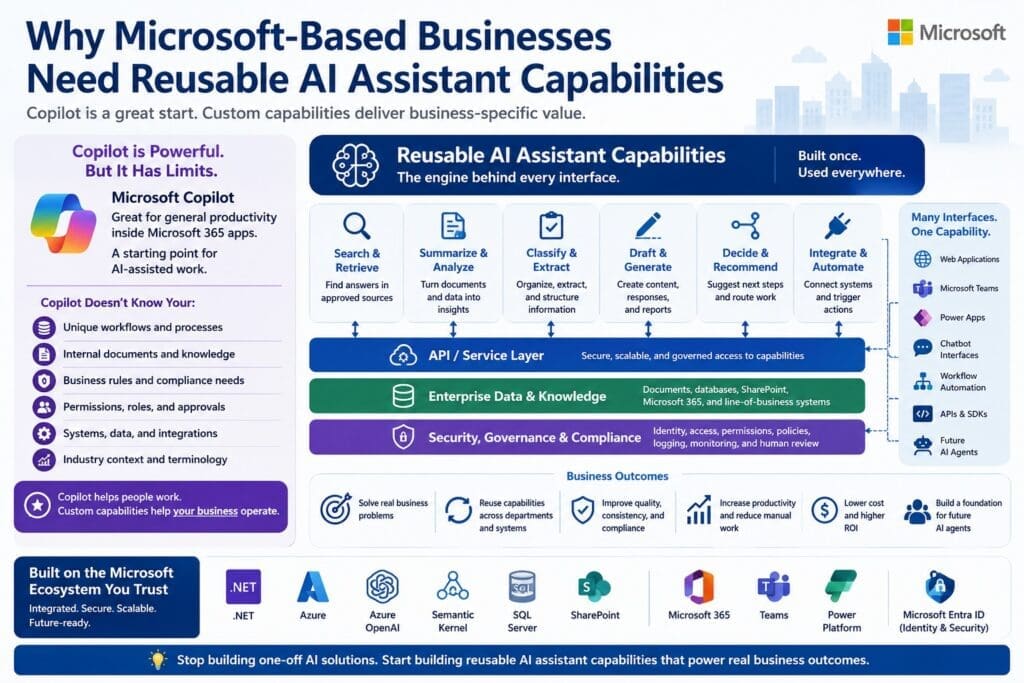
Microsoft-based businesses are in a strong position to benefit from AI.
Many already use Microsoft 365, Teams, SharePoint, SQL Server, Power Platform, Azure, .NET applications, and custom internal systems. They already have business data, documents, workflows, user permissions, identity management, and existing software infrastructure.
That is a major advantage.
But it also creates a strategic question:
Is Microsoft Copilot enough, or does the business need custom reusable AI assistant capabilities?
The answer is usually not either/or.
Microsoft Copilot can help employees become more productive inside Microsoft tools. That is valuable.
But many high-value business workflows require custom AI capabilities that understand the organization’s specific documents, data, business rules, approval processes, permissions, integrations, and operational context.
That is where reusable AI assistant capabilities matter.
A reusable AI assistant capability is not just a chatbot. It is not just a prompt. It is not just a generic AI tool.
It is a business-specific AI capability that can be built once, improved over time, and exposed through many interfaces: web apps, Teams, Power Apps, chatbot interfaces, workflow automation, APIs, internal applications, and future AI agents.
For Microsoft-based organizations, this is one of the most practical paths from AI curiosity to real business value.
Copilot Is Useful, But It Is Not the Whole AI Strategy
Microsoft Copilot matters because it introduces employees to the AI-assisted work pattern.
People start learning that AI can help them summarize, draft, search, explain, organize, and analyze information. That changes expectations.
Employees who use Copilot may begin asking better questions:
- Can AI help with this repetitive task?
- Can AI summarize this document?
- Can AI draft this response?
- Can AI search our internal knowledge?
- Can AI help route this request?
- Can AI explain this data?
- Can AI help me make this workflow faster?
That is a good thing.
But Copilot does not automatically solve every business-specific workflow.
Every organization has unique processes, terminology, systems, permissions, rules, exceptions, risks, and data structures.
Copilot may help with general productivity.
Custom AI assistant capabilities help with the work that is specific to how your business operates.
That is the difference.
Generic AI Helps Standard Tasks. Custom Capabilities Improve Business-Specific Work.
Generic AI is useful for common tasks.
It can help draft emails, summarize text, brainstorm ideas, outline documents, explain concepts, or prepare meeting notes.
Those are valuable productivity improvements.
But the larger opportunity is usually deeper inside the business.
Most organizations have workflows that are repetitive, knowledge-heavy, document-heavy, data-heavy, approval-heavy, or system-dependent.
Examples include:
- Classifying internal support requests
- Summarizing incident histories
- Extracting invoice terms
- Explaining budget variances
- Drafting policy-based HR responses
- Comparing vendor contract clauses
- Preparing onboarding checklists
- Searching approved technical documentation
- Routing procurement requests
- Summarizing compliance findings
- Drafting customer service responses
- Identifying missing information in a workflow
These tasks are not generic.
They depend on the business.
They require the right data, the right documents, the right business rules, the right permissions, and the right output format.
That is why custom reusable AI assistant capabilities matter.
They turn AI from a general-purpose productivity helper into a business-specific operating capability.
What Is a Reusable AI Assistant Capability?
A reusable AI assistant capability is a backend capability that performs a defined business task using AI, code, documents, data, business rules, permissions, and structured outputs.
It should be specific enough to be useful.
It should be controlled enough to be tested.
It should be reusable enough to become an asset.
For example, a finance department may need a capability that extracts invoice terms, checks them against vendor records, identifies discrepancies, and drafts a follow-up message.
That capability may use AI.
But it also needs software logic, validation, permissions, structured output, logging, and integration with financial systems.
A chatbot could expose that capability.
So could a Power App.
So could a Teams workflow.
So could an internal finance portal.
So could an API.
The chatbot is not the product.
The reusable capability is the product.
One Capability Should Support Many Interfaces
A common mistake is building isolated AI interfaces.
One department builds a chatbot.
Another builds a Power App.
Another experiments with a custom GPT.
Another asks IT for a Teams bot.
Another creates an automation script.
Each one may solve a narrow problem, but the organization ends up with fragmented AI experiments instead of reusable AI capability.
A better architecture separates the capability from the interface.
The model looks like this:
Business Domain → AI Assistant Capability Library → API / Service Layer → Multiple Interfaces → Future Agent Orchestration
The business domain defines the work.
The capability library contains reusable assistant capabilities.
The API or service layer exposes those capabilities safely and consistently.
The interface layer lets people or systems access those capabilities through web apps, Teams, Power Apps, chatbots, workflow automation, APIs, and internal systems.
The future orchestration layer allows agents to use stable, tested capabilities later.
This model creates reuse.
It also reduces waste.
Instead of rebuilding the same capability in multiple places, the business builds the capability once and exposes it where needed.
Why Microsoft-Based Businesses Are Well Positioned
Microsoft-based businesses often already have the ingredients needed for custom AI assistant capabilities.
They may already have:
- Business applications built in .NET
- C# development experience
- SQL Server databases
- SharePoint document libraries
- Microsoft 365 content
- Teams collaboration workflows
- Power Platform applications
- Azure infrastructure
- Active Directory or Microsoft Entra ID
- Existing APIs
- Internal portals
- Reporting systems
- Business analysts who understand workflows
- IT teams responsible for security, access, and support
That matters because serious AI implementation is not just about the model.
The model is only one component.
Production AI systems need architecture, integration, governance, testing, monitoring, security, logging, error handling, deployment, and support.
Microsoft-based organizations already have many of the architectural patterns and technical assets required to build AI into real business systems.
The opportunity is to connect AI to that existing ecosystem in a disciplined way.
Reusable Capabilities Fit the Microsoft Stack
Custom AI assistant capabilities can fit naturally into a Microsoft-oriented architecture.
For example:
- .NET and C# can provide the application logic, services, validation, structured outputs, and integration layer.
- ASP.NET Core can expose AI capabilities through APIs or web applications.
- Azure OpenAI can provide access to large language models.
- Semantic Kernel can help coordinate prompts, functions, plugins, and orchestration patterns.
- SQL Server can support structured business data, logging, configuration, and reporting.
- SharePoint can provide document and knowledge sources.
- Microsoft 365 can provide business content and user context.
- Teams can become an interface for employees.
- Power Platform can expose capabilities through low-code apps and workflows.
- OpenAPI can make capabilities accessible to different applications, services, or future agents.
The key is not to treat AI as a disconnected novelty.
The key is to build AI capabilities into the software architecture the business already depends on.
Custom Capabilities Handle Business Rules Better Than Generic Chat
Business workflows usually contain rules.
Some are simple.
Some are messy.
Examples:
- Who is allowed to see this information?
- When should a request be escalated?
- What documents are authoritative?
- What data source should be trusted?
- What output format is required?
- What exceptions require human review?
- Which department owns the answer?
- What compliance rules apply?
- What should be logged?
- What should never be automated?
- What confidence level is acceptable?
- What happens when information is missing?
Generic chat interfaces are weak at this unless they are backed by real architecture.
A reusable AI assistant capability can combine AI with deterministic software logic, validation, retrieval, permissions, structured data, business rules, and review workflows.
That is how AI becomes useful inside business operations.
The goal is not to let AI “make things up faster.”
The goal is to use AI inside controlled business processes where the organization can define boundaries, review output, capture feedback, and improve the system over time.
Reusable Capabilities Support Governance
Governance becomes much easier when AI is designed as reusable capabilities instead of scattered experiments.
A reusable capability can have:
- A business owner
- A technical owner
- Defined inputs
- Defined outputs
- Approved knowledge sources
- Access controls
- Logging requirements
- Review requirements
- Testing criteria
- Performance metrics
- Change management
- Version control
- Support procedures
- Risk classification
- Feedback capture
That gives the organization a manageable unit of AI governance.
Instead of trying to govern every random AI conversation, the organization governs defined capabilities.
That is a much stronger model for medium-to-large businesses and government entities.
Reusable Capabilities Create Better Economics
AI value compounds when capabilities are reusable.
The first capability may require careful assessment and design.
The business must define the workflow, data sources, documents, rules, risks, owners, outputs, integrations, and success metrics.
But once the first capability is built, future capabilities become easier.
The organization can reuse:
- Architecture patterns
- Authentication models
- Logging infrastructure
- Prompt and validation patterns
- Retrieval patterns
- API patterns
- User interface components
- Feedback loops
- Governance models
- Deployment pipelines
- Monitoring practices
- Domain knowledge structures
That is where the economics improve.
The first capability proves the pattern.
Later capabilities compound the value.
This is why businesses should avoid thinking only in terms of “build a chatbot.”
The strategic question is:
What reusable AI capability should we build first?
Domain-Specific Capabilities Produce Business-Specific Value
Different departments have different needs.
An IT assistant capability library may include:
- Classify support tickets
- Suggest troubleshooting steps
- Summarize incident history
- Draft user responses
- Detect recurring issue patterns
An HR assistant capability library may include:
- Answer policy questions
- Summarize handbook sections
- Draft onboarding checklists
- Classify employee requests
- Prepare interview question drafts
A finance assistant capability library may include:
- Extract invoice terms
- Summarize discrepancies
- Classify expenses
- Explain budget variances
- Draft vendor follow-ups
An operations assistant capability library may include:
- Summarize operational issues
- Classify requests
- Identify bottlenecks
- Draft status updates
- Recommend next steps
These are not the same capabilities with different labels.
Each department has different terminology, systems, permissions, risks, business rules, and approval requirements.
That is why domain-driven design matters.
Common capabilities should be reused.
Domain capabilities should be specialized.
Reusable Capabilities Are Safer Than Jumping Straight to Agents
AI agents are attractive because they sound advanced.
But agents should not be the first step for most organizations.
An AI agent is only as reliable as the capabilities it can call.
If the underlying capabilities are unstable, untested, poorly governed, or disconnected from permissions and business rules, then agent orchestration only increases risk.
A safer path is:
- Identify one valuable business workflow.
- Build one reusable AI assistant capability.
- Test it with real or representative business context.
- Add permissions, validation, logging, and human review.
- Expose it through one useful interface.
- Move toward MVP or production if value is proven.
- Add more capabilities.
- Let future agents orchestrate stable, tested capabilities.
Agents should come after capability maturity.
Not before.
How to Choose the First Reusable AI Assistant Capability
A good first AI assistant capability should be valuable, bounded, and reviewable.
Look for workflows where:
- The task happens often.
- The current process is slow or painful.
- The workflow is understood.
- The business value is measurable.
- Documents or data are available.
- The risk is manageable.
- A human can review the output.
- Permissions are clear enough to start.
- The output can be structured.
- The capability can be reused later.
- There is a clear business owner.
- There is a clear technical owner.
Avoid starting with vague goals like “build an AI platform” or “create an enterprise agent.”
Start with one practical capability.
Prove value.
Then expand.
Prototype Before MVP. MVP Before Production.
A reusable AI assistant capability does not need to start as a large production system.
The better path is staged.
Assessment
First, assess whether the workflow is a good candidate.
Evaluate business pain, frequency, manual effort, data availability, document quality, workflow clarity, business rules, integration complexity, security complexity, risk level, human review feasibility, ROI potential, stakeholder ownership, and production complexity.
Prototype
Next, prototype one bounded capability.
The goal is to test whether AI can help with the task using real or representative business context.
A prototype should answer practical questions:
- Can the assistant retrieve or use the right information?
- Can it produce a useful output?
- Are the documents good enough?
- Are the rules clear enough?
- Where does human review belong?
- What integrations are required?
- What risks appear during testing?
MVP
If the prototype proves value, the next step may be an MVP.
An MVP turns the capability into a usable internal tool for a defined group, workflow, and interface.
Production
Production requires a stronger architecture.
That includes security, monitoring, audit trails, cost tracking, governance, testing, deployment, documentation, support, and maintainability.
This staged approach reduces risk.
It prevents the organization from overinvesting before the value is proven.
The Strategic Question for Microsoft-Based Businesses
The question is not:
“Should we use Copilot or custom AI?”
The better question is:
Which AI needs are handled well by Copilot, and which business-specific workflows require reusable custom AI assistant capabilities?
Some needs will be handled by Copilot.
Some should remain manual.
Some should be handled by traditional workflow automation.
Some should become custom AI assistant capabilities.
Some may eventually be orchestrated by agents.
A mature AI strategy does not force everything into one tool.
It chooses the right architecture for the business problem.
Final Thought
Microsoft-based businesses have a major opportunity.
They already have the users, systems, documents, data, workflows, security models, and development platforms needed to apply AI in practical ways.
But the biggest value will not come from treating AI as a novelty chatbot.
It will come from building reusable AI assistant capabilities that improve real business workflows.
Copilot can introduce the AI-assisted work pattern.
Custom capabilities can extend that pattern into company-specific operations.
That is where Microsoft-based businesses can move from AI experimentation to business value.
Build the capability engine once.
Expose it through the right interfaces.
Improve it over time.
Then expand what proves value.
Frequently Asked Questions
Why do Microsoft-based businesses need reusable AI assistant capabilities?
Microsoft-based businesses often have complex workflows, internal systems, SharePoint documents, SQL Server databases, Microsoft 365 content, Teams processes, Power Platform apps, and custom .NET applications. Reusable AI assistant capabilities help connect AI to those business-specific assets instead of limiting AI use to generic productivity tasks or isolated chatbot experiments.
Is Microsoft Copilot enough for most businesses?
Microsoft Copilot is useful for general productivity, but it is not always enough for company-specific workflows. Copilot can help users summarize, draft, search, and organize information inside Microsoft tools. Custom AI assistant capabilities are needed when the business requires internal business rules, structured data access, role-based permissions, workflow integration, human approval, logging, or production governance.
How are reusable AI assistant capabilities different from Microsoft Copilot?
Microsoft Copilot is a Microsoft-provided AI productivity assistant. Reusable AI assistant capabilities are custom backend business functions designed around a company’s specific workflows, documents, data, rules, permissions, and systems. Copilot helps users work better inside Microsoft tools. Custom capabilities help the business improve its own operating processes.
What are examples of reusable AI assistant capabilities?
Examples include classifying support tickets, summarizing incident history, extracting invoice terms, answering HR policy questions, comparing contract clauses, explaining budget variances, drafting customer responses, searching approved knowledge sources, routing requests, generating onboarding checklists, and identifying missing information in a workflow.
Why should businesses build reusable capabilities instead of one-off AI tools?
Reusable capabilities reduce duplication, improve governance, and create long-term business value. A one-off AI tool may solve a narrow problem, but a reusable capability can be exposed through multiple interfaces such as web apps, Teams, Power Apps, chatbots, workflow automation, APIs, internal systems, and future AI agents.
How do reusable AI assistant capabilities fit into the Microsoft ecosystem?
Reusable AI assistant capabilities can be built using familiar Microsoft technologies such as .NET, C#, ASP.NET Core, Azure OpenAI, Semantic Kernel, SQL Server, SharePoint, Microsoft 365, Teams, Power Platform, Microsoft Entra ID, OpenAPI, and existing internal applications. This allows AI to become part of the organization’s existing software architecture rather than a disconnected experiment.
Can reusable AI assistant capabilities work with existing business data?
Yes. A well-designed AI assistant capability can work with existing business data, documents, APIs, databases, SharePoint libraries, Microsoft 365 content, and internal systems. The key is to define access rules, permissions, authoritative sources, structured outputs, logging, and human review boundaries before moving toward production.
Are reusable AI assistant capabilities only for large enterprises?
No. Medium-sized businesses can also benefit, especially if they already use Microsoft technologies and have repetitive knowledge work, document-heavy processes, internal workflows, or custom business applications. The important factor is not company size alone. The better question is whether the workflow is frequent, valuable, bounded, measurable, and supported by available data or documents.
Should businesses build custom AI capabilities before using Copilot?
Not necessarily. Copilot can be a good starting point for general AI adoption and employee familiarity. The better strategy is to identify which needs Copilot handles well and which workflows require custom AI assistant capabilities. Some tasks belong in Copilot, some belong in traditional automation, and some deserve custom reusable AI capabilities.
What makes a good first reusable AI assistant capability?
A good first capability is frequent, painful, bounded, measurable, and reviewable. It should have clear business ownership, available documents or data, manageable risk, reasonable integration complexity, and a path to reuse across more than one interface, workflow, or department.
How do reusable AI assistant capabilities support future AI agents?
AI agents need reliable capabilities to call. Reusable AI assistant capabilities provide stable, tested, permission-aware business functions that future agents can orchestrate. Without those capabilities, agents are more likely to operate on unstable prompts, disconnected tools, or poorly governed workflows.
How should a Microsoft-based business get started?
Start with an AI Assistant Capability Assessment. Evaluate candidate workflows based on business pain, frequency, manual effort, data availability, document quality, workflow clarity, business rules, security complexity, human review feasibility, ROI potential, stakeholder ownership, and production readiness. Then prototype one bounded reusable capability before investing in a larger MVP or production system.
