
Many businesses are approaching AI from the wrong direction.
They start with the visible interface.
They ask:
“Should we build a chatbot?”
“Can we add AI chat to our website?”
“Can employees ask questions through Teams?”
“Can we connect this to SharePoint?”
Those are reasonable questions, but they are not the most important questions.
The better question is:
What reusable AI capability should the business build first?
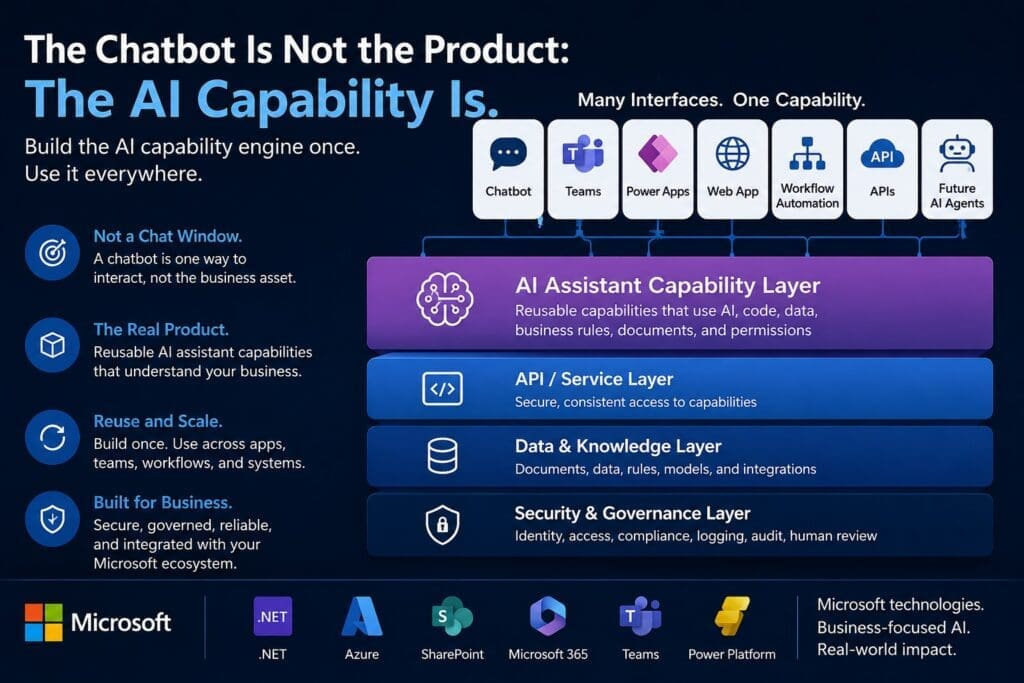
A chatbot may be one way to access that capability. A Teams app may be another. A Power App, workflow, API, Blazor web app, internal portal, or future AI agent may also use the same capability.
The interface matters.
But the interface is not the product.
The reusable AI capability behind the interface is the business asset.
Most Businesses Do Not Need Another Generic Chatbot
The market is full of chatbot products.
Some are useful. Some are shallow. Some are little more than a chat window connected to a pile of documents. Many can answer basic questions, summarize text, or generate generic responses.
That may be enough for simple use cases.
But medium-to-large businesses usually need more than a generic chatbot.
They need AI capabilities that understand:
- Business workflows
- Department-specific terminology
- Internal documents
- Structured data
- Approval rules
- Security permissions
- Compliance requirements
- Existing systems
- Human review points
- Operational risk
- Production logging and monitoring
That is not just a chatbot problem.
That is a business architecture problem.
A chatbot is only one possible user interface. The real value comes from the backend capability that performs useful work in a repeatable, testable, governable way.
What Is an AI Assistant Capability?
An AI assistant capability is a reusable backend function that helps perform a defined business task using AI, code, data, documents, rules, permissions, and structured outputs.
For example, an AI assistant capability might:
- Summarize a support ticket
- Classify an HR request
- Extract invoice terms
- Draft a customer response
- Compare two contract versions
- Search approved knowledge sources
- Recommend next steps in a workflow
- Generate a checklist
- Route a request to the correct department
- Prepare a structured report from business data
Each of those capabilities may use AI, but they should not depend on AI alone.
A serious business AI capability usually needs more than a prompt. It needs inputs, outputs, rules, validation, permissions, logging, exception handling, and integration with existing systems.
That is where many chatbot-first projects fail.
They confuse “a conversational interface” with “a production-ready business capability.”
Chatbots Are Interfaces. AI Capabilities Are Assets.
A chatbot is a way for a person to interact with a system using natural language.
That can be useful.
But the chatbot itself is rarely the highest-value asset.
The durable asset is the AI capability that can be reused through multiple interfaces.
For example, suppose a company builds an AI capability that can review an internal policy document, retrieve the relevant section, apply business rules, and draft a response to an employee question.
That same capability could be exposed through:
- A chatbot
- A Teams app
- A Power App
- A Blazor web application
- An internal HR portal
- A workflow automation process
- An API
- A future AI agent
The capability is the engine.
The interface is just one way to use the engine.
That distinction matters because businesses waste money when they build one-off AI interfaces instead of reusable AI capabilities.
Build the AI Capability Engine Once. Use It Through Many Interfaces.
The stronger architecture is simple:
Business Domain → AI Assistant Capability Library → API / Service Layer → Multiple Interfaces → Future Agent Orchestration
In practical terms, that means the business defines a useful task, builds a reusable backend capability, exposes it safely through services or APIs, and then allows different tools or interfaces to call that same capability.
This is especially important for Microsoft-based organizations.
A reusable AI assistant capability could be built using technologies such as:
- C#
- .NET
- ASP.NET Core
- Azure OpenAI
- Semantic Kernel
- SQL Server
- SharePoint
- Microsoft 365
- Teams
- Power Platform
- OpenAPI
- Existing internal applications
The point is not to force every AI interaction into a chatbot.
The point is to build business-specific AI capabilities that fit into the systems the organization already uses.
Microsoft Copilot Is a Starting Point, Not the Whole Strategy
Microsoft Copilot is important because it introduces employees to the AI-assisted work pattern.
People are learning that AI can help summarize, draft, search, explain, and organize information. That matters because it changes expectations.
But Copilot does not automatically solve every company-specific workflow.
Every business has unique processes, systems, documents, exceptions, rules, risks, and approval structures.
Copilot may help with standard productivity tasks.
Custom AI assistant capabilities help with the work that is specific to how the business actually operates.
That is the strategic gap.
The question is not:
“Should we use Copilot or build custom AI?”
The better question is:
“Where does off-the-shelf AI help, and where do we need custom AI capabilities tied to our workflows, systems, and business rules?”
Why Generic AI Produces Generic Value
Generic AI can be impressive.
It can summarize text. It can draft emails. It can brainstorm ideas. It can explain concepts. It can help employees work faster.
But generic AI usually produces generic value.
Business-specific value comes from connecting AI to the actual operating context of the organization.
That includes:
- The right documents
- The right data
- The right business rules
- The right permissions
- The right workflow steps
- The right approval process
- The right output format
- The right system integrations
- The right logging and feedback loop
That is why AI assistant capabilities should often be designed around business domains.
An IT assistant capability library should not look exactly like an HR assistant capability library.
A finance assistant capability should not follow the same rules as a sales assistant capability.
A compliance assistant capability should not have the same risk tolerance as a marketing content assistant.
Common capabilities should be reused.
Domain capabilities should be specialized.
Examples of Reusable AI Assistant Capabilities
To make this practical, consider a few examples.
IT Assistant Capabilities
An IT department might use AI assistant capabilities to:
- Classify support tickets
- Suggest troubleshooting steps
- Summarize incident history
- Draft user responses
- Detect recurring issue patterns
- Search internal technical documentation
- Prepare escalation summaries
The interface could be a help desk portal, Teams app, chatbot, or service desk integration.
The reusable capability is what matters.
HR Assistant Capabilities
An HR department might use AI assistant capabilities to:
- Answer policy questions
- Summarize handbook sections
- Draft onboarding checklists
- Classify employee requests
- Prepare interview question drafts
- Route sensitive requests for human review
- Generate employee communication drafts
Here, permissions and human approval boundaries are critical.
The AI should not become an uncontrolled HR authority. It should assist within defined rules and review processes.
Finance Assistant Capabilities
A finance department might use AI assistant capabilities to:
- Extract invoice terms
- Summarize invoice discrepancies
- Classify expenses
- Explain budget variances
- Draft vendor follow-ups
- Compare contract terms
- Flag unusual review items
Finance capabilities usually require strong controls, clear audit trails, and careful integration with business systems.
Operations Assistant Capabilities
An operations team might use AI assistant capabilities to:
- Summarize operational issues
- Classify incoming requests
- Identify bottlenecks
- Draft status updates
- Recommend next steps
- Extract action items from reports
- Compare current issues against historical patterns
Operations teams often benefit from AI capabilities because they deal with repetitive coordination, status reporting, exceptions, and process friction.
Why Prompt-Only AI Assistants Fail in Production
A prompt is not an architecture.
Prompts matter, but they are only one part of a production AI system.
A business AI assistant capability may require:
- Defined inputs
- Structured outputs
- Data validation
- Business rule enforcement
- Authentication
- Authorization
- Retrieval from approved sources
- Logging
- Audit trails
- Error handling
- Cost tracking
- Feedback capture
- Human approval workflows
- Testing
- Deployment controls
- Versioning
- Monitoring
This is where professional software engineering matters.
A prototype can be simple.
A production system cannot be sloppy.
If the capability will be used by real employees, with real business data, inside real workflows, then it needs production discipline.
That is one reason .NET is a strong fit for Microsoft-based organizations building custom AI assistant capabilities. The AI layer can be integrated into familiar enterprise software patterns instead of treated like a disconnected experiment.
Start With One Capability, Not a Full AI Platform
Many organizations make AI harder than it needs to be.
They try to define a massive AI platform before proving one useful business capability.
That creates risk.
A better approach is to start with one bounded capability.
Good first candidates usually have these traits:
- The task happens frequently
- The current process is painful or time-consuming
- The workflow is understood
- The business value is measurable
- The data or documents are available
- The risk is low to medium
- A human can review the output
- The task can be scoped clearly
- The capability can be reused later
- The organization has a clear business owner and technical owner
The first capability should prove the pattern.
After that, the organization can decide whether to expand into an MVP, a production system, additional domain libraries, more interfaces, or future agent orchestration.
Agents Should Come Later
AI agents are getting a lot of attention.
That is understandable. The idea of an AI system that can select tools, sequence tasks, and pursue goals is powerful.
But agents should not usually be the starting point.
An agent is only useful if it has reliable capabilities to call.
If the underlying capabilities are unstable, untested, insecure, poorly scoped, or disconnected from business rules, then adding an agent layer only increases the risk.
A practical AI roadmap looks more like this:
- Identify a valuable business task
- Build one reusable assistant capability
- Test it with real or representative business context
- Add permissions, logging, validation, and human review
- Expose it through one useful interface
- Move from prototype to MVP if the value is proven
- Productionize what works
- Expand across domains and interfaces
- Allow future agents to orchestrate stable capabilities
Agents should come after stable, tested, permission-aware capabilities exist.
Not before.
The Business Value Is Reuse
The economics of AI assistant capabilities improve when reuse is designed into the architecture.
The first capability may take the most thinking because the business must define the workflow, data, rules, permissions, outputs, and success criteria.
But once the pattern is established, future capabilities become easier to identify, design, prototype, and productionize.
A reusable capability library can grow over time.
Some capabilities may be common across departments.
Others may be specialized for IT, HR, finance, operations, sales, compliance, procurement, customer service, or other domains.
The value compounds when the organization stops building isolated AI demos and starts building reusable business capabilities.
A Better Way to Think About AI Assistants
A custom AI assistant should not be viewed as a chat window.
It should be viewed as a growing library of reusable business capabilities.
Some capabilities may answer questions.
Some may retrieve knowledge.
Some may summarize documents.
Some may classify requests.
Some may extract structured data.
Some may draft responses.
Some may recommend next steps.
Some may call tools or APIs.
Some may support workflow automation.
The chatbot is only one possible access point.
The real product is the capability layer behind it.
Final Thought
Businesses do not need to chase every AI trend.
They need to identify practical places where AI can improve real work.
For Microsoft-based organizations, the opportunity is especially strong because custom AI assistant capabilities can be built into the technology environment many businesses already use: .NET applications, SQL Server, SharePoint, Microsoft 365, Teams, Power Platform, Azure services, APIs, and existing internal systems.
The goal is not to build a novelty chatbot.
The goal is to build reusable AI capabilities that help the business operate better.
The chatbot is not the product.
The AI capability is.
Frequently Asked Questions
What does “the chatbot is not the product” mean?
It means the visible chat interface is not the real business asset. The real product is the reusable AI capability behind the interface. A chatbot may be one way to access that capability, but the same backend capability can also power web apps, Microsoft Teams, Power Apps, workflow automation, APIs, internal applications, and future AI agents.
What is an AI assistant capability?
An AI assistant capability is a reusable backend function that helps perform a defined business task using AI, code, business rules, documents, data, permissions, and structured outputs. Examples include summarizing a support ticket, extracting invoice terms, answering a policy question, drafting a response, classifying a request, or recommending the next workflow step.
How is an AI assistant capability different from a chatbot?
A chatbot is a conversational interface. An AI assistant capability is the reusable business function behind the interface. A chatbot lets a user ask questions or make requests in natural language, but the capability performs the actual work. The same capability can be reused through many different interfaces, not just chat.
Why should businesses avoid building one-off chatbots?
One-off chatbots often create narrow solutions that are difficult to reuse, govern, test, secure, and integrate with other systems. A capability-first approach creates reusable backend assets that can support multiple departments, workflows, applications, and interfaces over time.
Can Microsoft Copilot replace custom AI assistant capabilities?
Microsoft Copilot is useful for general productivity and helps employees become familiar with AI-assisted work. However, many business-specific workflows require custom AI capabilities tied to internal documents, structured data, business rules, permissions, approval processes, legacy systems, and production requirements.
Why are reusable AI capabilities better for Microsoft-based organizations?
Microsoft-based organizations often already use .NET, SQL Server, SharePoint, Microsoft 365, Teams, Power Platform, Azure, and existing internal applications. Reusable AI assistant capabilities can be integrated into that ecosystem instead of becoming disconnected AI experiments or isolated chatbot demos.
What kinds of interfaces can use the same AI assistant capability?
The same backend AI assistant capability can be exposed through a chatbot, Microsoft Teams, Power Apps, a Blazor or web application, workflow automation, internal portals, APIs, mobile apps, scheduled jobs, email notifications, or future AI agents. The interface should fit the workflow instead of forcing every AI interaction into chat.
Why does the backend architecture matter more than the chat window?
The backend architecture determines whether the AI capability can be secured, tested, logged, governed, reused, integrated, monitored, and improved. A chat window may make the system easy to use, but production business value depends on the capability layer behind it.
What is a good first AI assistant capability to build?
A good first capability is frequent, painful, bounded, measurable, and reviewable. It should have available documents or data, clear business ownership, reasonable technical feasibility, manageable risk, and a clear path to reuse across more than one workflow or interface.
How should a business start with custom AI assistant capabilities?
Start by assessing one workflow. Identify whether the task is frequent, valuable, well understood, supported by available data or documents, and safe enough for a bounded prototype. Then prototype one reusable AI assistant capability before investing in a larger MVP, production system, or agent-based architecture.
