
Most businesses should not start their AI assistant journey by building a platform.
They should not start by building an agent.
They should not start by building a generic chatbot.
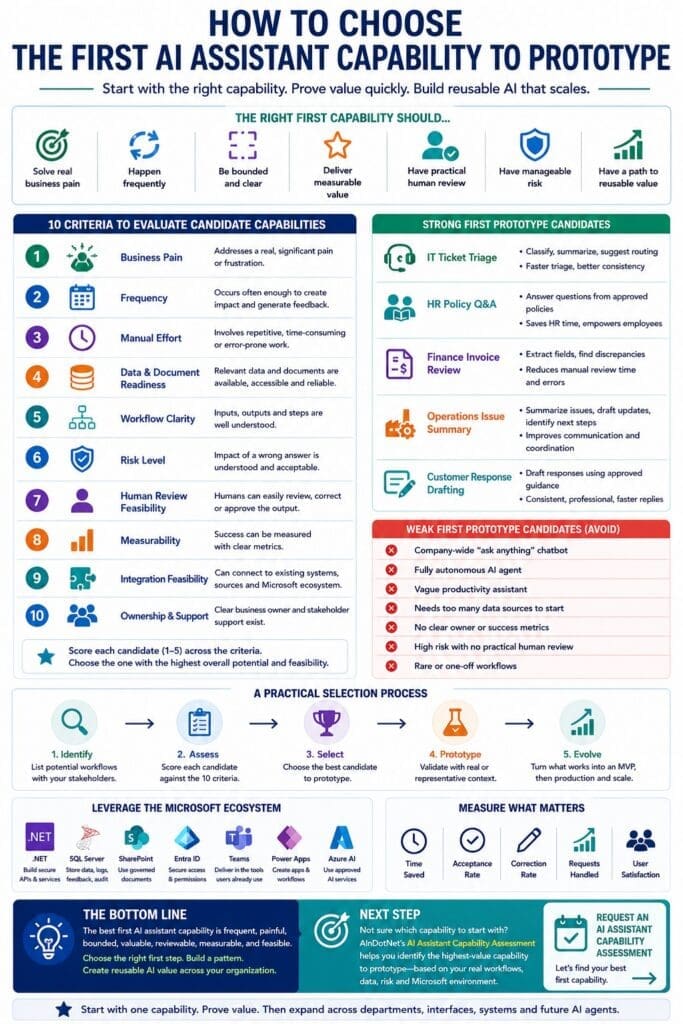
They should start by choosing one valuable AI assistant capability to prototype.
That first capability matters. Choose well, and the organization learns quickly, proves value, builds confidence, and creates a reusable pattern that can expand across departments, systems, interfaces, and future AI agents.
Choose poorly, and the project becomes another AI experiment that looks interesting but never becomes a practical business system.
The goal is not to build AI for the sake of AI.
The goal is to identify a frequent, painful, bounded, valuable workflow where an AI assistant capability can produce measurable business value and eventually become a reusable asset.
The First Capability Should Prove the Pattern
The first AI assistant capability is not just a feature.
It is the test case for the organization’s broader AI assistant strategy.
It should help answer several important questions:
- Can AI assist with this type of business workflow?
- Are the documents, data, and business rules good enough?
- Can subject matter experts evaluate the output?
- Can the workflow be bounded clearly enough?
- Can the assistant produce structured, useful results?
- Can humans review or approve the output when needed?
- Can the capability be exposed through a practical interface?
- Can the value be measured?
- Can this pattern be reused for other departments or workflows?
A good first prototype does more than test one idea.
It teaches the organization how to assess, prototype, validate, improve, and productionize reusable AI assistant capabilities.
That is why selection matters.
What Is an AI Assistant Capability?
An AI assistant capability is a reusable backend capability that performs a defined business task using software logic, AI reasoning, documents, data, business rules, permissions, structured outputs, and human review when appropriate.
Examples include:
- Classify an IT support ticket
- Summarize incident history
- Answer an HR policy question
- Extract invoice terms
- Summarize an operational issue
- Draft a professional customer response
- Compare two documents
- Generate a checklist
- Identify missing information
- Route a request to the correct department
- Prepare a risk summary for human review
The important point is that the capability is not the interface.
A chatbot is one possible interface.
So is a web app, Teams app, Power App, workflow, API, internal application, or future AI agent.
The reusable capability is the business asset.
That means the first prototype should focus on proving a capability, not merely creating a chat window.
Start with Business Pain
The best first AI assistant capability should solve a real business problem.
Not a theoretical problem.
Not a trendy problem.
Not a “wouldn’t it be cool if” problem.
A real problem.
Good candidates usually involve work that is repetitive, time-consuming, inconsistent, slow, error-prone, hard to scale, or dependent on tribal knowledge.
Look for workflows where employees say things like:
- “We answer the same questions over and over.”
- “This takes too long every week.”
- “Only a few people know how to do this.”
- “People keep sending requests to the wrong team.”
- “We spend too much time summarizing information.”
- “We keep copying information from one system to another.”
- “We review the same kind of document repeatedly.”
- “The quality depends too much on who handles the request.”
- “It takes too long to find the right policy, document, or history.”
Those are signs of possible AI assistant value.
AI works best when it helps reduce repetitive cognitive work, organize messy information, retrieve relevant context, draft structured outputs, classify requests, extract fields, summarize history, or prepare information for human decision-making.
If the pain is not clear, the prototype will be hard to justify.
Choose a Frequent Workflow
Frequency matters.
A workflow that happens once per year may be important, but it is usually not the best first prototype.
The first AI assistant capability should ideally support a task that occurs often enough to generate feedback, measurable value, and repeated learning.
Frequent workflows help because:
- Users can test the capability repeatedly.
- The team can observe patterns quickly.
- Value becomes easier to measure.
- Failures become visible sooner.
- Improvements can be validated faster.
- Adoption can be evaluated more realistically.
Examples of frequent workflows include:
- IT support ticket triage
- HR policy questions
- Invoice review
- Customer response drafting
- Operational issue summaries
- Document classification
- Request routing
- Report summarization
- Meeting or incident summaries
- Compliance checklist generation
A rare workflow may still be valuable, but it is usually a weaker first prototype unless the business impact is unusually high.
Keep the First Capability Bounded
A bad first AI project tries to solve everything.
A good first AI prototype solves one bounded problem.
Bounded means the workflow has reasonable limits.
The inputs are understandable. The outputs can be defined. The business rules are knowable. The users are identifiable. The risk is manageable. The documents or data sources are limited enough to evaluate.
Good bounded examples include:
- Classify new IT tickets into predefined categories.
- Answer HR policy questions using approved handbook sections.
- Extract invoice terms from standard vendor invoices.
- Summarize operational issues from daily shift notes.
- Draft customer responses from approved support guidance.
- Compare a new document against an approved template.
- Generate a checklist from an existing procedure.
Weak examples include:
- “Build an AI assistant for HR.”
- “Automate finance.”
- “Create an agent to manage operations.”
- “Let employees ask anything.”
- “Make a company-wide chatbot.”
- “Use AI to improve productivity.”
Those goals are too broad for a first prototype.
Broad goals need to be decomposed into specific capabilities.
Start small enough to learn quickly.
Look for Clear Inputs and Outputs
A strong AI assistant prototype candidate should have definable inputs and outputs.
If nobody can explain what information goes in and what useful result should come out, the capability is not ready.
For example, an invoice review capability may have inputs such as:
- Vendor invoice
- Purchase order
- Contract terms
- Vendor record
- Approval rules
Expected outputs might include:
- Extracted invoice fields
- Missing information
- Discrepancies
- Suggested next step
- Human review flag
An IT ticket triage capability may have inputs such as:
- Ticket description
- User role
- Affected system
- Prior ticket history
- Knowledge base articles
Expected outputs might include:
- Suggested category
- Priority recommendation
- Summary
- Possible next steps
- Routing suggestion
- Confidence or review flag
Clear inputs and outputs make the prototype easier to build, test, validate, and explain.
Vague inputs and vague outputs create vague results.
Check Data and Document Readiness
Many AI assistant projects fail because the business has not prepared its knowledge sources.
The model may be powerful, but it cannot reliably answer from documents that are outdated, contradictory, incomplete, poorly organized, inaccessible, or not approved.
Before prototyping, ask:
- Are the relevant documents available?
- Are the documents current?
- Are there approved sources of truth?
- Are examples available?
- Is the required data accessible?
- Are permissions clear?
- Are document owners identified?
- Are business rules documented?
- Are exceptions known?
- Can subject matter experts validate the results?
Good first candidates do not require perfect data.
But they do require enough usable business context to test the capability honestly.
If the necessary documents are scattered, outdated, or disputed, the first step may not be an AI prototype.
The first step may be knowledge readiness work.
Make Sure the Workflow Has an Owner
Every AI assistant capability needs a business owner.
The business owner understands the workflow, rules, risks, exceptions, and acceptable outcomes.
Without a business owner, the prototype will struggle.
Who decides whether the output is good?
Who explains the exceptions?
Who approves the source documents?
Who identifies the risk boundaries?
Who says whether the capability is worth turning into an MVP?
Who owns the process after the prototype?
AI assistant capabilities are not just technical assets. They are business capabilities.
A technical team can build the system.
But the business must own the workflow.
A strong prototype candidate has both a business owner and a technical owner.
The business owner defines value and correctness.
The technical owner defines architecture and implementation.
Both are needed.
Evaluate Risk Early
The first prototype should not be reckless.
A good first AI assistant capability should usually be low-to-medium risk, especially if the organization is still learning how to build and govern AI systems.
Risk questions include:
- What happens if the assistant gives a weak answer?
- Could a bad output affect customers?
- Could it affect employees?
- Could it affect money?
- Could it affect compliance?
- Could it expose sensitive information?
- Could it create legal or contractual problems?
- Could it damage trust?
- Can a human review the output before action is taken?
- Can the system avoid taking direct action automatically?
This does not mean the first prototype must be trivial.
It means the consequences of failure should be manageable.
A good first prototype often assists humans instead of replacing decisions.
The assistant drafts. A human approves.
The assistant summarizes. A human verifies.
The assistant classifies. A human corrects.
The assistant recommends. A human decides.
That is a safer and more practical starting point.
Human Review Should Be Practical
For a first prototype, human review is usually a strength.
It reduces risk, builds trust, and creates feedback for improvement.
But human review must be practical.
If every AI output requires a 45-minute expert review, the capability may not save time.
If the review process is simple, fast, and natural, the capability is more promising.
Good human review examples include:
- Technician approves or edits a ticket classification.
- HR representative reviews a policy answer before sending.
- Finance employee confirms extracted invoice fields.
- Operations manager approves a drafted status update.
- Compliance analyst reviews a generated checklist.
The first prototype should make review easier, not harder.
If the assistant helps prepare a better first draft, a cleaner summary, a structured extraction, or a faster triage recommendation, it can still create value even when humans remain in control.
Choose Something Measurable
A strong first prototype should support measurable value.
Measurement does not need to be perfect, but it should be practical.
Possible measurements include:
- Time saved per task
- Number of requests handled
- Reduction in manual review time
- Output acceptance rate
- Correction rate
- User satisfaction
- Faster response time
- Fewer routing errors
- More consistent answers
- Reduced backlog
- Fewer missing fields
- Improved documentation quality
- Faster onboarding
- Better first-pass classification
If there is no way to measure value, the prototype may still be interesting, but it will be harder to justify moving to MVP or production.
The first capability should help the organization make a rational decision.
Continue, revise, or stop.
Avoid the Company-Wide Chatbot Trap
Many organizations want to start with a company-wide chatbot.
That is usually a mistake.
A company-wide chatbot sounds attractive because it appears broad and useful. But broad assistants are harder to govern, harder to secure, harder to test, harder to measure, and harder to support.
They also create vague expectations.
Users may ask anything.
The assistant may answer outside its intended scope.
Source documents may conflict.
Permissions may become complicated.
The business may not know who owns the answers.
A better starting point is one bounded capability for one workflow.
For example, do not start with “an HR chatbot.”
Start with “an HR policy question-answering capability using approved employee handbook sections for a defined audience.”
Do not start with “an IT assistant.”
Start with “an IT ticket classification and summary capability for incoming support requests.”
Do not start with “a finance bot.”
Start with “an invoice term extraction and discrepancy summary capability.”
Specific beats broad.
Capability beats chatbot.
Avoid Starting with Full Autonomy
The first AI assistant capability does not need to take action automatically.
In many cases, it should not.
Full autonomy creates more risk, more governance burden, more testing requirements, and more organizational resistance.
A better first prototype is usually assistive.
It prepares work for humans.
It does not replace human judgment.
Examples include:
- Draft, but do not send.
- Classify, but allow correction.
- Summarize, but allow verification.
- Extract, but require approval.
- Recommend, but do not execute.
- Route with human override.
- Flag exceptions for review.
Autonomy should be earned over time.
First prove the capability can assist reliably.
Then consider whether any part of the workflow can safely become more automated.
Consider Microsoft Ecosystem Fit
For Microsoft-based businesses, the first AI assistant capability should ideally connect to systems the organization already uses.
That may include:
- .NET applications
- SQL Server databases
- SharePoint document libraries
- Microsoft 365
- Microsoft Teams
- Power Platform
- Azure
- Microsoft Entra ID
- Existing internal APIs
- Existing workflow tools
- Existing reporting systems
A strong first prototype does not need to integrate with everything.
But it should have a plausible Microsoft-stack implementation path.
For example:
- A .NET service could expose the capability through an ASP.NET Core API.
- SQL Server could store logs, structured outputs, feedback, and audit records.
- SharePoint could provide approved documents.
- Microsoft Entra ID could support authentication and authorization.
- Teams or Power Apps could become practical interfaces.
- Azure OpenAI or another approved model provider could support the AI reasoning.
- Semantic Kernel could help organize prompts, functions, and orchestration where useful.
The prototype should not be disconnected from the organization’s real technology environment.
Otherwise, it may prove the AI model can work but fail to prove the business can implement and operate the capability.
Score Candidate Capabilities
A practical way to choose the first prototype is to score each candidate capability.
Useful scoring dimensions include:
- Business pain
- Frequency
- Manual effort
- Data availability
- Document quality
- Workflow clarity
- Business rule clarity
- Integration complexity
- Security complexity
- Risk level
- Human review feasibility
- ROI potential
- Prototype feasibility
- Stakeholder ownership
- Production complexity
Not every dimension needs to be perfect.
In fact, a good assessment often reveals what needs to be improved before prototyping.
But scoring prevents the organization from choosing based only on enthusiasm, politics, or hype.
It forces a more serious conversation.
Which workflow is painful?
Which one is feasible?
Which one has enough data?
Which one has an owner?
Which one can be reviewed safely?
Which one can prove value?
Which one can become reusable?
That is the conversation that should happen before money is spent building.
Strong First Prototype Candidates
Some workflows are usually stronger first candidates than others.
Strong examples include:
IT Ticket Triage
This capability can classify tickets, summarize issue descriptions, suggest routing, identify missing information, and draft technician notes or user responses.
Why it is strong:
- Frequent
- Measurable
- Reviewable
- Often supported by ticket history
- Clear value in faster triage and better consistency
HR Policy Question Answering
This capability can answer employee policy questions using approved documents, cite sources, identify sensitive cases, and route complex questions to HR.
Why it is strong:
- Repetitive
- Document-driven
- Useful for employees and HR teams
- Requires clear source control and review boundaries
- Good example of governed AI assistance
Finance Invoice Review
This capability can extract invoice fields, compare invoices to purchase orders or contract terms, identify discrepancies, and prepare exception summaries.
Why it is strong:
- Structured
- Repetitive
- High manual effort
- Measurable time savings
- Human review naturally fits the workflow
Operations Issue Summary
This capability can summarize operational issues, identify missing information, draft status updates, and recommend next steps for human review.
Why it is strong:
- Frequent in many organizations
- Helps with communication and coordination
- Can reduce repeated status gathering
- Useful for managers and frontline teams
Customer Response Drafting
This capability can draft professional responses using approved guidance, account context, issue history, and human approval.
Why it is strong:
- Frequent
- Easy to review
- Can improve consistency
- Can reduce writing time
- Human approval boundary is clear
These are not the only candidates, but they show the pattern.
The best first capability is specific, useful, bounded, reviewable, and measurable.
Weak First Prototype Candidates
Some ideas are usually poor first candidates.
Examples include:
- A company-wide “ask anything” chatbot
- A fully autonomous AI agent
- A vague productivity assistant
- A system that requires access to too many disconnected data sources
- A workflow with no clear owner
- A workflow with outdated or disputed source documents
- A process where errors create unacceptable risk
- A capability with no measurable value
- A task that happens too rarely to evaluate
- A use case where nobody can define what good output looks like
These ideas may become viable later.
But they are usually not good first prototypes.
The first prototype should reduce uncertainty, not multiply it.
The Best First Capability Has a Clear Next Step
A good prototype candidate should have a natural path forward.
If the prototype works, what happens next?
Can it become an MVP for a defined user group?
Can it be integrated into a workflow?
Can it be exposed through Teams, Power Apps, a web app, an API, or an internal system?
Can it be productionized with security, logging, governance, monitoring, and support?
Can it become part of a reusable capability library?
Can future agents eventually call it as a stable capability?
If there is no path beyond the demo, the candidate may not be worth prototyping.
The first capability should not be a dead-end experiment.
It should be the beginning of a reusable pattern.
A Simple Selection Rule
Use this rule:
Choose a capability that is frequent, painful, bounded, valuable, reviewable, measurable, and feasible.
That may sound simple, but it prevents many bad AI decisions.
Frequent means the task happens often enough to matter.
Painful means the current process creates real cost, delay, inconsistency, risk, or frustration.
Bounded means the scope can be clearly defined.
Valuable means improvement would matter to the business.
Reviewable means humans can evaluate and approve outputs.
Measurable means success can be judged.
Feasible means the data, documents, systems, and ownership are realistic enough for a prototype.
If a candidate is missing several of those qualities, do not start there.
From First Prototype to Reusable Capability Library
The first successful prototype should not remain isolated.
It should become part of a reusable capability model.
For example, an IT ticket triage prototype may lead to additional IT assistant capabilities such as incident summaries, recurring issue detection, user response drafting, and knowledge base suggestions.
A finance invoice extraction prototype may lead to discrepancy summaries, vendor follow-up drafts, budget variance explanations, and approval workflow support.
An HR policy assistant prototype may lead to onboarding checklists, employee communication drafts, benefits summaries, and request classification.
An operations issue summary prototype may lead to bottleneck identification, shift handoff summaries, status update drafting, and process improvement checklists.
The first capability proves the pattern.
Later capabilities compound the value.
That is how AI assistant development moves from isolated experiment to business infrastructure.
Why Assessment Comes Before Prototyping
An AI assistant prototype should not start with coding.
It should start with assessment.
Assessment helps determine whether the candidate is worth prototyping at all.
A good AI Assistant Capability Assessment should evaluate:
- Business pain
- Workflow frequency
- Manual effort
- Data availability
- Document quality
- Workflow clarity
- Business rules
- Integration needs
- Security concerns
- Risk level
- Human review requirements
- ROI potential
- Prototype feasibility
- Stakeholder ownership
- Production complexity
This assessment does not need to be bureaucratic.
It needs to be honest.
The purpose is to choose the right first capability, avoid bad candidates, define the prototype scope, and identify readiness gaps before development begins.
That is how organizations avoid wasting time on AI projects that were never good candidates.
Final Thought
The first AI assistant capability should be chosen carefully.
Do not start with a generic chatbot.
Do not start with a company-wide assistant.
Do not start with full autonomy.
Do not start with agent hype.
Start with one frequent, painful, bounded, valuable, reviewable, measurable, and feasible business workflow.
Prototype one reusable capability.
Learn from real or representative business context.
Turn what works into an MVP.
Productionize what proves value.
Then expand across departments, interfaces, systems, and future agent orchestration.
The chatbot is not the product.
The reusable AI assistant capability is the business asset.
Choosing the right first capability is how Microsoft-based organizations move from AI experimentation to practical business value.
Next Step
Before building an AI assistant prototype, assess whether the workflow is a strong candidate.
AInDotNet helps Microsoft-based organizations identify, assess, prototype, and productionize reusable AI assistant capabilities that can power web apps, Teams, Power Apps, chatbot interfaces, workflow automation, APIs, and future AI agents.
Request an AI Assistant Capability Assessment to identify the first reusable capability worth prototyping.
Frequently Asked Questions
What is the best first AI assistant capability to prototype?
The best first AI assistant capability is frequent, painful, bounded, valuable, reviewable, measurable, and feasible. Good examples include IT ticket triage, HR policy question answering, finance invoice review, operations issue summaries, and customer response drafting.
Why should businesses avoid starting with a company-wide chatbot?
A company-wide chatbot is usually too broad for a first AI project. It is harder to govern, secure, test, measure, and support. A better starting point is one bounded AI assistant capability for one workflow.
What makes an AI assistant capability prototype feasible?
A prototype is feasible when the workflow is clear, the required data or documents are available, the expected outputs can be defined, human review is possible, risk is manageable, and there is a business owner who can evaluate results.
Should AI assistant prototypes be fully autonomous?
Usually, no. The first prototype should normally assist humans rather than act autonomously. The assistant can draft, summarize, classify, extract, recommend, or route while humans review, approve, correct, or decide.
Why does assessment come before prototyping?
Assessment helps determine whether a workflow is worth prototyping. It evaluates business pain, frequency, data readiness, document quality, workflow clarity, risk, integration needs, ownership, human review feasibility, ROI potential, and production complexity.
How does the first AI assistant capability lead to future value?
The first successful capability proves the pattern. Once the organization learns how to assess, prototype, validate, and productionize one reusable capability, it can expand into additional capability libraries for IT, HR, finance, operations, sales, compliance, procurement, customer service, and future AI agents.
