
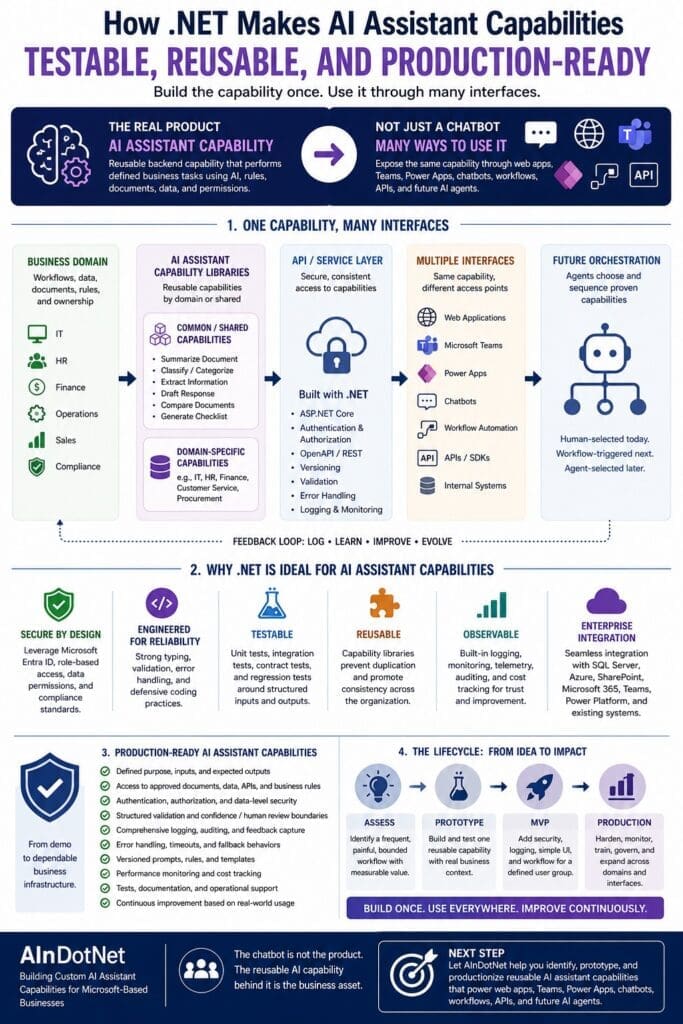
Most businesses do not need another AI demo.
They need AI assistant capabilities that can survive real business use.
That means the capability needs to be testable. It needs to be reusable. It needs to be secure. It needs to be maintainable. It needs to integrate with existing systems. It needs logging, error handling, permissions, monitoring, versioning, and a realistic path from prototype to production.
That is where .NET matters.
For Microsoft-based businesses, .NET is not just a programming language choice. It is an engineering discipline. It gives organizations a practical way to turn AI assistant ideas into reusable business capabilities that can power web applications, Teams apps, Power Apps, chatbot interfaces, workflow automation, APIs, and future AI agents.
The chatbot is not the product.
The reusable AI capability behind the chatbot is the business asset.
AI Assistants Need More Than Prompts
Prompting is useful, but prompts are not architecture.
A prompt can help someone experiment with an idea. A prompt can help a subject matter expert test whether AI might be useful for a workflow. A prompt can even become part of a prototype.
But a production AI assistant capability needs more than a well-written prompt.
It needs defined inputs. It needs expected outputs. It needs validation. It needs access control. It needs to know which documents, databases, APIs, and business rules it is allowed to use. It needs to log what happened. It needs to handle errors. It needs to support testing and improvement over time.
Without that engineering foundation, an AI assistant remains fragile.
It may work in a demo. It may impress people in a meeting. It may even help a few employees manually complete a task.
But it is not ready to become part of a business process.
What Is an AI Assistant Capability?
An AI assistant capability is a reusable backend function that performs a defined business task using some combination of software logic, AI reasoning, business rules, documents, data, permissions, and structured outputs.
Examples include:
- Classifying an IT support ticket
- Summarizing an incident history
- Extracting terms from an invoice
- Drafting a professional response to a customer
- Answering an HR policy question from approved documents
- Comparing two contracts or policy documents
- Generating a checklist from a procedure
- Routing a request to the correct department
- Preparing a structured risk summary for human review
The important point is that the capability is not tied to one interface.
The same backend capability could be used from a Blazor web app, an ASP.NET Core API, Microsoft Teams, a Power App, a chatbot, a workflow, or eventually an AI agent.
That is the business value.
Build the capability once. Use it through many interfaces.
Why .NET Is a Strong Foundation for AI Assistant Capabilities
Many AI discussions focus on models, prompts, and chat windows. Those things matter, but they are not enough for production business systems.
Microsoft-based organizations usually already have important assets in place:
- .NET applications
- C# developers
- SQL Server databases
- Active Directory or Microsoft Entra ID
- Microsoft 365
- SharePoint
- Teams
- Power Platform
- Azure
- Existing APIs
- Internal business applications
- Established DevOps practices
- Security and compliance requirements
For these organizations, .NET provides a practical way to connect AI capabilities to the systems, data, users, permissions, and workflows the business already depends on.
Instead of treating AI as a separate experimental island, .NET allows AI assistant capabilities to become part of the existing enterprise application architecture.
Testability: AI Assistants Need Repeatable Behavior
One of the biggest weaknesses in AI prototypes is that they are hard to test.
Someone types something into a chat window. The model gives a response. People decide whether the answer “looks good.” That may be acceptable for exploration, but it is not enough for business use.
A production AI assistant capability needs testable behavior.
In .NET, a capability can be designed with clear contracts:
- What inputs are required?
- What outputs are expected?
- What format should the response follow?
- What data sources may be used?
- What rules must be applied?
- What should happen when the model is uncertain?
- What should happen when required data is missing?
- What should be logged?
- What requires human approval?
This structure makes it possible to create unit tests, integration tests, regression tests, and acceptance tests around the assistant capability.
That does not mean every AI response will be perfectly deterministic. Large language models are probabilistic by nature. But the surrounding software can still be tested.
The application can test whether required fields are present. It can test whether the output matches a schema. It can test whether unauthorized data was excluded. It can test whether exceptions are handled correctly. It can test whether the response includes citations or supporting evidence when required. It can test whether the workflow routes to human review when confidence is too low.
That is the difference between casual AI usage and production-intent AI engineering.
Reusability: Capability Libraries Prevent One-Off AI Tools
One-off AI tools are easy to create and hard to maintain.
A department asks for an AI helper. Someone builds a small chatbot. Another department asks for something similar. Another chatbot gets built. Then another. Then another.
Before long, the organization has a pile of disconnected AI experiments with duplicated logic, inconsistent behavior, weak governance, and unclear ownership.
A better pattern is to create reusable AI assistant capability libraries.
In a .NET architecture, common capabilities can be placed into shared libraries or services. Domain-specific capabilities can be grouped by business area.
For example, a common capability library might include:
- Summarize document
- Extract key entities
- Classify document type
- Draft professional response
- Compare two documents
- Generate checklist
- Search approved knowledge sources
Then domain-specific libraries can specialize around business needs.
An IT assistant capability library might classify support tickets, summarize incident history, suggest troubleshooting steps, and draft user responses.
An HR assistant capability library might answer policy questions, draft onboarding checklists, classify HR requests, and summarize handbook sections.
A finance assistant capability library might extract invoice terms, explain budget variances, classify expenses, and draft vendor follow-ups.
This structure supports a simple principle:
Common capabilities should be reused. Domain capabilities should be specialized.
.NET is well suited to this pattern because it already supports modular application design, shared libraries, dependency injection, interfaces, services, APIs, and domain-oriented architecture.
Production Readiness: The Demo Is Not the System
A working demo proves that something might be possible.
It does not prove that the capability is ready for production.
Production readiness requires more discipline.
A production-ready AI assistant capability should address questions like:
- Who is allowed to use it?
- What data can it access?
- What documents are approved knowledge sources?
- How are permissions enforced?
- What happens when the model gives a weak answer?
- What actions require human approval?
- How are prompts, rules, and templates versioned?
- How are requests and responses logged?
- How are costs tracked?
- How are errors handled?
- How is performance monitored?
- How are outputs tested?
- Who owns the business rules?
- Who owns the technical implementation?
- How will the capability improve over time?
These are not chatbot questions.
These are software engineering questions.
For Microsoft-based businesses, .NET provides a mature foundation for answering them.
ASP.NET Core can expose capabilities through APIs. C# can define typed models and business logic. SQL Server can store structured records, audit trails, feedback, and operational data. Microsoft Entra ID can support authentication and authorization. Azure can provide hosting, monitoring, AI services, and integration options. Semantic Kernel can help orchestrate AI functions, prompts, plugins, and workflows inside a .NET application.
The result is not just an AI assistant.
The result is a maintainable business capability.
Structured Inputs and Outputs Matter
A production AI assistant should not depend only on free-form chat.
Free-form chat is useful when users need flexibility, but many business workflows benefit from structured inputs and structured outputs.
For example, an invoice review capability might require:
- Vendor name
- Invoice number
- Purchase order number
- Invoice date
- Due date
- Line items
- Contract reference
- Approval status
- Exception notes
An IT ticket classification capability might require:
- User
- Department
- System affected
- Issue description
- Priority
- Previous incidents
- Suggested category
- Recommended next step
A policy-answering capability might require:
- Employee role
- Location
- Policy category
- Question
- Approved source document
- Answer summary
- Supporting citation
- Human review flag
.NET makes this kind of structure natural.
C# models can define the expected data. Validation rules can check completeness. APIs can enforce contracts. Tests can verify expected behavior. Logs can capture both the request and the result. User interfaces can present structured forms instead of forcing every workflow through a generic chat box.
This is one of the major reasons AI assistant capabilities should not be designed as “chatbot first.”
The better pattern is capability first, then interface.
One Capability Can Power Many Interfaces
A well-designed AI assistant capability should not care whether it is called from a web app, Teams, Power Apps, a chatbot, a workflow, or an API.
The interface should call the capability.
The capability should not be trapped inside the interface.
For example, a reusable “summarize customer issue” capability might be exposed through:
- A customer service dashboard
- A Teams app
- A Power App
- A chatbot
- A scheduled workflow
- An internal API
- A future AI agent
The business should not have to rebuild the same logic for each interface.
This is why the backend matters more than the chat window.
When the AI capability is built as a .NET service or library, the organization can expose it through multiple interfaces over time. That creates reuse. It reduces duplication. It improves consistency. It makes governance easier. It also creates a better path for future agent orchestration.
Agents should not be built on top of random prompts and disconnected chatbot experiments.
Agents should call stable, tested, permission-aware capabilities.
Human Approval Boundaries Are Easier to Enforce in Real Software
Many AI workflows should not be fully autonomous at first.
That is not a weakness. That is good engineering.
An assistant can draft. A human can approve.
An assistant can summarize. A human can verify.
An assistant can classify. A human can correct.
An assistant can recommend. A human can decide.
In .NET applications, these approval boundaries can be built into the workflow. The system can require review before sending a message, updating a record, approving a document, escalating a request, or triggering an external action.
This matters because production AI is not just about getting the model to respond.
It is about controlling what happens next.
A responsible AI assistant capability should make it clear when the system is assisting, when a human is approving, and when an action is being taken.
That is much easier to manage in a real software architecture than in a loose collection of prompts.
Logging, Auditing, and Feedback Create the Trust-Building Loop
AI assistant capabilities improve through use, but only if the system captures the right information.
A production-intent system should log:
- User request
- Input data
- Retrieved documents or sources
- Prompt or prompt version
- Model used
- Response
- Structured output
- Confidence signals when available
- Errors or exceptions
- Human corrections
- User feedback
- Approval or rejection decisions
- Cost and performance data
This creates a trust-building loop.
When the assistant gives a weak answer, the organization can inspect what happened. Was the prompt unclear? Was the document outdated? Was retrieval poor? Was the business rule missing? Was the user asking for something outside the intended scope? Was the model response acceptable but the workflow design weak?
Without logging, every bad result is just a complaint.
With logging, every bad result becomes diagnostic data.
.NET systems already commonly include logging, monitoring, exception handling, telemetry, and database persistence. Those practices should carry into AI assistant development.
Production AI should not be treated as magic.
It should be treated as software.
.NET Helps Separate Business Logic from AI Reasoning
A common AI implementation mistake is putting too much responsibility into the prompt.
The prompt becomes the business rules engine. The prompt becomes the validation layer. The prompt becomes the workflow engine. The prompt becomes the security boundary.
That is fragile.
Some logic belongs in code.
Some rules belong in databases.
Some decisions belong to humans.
Some tasks belong to the AI model.
A .NET-based architecture makes it easier to separate these responsibilities.
For example:
- C# code can enforce required fields.
- Business rules can determine whether human approval is required.
- Authorization policies can determine what data the user can access.
- Retrieval logic can select approved knowledge sources.
- AI can summarize, draft, classify, extract, compare, or reason.
- Validation logic can inspect the AI output.
- Workflow logic can route the next step.
- Logging can preserve what happened.
This division of responsibility is critical.
Prompts are useful, but prompts should not replace architecture.
Microsoft-Based Businesses Should Build on What They Already Have
Many medium-to-large businesses and government entities already depend heavily on the Microsoft ecosystem.
They may have years or decades of investment in .NET applications, SQL Server databases, SharePoint document libraries, Microsoft 365, Teams, Power Platform, Azure infrastructure, identity management, internal APIs, reporting systems, and custom business applications.
A practical AI strategy should use those assets.
It should not require the organization to abandon its existing architecture just to chase the newest AI trend.
For many Microsoft-based businesses, the smarter path is to add reusable AI assistant capabilities into the environment they already understand.
That means:
- Use .NET for capability libraries and services.
- Use ASP.NET Core for APIs.
- Use Azure OpenAI or approved model providers for AI reasoning.
- Use Semantic Kernel where orchestration is useful.
- Use SQL Server for structured operational data, logs, and business records.
- Use SharePoint and Microsoft 365 as governed knowledge sources when appropriate.
- Use Teams, Power Apps, web apps, and internal systems as interfaces.
- Use existing security, identity, DevOps, and monitoring practices.
This is not about chasing AI hype.
It is about extending proven enterprise software practices into AI-assisted workflows.
From Prototype to MVP to Production
A responsible AI assistant capability usually moves through stages.
First, the organization identifies a frequent, painful, bounded workflow where AI assistance could create measurable value.
Then it builds a prototype to test whether the capability can work with real or representative business context.
Then it moves toward an MVP for a defined user group, workflow, and interface.
Only after the capability proves useful should the organization invest in production hardening, governance, monitoring, security, documentation, and broader rollout.
.NET supports this staged path well.
A prototype can begin as a focused capability library or service. An MVP can add authentication, a simple interface, logging, validation, and workflow support. A production implementation can add stronger security, audit trails, monitoring, cost tracking, deployment automation, support processes, and expansion across additional departments or interfaces.
This staged approach avoids two common mistakes.
The first mistake is staying forever in demo mode.
The second mistake is trying to build a full AI platform before proving one valuable capability.
The better path is simple:
Assess one workflow.
Prototype one reusable capability.
Turn what works into an MVP.
Productionize what proves value.
Expand across domains after the pattern is proven.
The Real Value Is the Capability Layer
The visible interface gets attention.
The backend capability creates value.
A chatbot may be one useful way to access an AI assistant capability. But it should not be the center of the architecture.
The durable business asset is the reusable capability layer: the tested, governed, domain-aware, permission-aware, production-ready set of AI capabilities that can be used across multiple interfaces and workflows.
For Microsoft-based businesses, .NET provides a strong foundation for building that layer.
It brings AI assistant development back into the world of serious software engineering:
- Clear contracts
- Typed inputs and outputs
- Reusable libraries
- API-based access
- Authentication and authorization
- Logging and audit trails
- Unit and integration testing
- Structured validation
- Workflow integration
- Deployment discipline
- Maintainable architecture
That is how AI assistant capabilities become more than experiments.
That is how they become business infrastructure.
Final Thought
AI assistants should not be built as isolated chatbot experiments.
They should be built as reusable business capabilities.
For Microsoft-based organizations, .NET provides the engineering foundation to make those capabilities testable, reusable, secure, maintainable, and production-ready.
The chatbot is just one interface.
The capability is the asset.
The companies that understand that distinction will be in a much stronger position to move from AI experimentation to real operational value.
Next Step
Before building an AI assistant, identify the first workflow that is frequent, painful, bounded, valuable, and realistic to prototype.
AInDotNet helps Microsoft-based organizations assess, prototype, and productionize reusable AI assistant capabilities that can power web apps, Teams, Power Apps, chatbot interfaces, workflow automation, APIs, and future AI agents.
Request an AI Assistant Capability Assessment to identify the first reusable capability worth prototyping.
Frequently Asked Questions
What is an AI assistant capability?
An AI assistant capability is a reusable backend function that performs a defined business task using AI reasoning, software logic, business rules, documents, data, permissions, and structured outputs. It is the engine behind interfaces such as web apps, Teams apps, Power Apps, chatbots, workflows, APIs, and future AI agents.
Why is .NET useful for building AI assistant capabilities?
.NET is useful because it supports mature software engineering practices such as typed models, reusable libraries, dependency injection, APIs, authentication, authorization, logging, testing, deployment, and integration with Microsoft systems. These practices are critical for moving AI assistants from prototype to production.
Is an AI assistant the same thing as a chatbot?
No. A chatbot is an interface. An AI assistant capability is the reusable backend asset that performs the business task. The same capability can be accessed through a chatbot, web app, Teams app, Power App, workflow, API, or future AI agent.
Why do prompt-only AI assistants fail in production?
Prompt-only assistants often fail because they lack structured inputs, validation, access control, logging, error handling, testing, governance, and integration with real business systems. Prompts are useful, but prompts are not a substitute for software architecture.
Can one AI assistant capability be reused across multiple interfaces?
Yes. That is the main architectural advantage. A well-designed capability can be built once and exposed through multiple interfaces, including web applications, Teams, Power Apps, chatbot interfaces, workflow automation, APIs, and future AI agents.
Should businesses build AI agents first?
Usually, no. Businesses should first build stable, tested, permission-aware AI assistant capabilities. Future agents can then orchestrate those proven capabilities. Building agents before stable capabilities often leads to fragile, risky, and hard-to-govern systems.
