
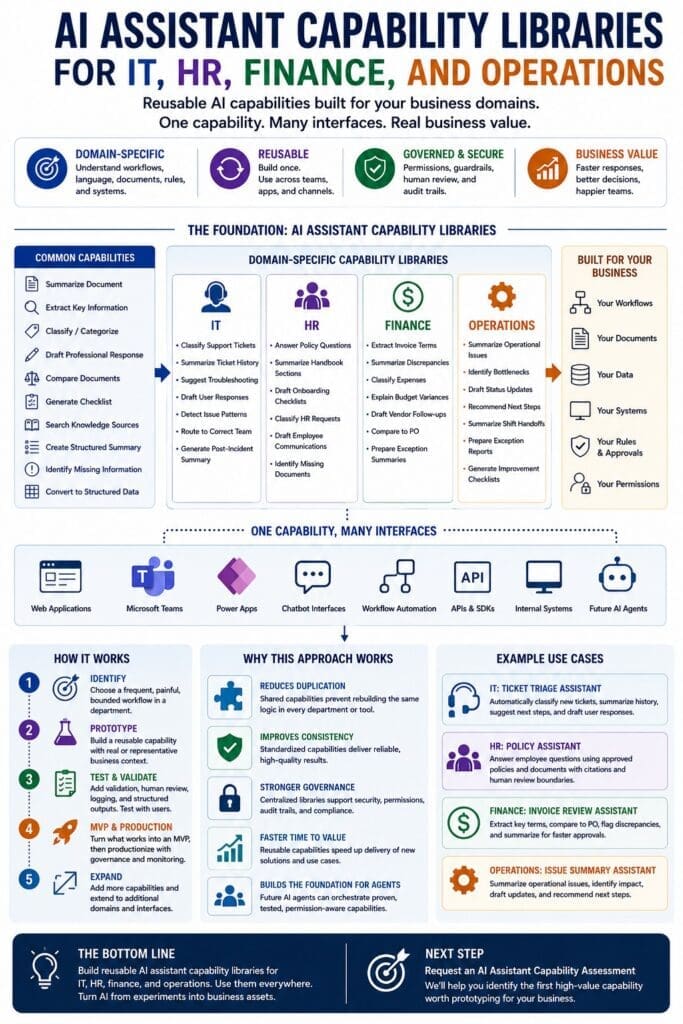
Generic AI produces generic value.
Business-specific AI produces business-specific value.
That distinction matters because most organizations do not need a random chatbot bolted onto the side of the business. They need reusable AI assistant capabilities that understand their departments, workflows, documents, systems, rules, permissions, and approval processes.
An IT department does not work like HR.
HR does not work like finance.
Finance does not work like operations.
Each department has its own language, risks, data, workflows, documents, systems, and business rules. That is why serious AI assistant development should not begin with the question, “What chatbot should we build?”
A better question is:
What reusable AI assistant capabilities does each department need?
For Microsoft-based businesses, this leads to a practical architecture: AI assistant capability libraries.
What Is an AI Assistant Capability Library?
An AI assistant capability library is a collection of reusable backend capabilities designed to perform defined business tasks.
These capabilities may summarize, classify, extract, compare, draft, route, recommend, retrieve, validate, or prepare information for human review.
The key point is that the capability is not the user interface.
The capability is the reusable business function behind the interface.
A capability library can be exposed through many access points, including:
- Web applications
- Microsoft Teams
- Power Apps
- Chatbot interfaces
- Workflow automation
- Internal APIs
- Existing business applications
- Future AI agents
The interface may change.
The capability remains the asset.
That is why organizations should think in terms of reusable AI assistant capabilities instead of one-off chatbot experiments.
Common Capabilities vs. Domain-Specific Capabilities
Most organizations need two types of AI assistant capabilities.
The first type is common capabilities.
These are reusable tasks that apply across many departments.
Examples include:
- Summarize a document
- Extract key entities
- Classify a request
- Draft a professional response
- Compare two documents
- Generate a checklist
- Search approved knowledge sources
- Create a structured summary
- Identify missing information
- Convert unstructured text into structured data
These common capabilities should not be rebuilt separately for every department.
The second type is domain-specific capabilities.
These are capabilities specialized for a department, workflow, vocabulary, document type, system, permission model, or business rule set.
Examples include:
- Classify an IT support ticket
- Answer an HR policy question
- Extract payment terms from an invoice
- Summarize an operational exception
- Draft a procurement follow-up
- Identify compliance documentation gaps
The rule is simple:
Common capabilities should be reused. Domain capabilities should be specialized.
That is the foundation of a practical AI assistant capability library model.
Why Department Context Matters
A generic assistant can summarize text.
A domain-specific assistant can summarize text in the context of a business process.
That is a major difference.
For example, an AI assistant can summarize a support ticket. But an IT-specific assistant should understand systems, incident history, escalation paths, severity levels, service-level expectations, asset information, affected users, and known troubleshooting steps.
An AI assistant can summarize an employee handbook. But an HR-specific assistant should understand policy categories, eligibility rules, employee location, effective dates, sensitive questions, and when to route the request to a human HR representative.
An AI assistant can extract data from an invoice. But a finance-specific assistant should understand purchase orders, vendor terms, approval thresholds, budget categories, discrepancies, tax fields, and exception handling.
An AI assistant can summarize an operational issue. But an operations-specific assistant should understand process bottlenecks, scheduling constraints, inventory impact, customer impact, staffing issues, and required follow-up actions.
The more the assistant understands the department context, the more useful the capability becomes.
This is why domain-driven design matters in AI assistant development.
AI Assistant Capability Libraries for IT
IT is one of the most practical starting points for AI assistant capabilities because IT work usually includes repeated requests, structured systems, ticket history, known troubleshooting patterns, technical documentation, and measurable outcomes.
An IT assistant capability library might include capabilities such as:
- Classify support tickets
- Summarize ticket history
- Suggest troubleshooting steps
- Draft user response messages
- Detect recurring issue patterns
- Summarize incident timelines
- Identify likely affected systems
- Route tickets to the correct team
- Generate post-incident summaries
- Convert technical notes into user-friendly explanations
These capabilities can help IT teams reduce repetitive work, improve consistency, and speed up triage.
For example, a ticket classification capability could review a new support request and suggest the correct category, priority, affected system, and routing path. A support analyst could review and approve the classification before the ticket moves forward.
A ticket history summary capability could review previous incidents, related tickets, and knowledge base articles to prepare a concise summary for the support team.
A draft response capability could prepare a professional response to the user while leaving final approval to the technician.
The assistant does not need to replace the IT team.
The assistant should reduce repetitive work and help the IT team respond faster, more consistently, and with better context.
AI Assistant Capability Libraries for HR
HR is another strong candidate for AI assistant capabilities, but it requires more caution because HR information can be sensitive, policy-driven, and context-dependent.
An HR assistant capability library might include capabilities such as:
- Answer policy questions from approved documents
- Summarize handbook sections
- Draft onboarding checklists
- Classify HR requests
- Prepare interview question drafts
- Draft employee communications
- Identify missing onboarding documents
- Summarize benefits information
- Route employee requests to the correct HR process
- Prepare manager-facing policy summaries
The important point is that HR assistant capabilities should use approved sources and clear boundaries.
An HR assistant should not invent policy.
It should retrieve, summarize, explain, and route based on approved documents, current policies, and defined review processes.
For example, an HR policy-answering capability could answer a question using the employee handbook, benefits documents, or internal policy library. The response could include the source document, policy section, summary, and a recommendation to contact HR for complex or sensitive cases.
An onboarding checklist capability could generate a role-specific checklist for a new employee based on department, location, job type, required forms, equipment needs, system access, and training requirements.
A manager communication capability could help draft a professional message based on approved HR language and company policy.
HR assistant capabilities should be designed to assist, not overstep.
Human review boundaries are especially important in HR workflows.
AI Assistant Capability Libraries for Finance
Finance departments deal with structured data, approvals, vendors, budgets, exceptions, and controls. This makes finance a strong candidate for AI assistant capabilities, especially where documents and manual review slow down business processes.
A finance assistant capability library might include capabilities such as:
- Extract invoice terms
- Summarize invoice discrepancies
- Classify expenses
- Explain budget variances
- Draft vendor follow-up messages
- Compare invoices to purchase orders
- Identify missing invoice information
- Summarize approval status
- Prepare exception summaries
- Route finance requests to the correct workflow
Finance AI assistant capabilities should be designed around control, traceability, and review.
For example, an invoice review capability could extract vendor name, invoice number, purchase order number, due date, line items, payment terms, and discrepancies. It could flag missing fields, mismatches, or items that require human review.
A budget variance explanation capability could summarize differences between expected and actual spending, identify likely causes, and prepare a structured explanation for a finance manager.
A vendor follow-up capability could draft a professional message requesting clarification on an invoice discrepancy, missing purchase order, or payment term issue.
The assistant should not blindly approve payments.
It should prepare structured information so finance professionals can review faster and make better decisions.
AI Assistant Capability Libraries for Operations
Operations teams often deal with moving parts: people, schedules, inventory, production issues, service delivery, exceptions, delays, customer impact, and process bottlenecks.
This makes operations a strong area for practical AI assistant capabilities.
An operations assistant capability library might include capabilities such as:
- Summarize operational issues
- Classify service requests
- Identify bottlenecks
- Draft status updates
- Recommend next steps
- Summarize shift handoff notes
- Prepare exception reports
- Identify missing information in issue reports
- Convert field notes into structured records
- Generate process improvement checklists
Operations work often suffers from scattered information. Details may be spread across emails, spreadsheets, notes, reports, systems, and conversations.
An operations assistant capability can help organize that information into structured summaries and recommended actions.
For example, an operational issue summary capability could take notes from several sources and prepare a clear summary of what happened, who is affected, what systems or processes are involved, what has already been tried, and what needs to happen next.
A status update capability could draft a professional update for managers, customers, or internal teams.
A bottleneck identification capability could review repeated issues and highlight patterns that deserve management attention.
The goal is not to let AI run operations.
The goal is to help operations teams see problems faster, communicate more clearly, and reduce repetitive coordination work.
Why Capability Libraries Are Better Than One-Off Chatbots
One-off chatbots create long-term problems.
They are often built around a single department request, a single interface, or a single demo. They may not share code, prompts, rules, logging, testing, security, or governance with other AI projects.
That creates duplication.
It also creates risk.
One department gets one chatbot. Another department gets another chatbot. A third department gets a slightly different version. Soon the organization has multiple disconnected AI tools that are hard to maintain, hard to test, hard to govern, and hard to improve.
Capability libraries solve this problem by separating the reusable business capability from the interface.
Instead of building ten disconnected chatbot experiments, the organization can build reusable capabilities that are exposed through the interfaces employees already use.
The same backend capability can support a web app today, a Teams app next month, a Power App later, and an agent orchestration layer in the future.
That is the architectural advantage.
The chatbot is not the product.
The reusable AI capability behind it is the business asset.
How .NET Supports Capability Libraries
For Microsoft-based businesses, .NET is a strong foundation for building AI assistant capability libraries because it supports serious application architecture.
A .NET-based implementation can use:
- C# models for structured inputs and outputs
- Shared class libraries for reusable capabilities
- ASP.NET Core APIs for exposing capabilities
- Dependency injection for modular design
- Unit tests and integration tests for reliability
- Microsoft Entra ID for authentication and authorization
- SQL Server for structured data, logs, audit records, and feedback
- Azure OpenAI or approved model providers for AI reasoning
- Semantic Kernel for AI orchestration where useful
- SharePoint and Microsoft 365 as governed knowledge sources
- Teams and Power Platform as interface options
- Azure services for hosting, monitoring, and deployment
This matters because production AI is still software.
It needs architecture, security, testing, logging, monitoring, versioning, ownership, and maintenance.
.NET gives Microsoft-based organizations a practical path to build AI capabilities using tools, systems, and skills they already have.
The Architecture: One Capability, Many Interfaces
A good AI assistant capability library follows a simple architectural pattern:
Business domain to capability library to API or service layer to multiple interfaces.
The business domain defines the workflow, documents, terminology, systems, rules, risks, approvals, and ownership.
The capability library contains reusable AI assistant capabilities for that domain.
The API or service layer exposes those capabilities safely and consistently.
The interface layer allows people or systems to use those capabilities through web apps, Teams, Power Apps, chatbots, workflow automation, internal applications, or APIs.
Future AI agents can eventually orchestrate stable, tested, permission-aware capabilities.
This matters because agents should not be built on top of random prompts and disconnected chatbot experiments.
Agents should call proven capabilities.
The capability library is what makes that possible.
How to Choose the First Department Capability
Organizations should not try to build every capability at once.
The best starting point is usually one workflow in one department.
A good first AI assistant capability should be:
- Frequent
- Painful
- Bounded
- Valuable
- Measurable
- Supported by available documents or data
- Low-to-medium risk
- Reviewable by a human
- Owned by a business stakeholder
- Feasible to prototype with existing systems
For IT, that might be ticket classification or incident summary.
For HR, it might be policy question answering from approved documents.
For finance, it might be invoice term extraction or discrepancy summary.
For operations, it might be issue summary or status update drafting.
The first capability should prove the pattern.
Once the organization proves that one reusable capability can be assessed, prototyped, tested, used, improved, and productionized, the model can expand across departments.
That is where the value compounds.
Capability Ownership Matters
Every AI assistant capability needs ownership.
A reusable capability should have both a business owner and a technical owner.
The business owner understands the workflow, rules, exceptions, risks, and acceptable outcomes.
The technical owner understands the architecture, data sources, permissions, testing, deployment, monitoring, and maintenance.
Without ownership, AI capabilities become abandoned experiments.
With ownership, they can improve over time.
This is especially important for domain-specific capabilities because business rules change. Documents become outdated. Systems evolve. Approval processes shift. Regulations change. Teams reorganize.
An AI assistant capability library should not be treated as a one-time build.
It should be treated as a living business asset.
Human Approval Boundaries Should Be Designed Early
AI assistant capabilities do not need to be fully autonomous to create value.
In many business workflows, the best starting point is assisted execution.
The assistant drafts. A human approves.
The assistant summarizes. A human verifies.
The assistant classifies. A human corrects.
The assistant recommends. A human decides.
This is especially important in IT, HR, finance, and operations because mistakes can create real business impact.
The question should not be, “Can AI replace this role?”
The better question is, “Where can AI reduce repetitive work while keeping humans in control of important decisions?”
That is a much better foundation for production AI adoption.
From Department Capability to Enterprise AI Platform
The path to enterprise AI does not have to begin with a massive platform project.
A more practical path is:
Start with one department.
Choose one workflow.
Prototype one reusable capability.
Test it with real or representative business context.
Add logging, validation, human review, and structured outputs.
Turn what works into an MVP.
Productionize what proves value.
Then expand to additional capabilities and departments.
Over time, the organization can build a shared library of common capabilities plus specialized domain libraries for IT, HR, finance, operations, and other business areas.
That is how AI assistant capabilities become business infrastructure.
Not because the company bought a chatbot.
Because the company built reusable AI capabilities into the way work actually gets done.
Final Thought
The real value of AI assistants is not the chat window.
The real value is the reusable capability library behind the interface.
IT needs capabilities that understand tickets, incidents, systems, and support workflows.
HR needs capabilities that understand policies, onboarding, employee communication, and sensitive boundaries.
Finance needs capabilities that understand invoices, budgets, approvals, vendors, and controls.
Operations needs capabilities that understand issues, schedules, bottlenecks, coordination, and status reporting.
Each department needs specialized capabilities.
The organization also needs common capabilities that can be reused across departments.
That is why AI assistant capability libraries are so important.
They turn AI from a collection of isolated experiments into a reusable business asset.
For Microsoft-based organizations, .NET provides a practical foundation for building these capabilities with real software engineering discipline, Microsoft ecosystem integration, and a path from prototype to MVP to production.
The chatbot is not the product.
The reusable AI capability library is the asset.
Next Step
Before building an AI assistant, identify one department workflow that is frequent, painful, bounded, valuable, and realistic to prototype.
AInDotNet helps Microsoft-based organizations assess, prototype, and productionize reusable AI assistant capabilities for IT, HR, finance, operations, and other business domains.
Request an AI Assistant Capability Assessment to identify the first reusable capability worth prototyping.
Frequently Asked Questions
What is an AI assistant capability library?
An AI assistant capability library is a collection of reusable backend capabilities that perform defined business tasks using AI reasoning, software logic, business rules, documents, data, permissions, and structured outputs. These capabilities can be used through web apps, Teams, Power Apps, chatbots, workflows, APIs, and future AI agents.
Why should AI assistant capabilities be organized by department?
Departments have different workflows, terminology, documents, risks, rules, permissions, and approval processes. IT, HR, finance, and operations each need specialized AI assistant capabilities that reflect how that department actually works.
What is the difference between common capabilities and domain-specific capabilities?
Common capabilities are reusable across departments, such as summarizing documents, extracting key information, drafting responses, or classifying requests. Domain-specific capabilities are specialized for a department, such as classifying IT tickets, answering HR policy questions, extracting invoice terms, or summarizing operational issues.
Why are capability libraries better than one-off chatbots?
One-off chatbots often duplicate logic, create inconsistent behavior, and become hard to maintain. Capability libraries separate the reusable business logic from the interface, allowing the same backend capability to be used through multiple interfaces.
How does .NET support AI assistant capability libraries?
.NET supports capability libraries through C#, shared libraries, ASP.NET Core APIs, dependency injection, structured models, authentication, authorization, testing, logging, monitoring, and integration with Microsoft systems such as SQL Server, Azure, SharePoint, Teams, and Power Platform.
Should businesses build AI agents before building capability libraries?
Usually, no. Businesses should first build stable, tested, permission-aware AI assistant capabilities. Future AI agents can then orchestrate those proven capabilities. Agents built on top of disconnected prompts and one-off chatbot experiments are usually fragile and hard to govern.
