
Most organizations do not have an AI idea problem.
They have an AI prioritization problem.
In many Microsoft-centric enterprises, AI ideas are coming from every direction: executives want strategic wins, department heads want efficiency, technical teams want to experiment, and vendors keep introducing new tools and features. The result is predictable. The backlog fills up. Meetings multiply. Proofs of concept start. Very little reaches production. That is the exact Week 1 problem your April plan is built around: too many AI ideas and no prioritization discipline.
If your AI backlog is growing faster than your organization’s ability to evaluate, govern, and implement projects, the answer is not to generate more ideas. The answer is to decide which projects deserve to move first.
Why Most AI Backlogs Become Junk Drawers
Many enterprise AI backlogs turn into junk drawers because ideas are collected without construction order.
Some ideas are real project candidates. Some are useful learning exercises. Some are just curiosity items triggered by hype, conference demos, or a vendor pitch. When those all get mixed together, leadership loses visibility, technical teams lose direction, and the business starts confusing activity with progress. Your April content map frames this clearly: enterprises are generating AI ideas faster than they can evaluate them, and the core issue is not enthusiasm but lack of gating, decision discipline, and construction order.
This usually shows up in a few familiar ways:
- every department wants “something with AI”
- no one agrees on what success means
- pilot ideas get approved before business value is defined
- tool selection starts before workflow clarity exists
- disconnected experiments create support debt later
An AI backlog without prioritization is not a pipeline. It is inventory without quality control.
The Most Common Mistake: Approving AI Ideas Before Defining Business Value
One of the fastest ways to waste time and money is to approve AI initiatives because they sound impressive.
This happens constantly. A team sees a compelling demo. Someone says, “We should do that.” A pilot begins. Weeks later, the organization still cannot answer basic questions:
- What business problem are we solving?
- Which workflow is affected?
- Who owns the process?
- How will value be measured?
- What happens if the system fails?
- Is this a real production candidate or just a learning exercise?
Your plan calls this out directly: teams often jump into proof-of-concepts because something sounds impressive, not because it solves a costly or recurring business problem.
That is the wrong order.
The correct order is not: tool first, use case second.
The correct order is: problem first, workflow second, value third, implementation path fourth.
Start by Separating Experiments from Real Project Candidates
Before you prioritize anything, split your AI ideas into three buckets. This bucket model is explicitly part of your Week 1 structure.
1. Curiosity or learning items
These are useful for internal exploration, team education, or technology familiarization. They may help people understand Copilot, Azure AI, Power Platform, or custom .NET AI options. But they are not automatically good business projects.
2. Bounded pilot candidates
These are limited-scope initiatives where the business problem is somewhat understood, risk can be contained, and the team wants evidence before committing to broader rollout.
3. Production candidates
These are the projects worth serious prioritization. They solve a meaningful problem, affect a known workflow, have a business owner, and could realistically move toward supportable implementation.
This one step removes a lot of confusion. It prevents leadership from treating every interesting AI concept like it deserves equal attention.
More AI Ideas Usually Means Less Actual Progress
This is the contrarian point, and it is true.
A lot of organizations assume that a high volume of AI ideas means momentum. Usually it means the opposite. Your April plan states it plainly: when idea volume rises without gating, delivery confidence goes down.
Why?
Because every new idea creates overhead:
- evaluation time
- stakeholder discussion
- technical investigation
- expectation management
- potential governance review
- possible support burden later
If you do not narrow the field early, the organization burns time on comparison, conversation, and noise. Teams feel busy, but the enterprise does not move forward in a disciplined way.
Quantity of ideas is not the metric that matters.
Quality of selection is.
Prioritization Comes Before Tool Selection
This is where many Microsoft-centric organizations get tripped up.
They start asking questions like:
- Should we use Microsoft Copilot?
- Should we build this in Azure AI?
- Should this be a Power Platform solution?
- Should this be custom .NET?
Those are valid questions, but they are not the first questions.
Your plan makes this point directly: before asking which tool to use, first define the problem, workflow, owner, measurable gain, and risk level.
That order matters because tool-first thinking usually creates one of two bad outcomes:
Bad outcome 1: technology searching for a problem
The team picks a platform and starts hunting for something to justify it.
Bad outcome 2: premature design commitment
The organization makes architecture decisions before it understands whether the use case is even worth pursuing.
In enterprise AI, the problem should drive the pattern. The pattern should drive the platform. The platform should support the implementation.
Not the other way around.
The 6 Questions That Should Gate Every AI Project
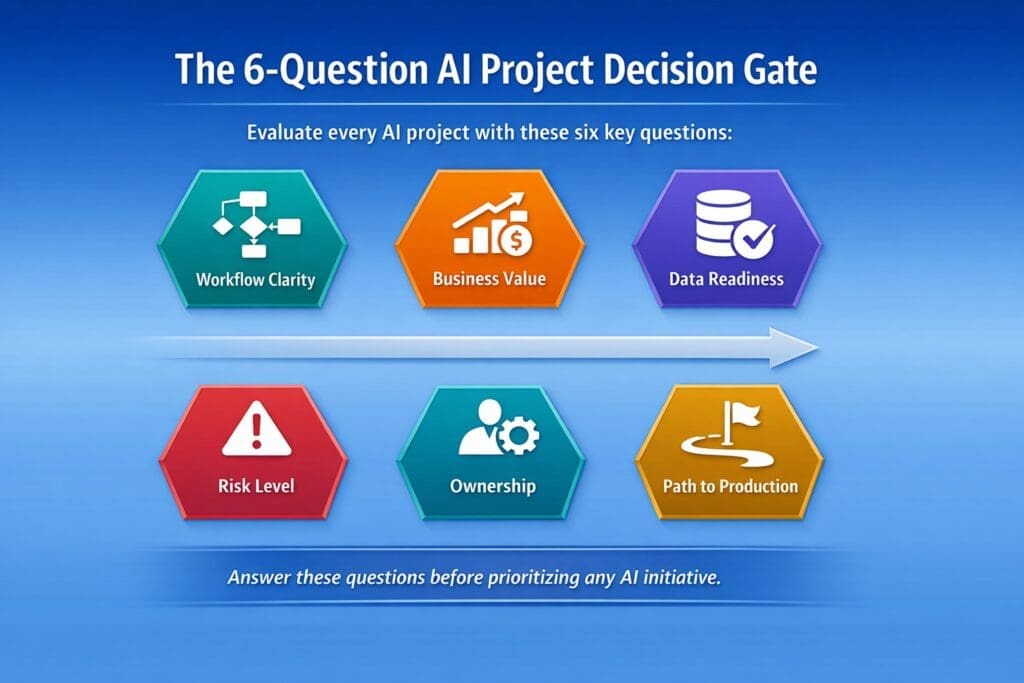
If you want a simple way to decide which AI projects to work on first, use a decision gate. Your Week 1 structure recommends scoring projects on workflow clarity, business value, data readiness, risk level, ownership, and path to production.
That is a practical enterprise filter. Here is how to use it.
1. Is the workflow clear?
If the work itself is vague, political, exception-heavy, or poorly documented, the AI project is probably too early.
Ask:
- What exact workflow is involved?
- Where does it begin?
- What triggers it?
- What inputs are required?
- What output is expected?
- Where are the handoffs and approval points?
If the workflow is not clear, the AI project should not move to the front of the line.
2. Is there measurable business value?
Every AI initiative should be tied to a business outcome, not vague optimism.
Ask:
- Does this reduce cost?
- Does it save labor?
- Does it reduce cycle time?
- Does it improve quality or consistency?
- Does it lower risk?
- Does it increase throughput?
If the answer is mostly “it seems interesting,” it is not ready.
3. Is the data ready enough?
Many AI ideas sound good until the data reality shows up.
Ask:
- Is the needed data accessible?
- Is it usable?
- Is it reliable enough?
- Is it scattered across systems?
- Are there privacy or sensitivity concerns?
- How much cleanup will be required?
A good idea with bad data is still a bad first project.
4. Is the risk level acceptable?
Some use cases are naturally safer starting points than others.
Ask:
- What happens if the output is wrong?
- Can a human review the result?
- Is the decision reversible?
- Does this affect customers, compliance, finance, or legal exposure?
- Is the use case bounded enough for controlled rollout?
Low-risk, reviewable use cases usually make better early projects than high-risk autonomous decisions.
5. Is there clear ownership?
If no one owns the workflow, no one really owns the AI project.
Ask:
- Who owns the process?
- Who will define success?
- Who will help evaluate the output?
- Who will support adoption?
- Who is accountable when the system underperforms?
No owner usually means no sustained momentum.
6. Is there a path to production?
This question eliminates a lot of false starts.
Ask:
- Can this move beyond a demo?
- Who will support it?
- How will it be monitored?
- What logging is needed?
- How will exceptions be handled?
- What governance or approval path applies?
- Can it realistically be maintained in production?
A project without a path to production may still be a useful experiment, but it should not be treated like a priority business initiative.
A Simple AI Project Prioritization Framework
You do not need a bloated scoring model to improve decision quality.
A simple 1-to-5 score across the six criteria above is often enough:
- Workflow clarity
- Business value
- Data readiness
- Risk level
- Ownership
- Path to production
You can weight them equally, or you can give more weight to business value, ownership, and path to production. The point is not mathematical perfection. The point is forcing disciplined conversation before approval.
For example:
- a flashy AI idea with unclear value and no owner should score low
- a smaller workflow-specific use case with measurable value, clear ownership, and low risk should score high
That is how organizations stop chasing noise and start building momentum.
What Good First AI Projects Usually Look Like
In a Microsoft-centric enterprise, the best first AI projects are often not the loudest ones.
They are usually projects with these traits:
- tied to a painful and recurring workflow
- narrow enough to define clearly
- measurable enough to justify
- supported by accessible data
- low enough in risk for controlled implementation
- owned by a business leader who actually wants the outcome
- realistic to support in a production environment
These are not always the most exciting demo ideas. They are often the most useful business projects.
That is why prioritization discipline matters so much. It protects the organization from confusing novelty with value.
Why Random Pilots Create Support Debt
This is another point your April plan gets right: disconnected experiments train organizations to tolerate operational chaos.
Every random pilot leaves something behind:
- unfinished expectations
- undocumented logic
- unclear ownership
- no support model
- no observability plan
- pressure to “just keep it alive”
Over time, these experiments create support debt. The business starts depending on things that were never engineered to be production-ready. Then technical teams inherit a mess they did not design properly in the first place.
That is why choosing the right first projects matters. Prioritization is not just about where to invest. It is also about what to refuse, what to postpone, and what to classify honestly as learning rather than delivery.
How Microsoft-Centric Organizations Should Think About AI Prioritization
If your organization already lives in the Microsoft stack, that is an advantage. But it is only an advantage if prioritization happens before tool enthusiasm takes over.
A practical order of operations looks like this:
- identify the costly or recurring business problem
- define the workflow clearly
- confirm ownership and measurable value
- evaluate data readiness and risk
- determine whether the initiative is an experiment, pilot, or production candidate
- only then decide whether Copilot, Azure AI, Power Platform, or custom .NET is the best fit
That sequence is more disciplined, more supportable, and more likely to produce real business outcomes.
Final Thought: Better AI Progress Starts with Better Filters
If your enterprise has too many AI ideas, the solution is not more brainstorming.
It is better filtering.
The organizations that make real progress with AI are not necessarily the ones generating the most ideas. They are the ones using better gates, better sequencing, and better judgment.
That is how you decide which AI projects to work on first.
You do not start with hype.
You do not start with tools.
You do not start with demos.
You start with business value, workflow clarity, ownership, acceptable risk, and a real path to production.
That is what turns AI from a backlog problem into an implementation strategy.
Want to learn more?
If your organization is struggling to prioritize AI projects, this is exactly why we created our Enterprise AI Operating Model—a structured system for discovering, selecting, validating, and advancing the right enterprise AI initiatives. It helps Microsoft-centric organizations move beyond scattered ideas and disconnected pilots toward a more disciplined, production-aware approach. You can learn more here: Enterprise AI Operating Model
Frequently Asked Questions
What is AI project prioritization?
AI project prioritization is the process of ranking AI ideas based on business value, workflow clarity, data readiness, risk, ownership, and path to production.
What makes a good first AI project?
A good first AI project solves a clear business problem, fits a defined workflow, has measurable value, uses accessible data, carries manageable risk, and has a realistic path to production.
Should we start with an AI pilot or a production project?
Most organizations should start with a bounded pilot that solves a real business problem and can later move toward production. Random experiments without ownership or production criteria usually create support debt.
Why do enterprise AI projects stall before production?
They usually stall because teams approve ideas before defining business value, workflow, ownership, support model, logging, governance, and rollout criteria.
Should we pick the AI tool first or the use case first?
The use case should come first. Start with the business problem, workflow, owner, measurable gain, and risk level. Then choose the best-fit tool.
How many AI projects should an enterprise prioritize at once?
Usually fewer than leaders want. Most organizations make better progress when they focus on a small number of high-value, well-defined AI initiatives instead of spreading effort across too many ideas.
