For decades, the software development lifecycle (SDLC) has been a slow, linear, and highly manual process. Requirements take weeks to document. Developers spend months writing boilerplate code. Testers chase bugs across environments. DevOps teams stitch together pipelines and deployment scripts.
But the rise of AI — Copilot, ChatGPT, Azure AI, ML.NET, and automated DevOps systems — has changed everything.
The modern SDLC is no longer a mechanical pipeline. It’s an AI-amplified ecosystem.
Every phase moves faster. Every output is more accurate. And every team member contributes at a higher level.
AI doesn’t replace the SDLC.
It accelerates it.
And the organizations that embrace this shift now will outpace competitors who continue treating AI like a novelty.
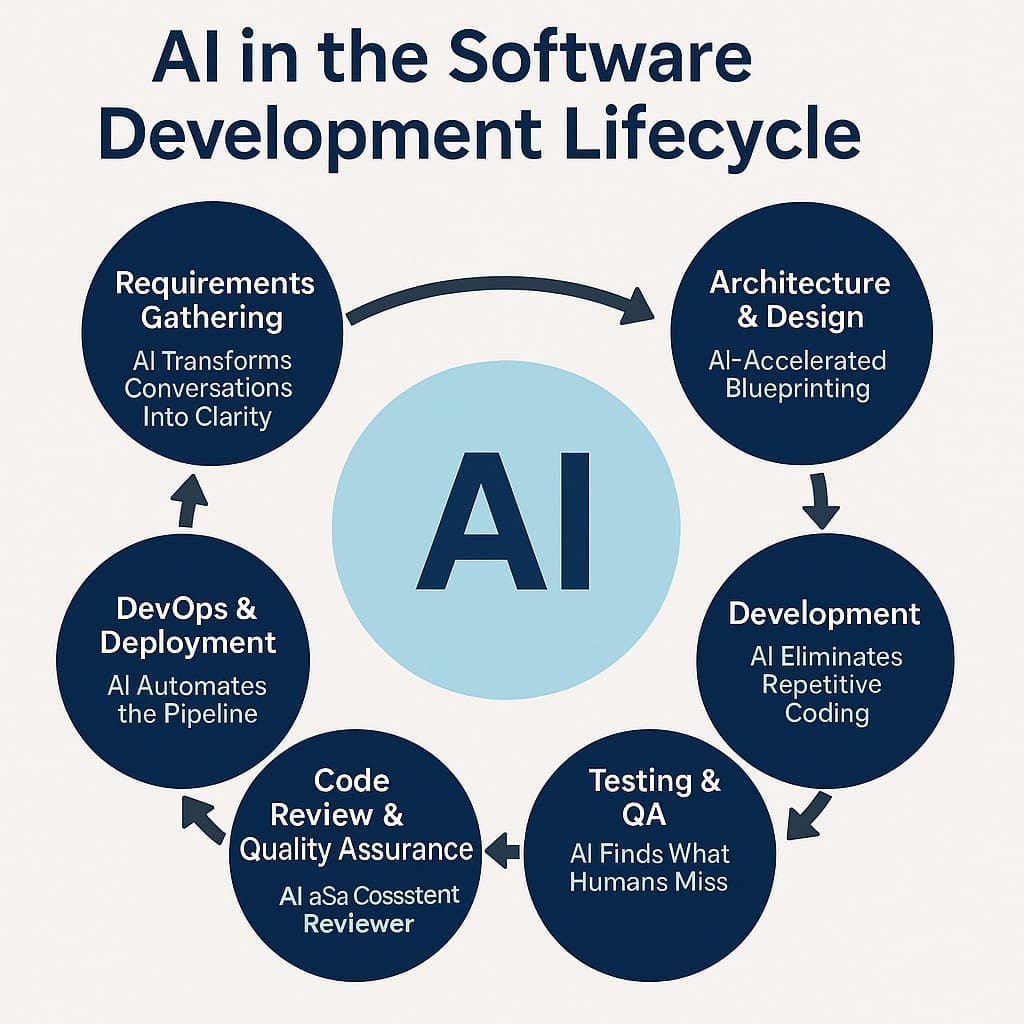
1. Requirements Gathering: AI Transforms Conversations Into Clarity
Traditionally, requirements are the most error-prone part of software development. Misunderstandings here ripple through the entire system.
AI now acts as a force multiplier for business analysts, architects, and SMEs:
How AI Enhances Requirements:
- Interview Transcriptions → Structured Requirements
Feed meeting transcripts into AI and instantly generate:
• user stories
• acceptance criteria
• domain models
• process flows
• edge cases you didn’t think to ask - Clarification & Expansion
AI identifies missing rules, contradictory statements, and incomplete scenarios. - Requirements-as-Code
You can prompt AI using plain English requirements, and it outputs:
• C# business rules
• sample API contracts
• test cases
• architecture suggestions
The Result:
The requirements phase is no longer a bottleneck — it’s the engine that drives the rest of the lifecycle with precision.
2. Architecture & Design: The New AI-Accelerated Blueprinting
Architects aren’t replaced — they’re elevated.
How AI speeds architecture:
- Convert business requirements into domain models, entity diagrams, and service boundaries.
- Generate pros/cons analyses for architecture choices (API Gateway vs. BFF, CQRS vs. CRUD, Microservices vs. Monolith).
- Create initial solution designs that architects refine instead of starting from scratch.
- Generate sample interfaces, contracts, DTOs, and repository patterns aligned with clean code practices.
But here’s the key:
AI supports architectural thinking, but humans still make the decisions.
You define the rules.
AI handles the scaffolding.
3. Development: AI Eliminates Repetitive Coding
This is where AI shines brightest.
What AI generates instantly:
- Controllers, handlers, endpoints
- EF Core entity classes
- CRUD operations
- DTOs and mappers
- API documentation
- Logging and exception-handling scaffolding
- Feature flags
- Configuration files
- Dependency injection registrations
In .NET specifically, AI tools integrate beautifully:
- GitHub Copilot writes 30–50% of code with high accuracy.
- ChatGPT handles entire patterns end-to-end (repositories, factories, adapters).
- Semantic Kernel lets AI interact with your app logic directly.
Developers no longer write glue code.
They write business logic — and let AI handle everything else.
4. Testing & QA: AI Finds What Humans Miss
Testing used to consume 30–40% of project time.
Now AI cuts that drastically.
AI automates major testing tasks:
- Generate unit tests for any class, service, or workflow.
- Create integration tests with mocks, fakes, and test data scaffolding.
- Identify missing test cases by analyzing business rules.
- Suggest edge cases humans rarely consider.
- Convert bug reports into failing test cases automatically.
You’re no longer guessing what to test.
AI provides a comprehensive, risk-based test suite in minutes.
5. Code Review & Quality Assurance: AI as a Consistent Reviewer
AI brings consistency humans can’t match.
AI provides:
- style and naming corrections
- anti-pattern detection
- unused code removal
- secure coding recommendations (OWASP, NIST, Microsoft SDL)
- performance improvement suggestions
- architectural drift detection
- smell detection (long methods, duplication, violations of SOLID)
AI makes every developer review like a senior engineer.
It levels the team while elevating overall output.
6. DevOps & Deployment: AI Automates the Pipeline
Modern DevOps workflows thrive with AI because nearly everything can be generated or optimized automatically.
AI accelerates DevOps by:
- creating CI/CD YAML pipelines for GitHub Actions or Azure DevOps
- generating IaC templates (Bicep, ARM, Terraform)
- optimizing resource usage
- identifying performance bottlenecks
- writing deployment scripts
- validating production readiness
- recommending rollback strategies
- improving monitoring dashboards
AI also helps teams adopt best practices effortlessly:
- blue/green deployments
- canary rollouts
- feature flag management
- automated regression suites
- alert tuning and noise reduction
AI doesn’t just help deploy systems.
It ensures they deploy safely.
7. Maintenance, Support, and Continuous Improvement: AI Never Stops Monitoring
After deployment, AI becomes your always-on support engineer.
AI can:
- analyze logs and health checks
- detect anomalies in real time
- predict outages before they occur
- suggest fixes for recurring issues
- summarize incident reports
- recommend optimizations based on telemetry
The system gets smarter with use.
Your SDLC becomes a continuously evolving intelligence loop — not a finite project.
The AI-Accelerated SDLC: A Holistic View
Every phase of software development is transformed:
| SDLC Phase | AI Contribution |
|---|---|
| Requirements | clarity, expansion, domain modeling |
| Architecture | diagrams, patterns, baseline structure |
| Development | code generation, patterns, tests |
| Testing | test generation, edge case detection |
| QA | static analysis, quality reports |
| DevOps | pipelines, IaC, monitoring |
| Maintenance | telemetry insights, prediction, automated fixes |
This isn’t hype.
This is already happening inside forward-looking .NET teams.
The Bottom Line: AI Isn’t a Tool — It’s a Development Partner
The SDLC is becoming:
- faster
- more accurate
- less repetitive
- more business-focused
And the true winners are the teams that embrace the partnership between human intelligence and machine intelligence.
AI does the mechanical work.
Humans provide the meaning.
Together, they deliver better software than either could alone.
Frequently Asked Questions
How does AI improve the software development lifecycle?
AI accelerates every phase of the SDLC by automating repetitive tasks, generating code and tests, improving requirement clarity, identifying bugs earlier, and optimizing DevOps pipelines. It reduces development time while improving accuracy, consistency, and maintainability.
Can AI really understand business requirements?
AI doesn’t “understand” requirements the way humans do, but it can analyze conversations, documents, transcripts, and notes to produce structured user stories, acceptance criteria, and domain models. AI enhances business analysis by filling gaps, identifying contradictions, and suggesting missing rules.
Does AI replace developers or architects?
No — AI replaces repetitive coding tasks, not the strategic thinking that architects and developers provide. Humans design the business logic, system structure, boundaries, and rules. AI assists by automating the mechanical work around those decisions.
Which SDLC phases benefit most from AI?
Every phase benefits, but the highest impact areas are:
DevOps (pipeline automation + monitoring)
Requirements gathering (clarity + structure)
Development (code generation + scaffolding)
Testing & QA (automated test creation + bug detection)
How does AI help in testing and QA?
AI generates unit tests, integration tests, mocks, and edge cases automatically. It can convert bug reports into failing tests, identify missing scenarios, and suggest improvements based on the application’s business logic. This reduces testing time significantly.
How does AI support DevOps automation?
AI generates CI/CD pipelines, deployment YAML files, IaC scripts (Bicep, Terraform, ARM), monitoring dashboards, rollback strategies, and optimization recommendations. It detects anomalies and predicts issues using real-time telemetry, making DevOps faster and more reliable.
What tools are used to implement AI in the SDLC?
Common tools include:
Semantic Kernel (AI orchestration inside enterprise systems)
GitHub Copilot (code generation)
ChatGPT / OpenAI (architecture, requirements, testing)
Azure AI (ML and cognitive services)
ML.NET (machine learning inside .NET apps)
How does AI improve code quality?
AI acts as a consistent reviewer, detecting code smells, violations of best practices, performance issues, unused code, security vulnerabilities, and architectural drift. It ensures every developer receives senior-level feedback.
Is AI safe to use in enterprise software development?
Yes, when used correctly. Enterprises use private models, secure prompts, and controlled environments. AI supports compliance by enhancing traceability, reproducibility, auditing, and human-in-the-loop governance.
What is the biggest advantage of using AI in the SDLC?
The biggest advantage is speed with accuracy. AI reduces friction throughout the lifecycle, allowing teams to focus on high-value work — especially business logic, architecture, and strategic decision-making.
Want More?
- Check out all of our free blog articles
- Check out all of our free infographics
- We currently have two books published
- Check out our hub for social media links to stay updated on what we publish
