
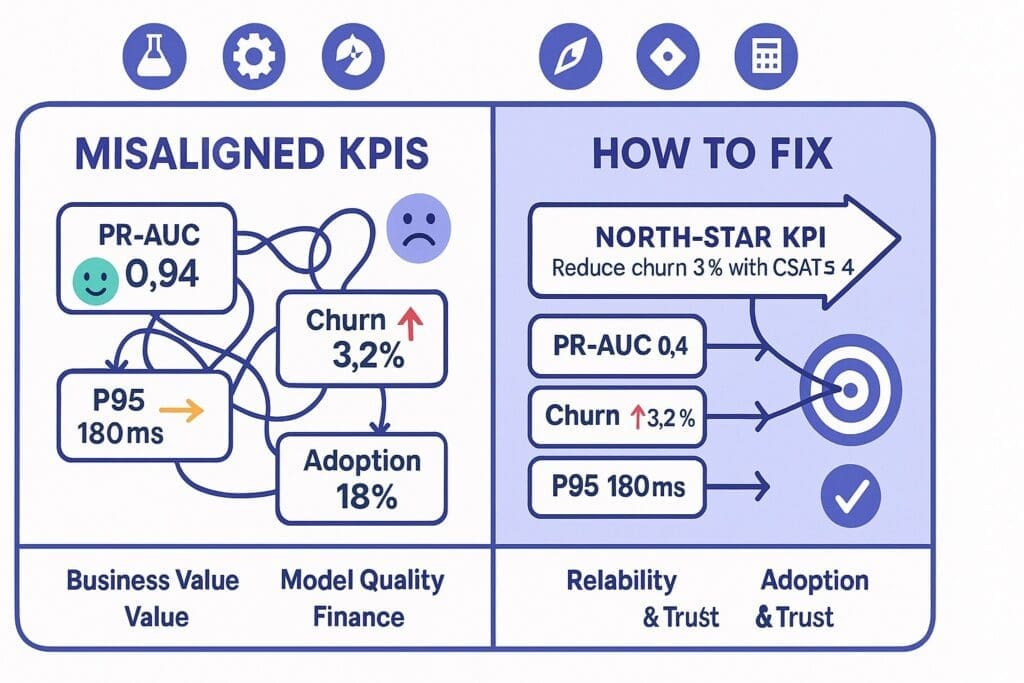
If your AI team is celebrating a 0.94 ROC-AUC while the CFO wonders why churn is still rising, congratulations—you’ve discovered misaligned KPIs in AI projects. It’s the corporate version of posting gym selfies while losing muscle mass. The metrics look swole; the business looks tired.
This piece explores why KPI drift happens, the warning signs, and a practical, .NET-friendly fix. We’ll keep it light (humor) and sharp (insight), because nothing unites cross-functional teams like laughing at the problem and shipping a solution.
Why Misaligned KPIs Happen (and Why They’re Weirdly Rational)
1) Everyone’s KPI Is Secretly Self-Defense
- Data Science: “Maximize F1.” Translation: “Prove the model is good so I can sleep.”
- Engineering: “Hit P95 latency.” Translation: “Please stop paging me at 2 a.m.”
- Product: “Increase engagement.” Translation: “Executives like up-and-to-the-right charts.”
- Compliance: “Zero incidents.” Translation: “No career-limiting events this quarter.”
Each KPI makes sense in isolation, then collides in production like shopping carts on Black Friday.
2) Goodhart’s Law in Fancy Clothing
When a measure becomes a target, it ceases to be a good measure.
Train long enough on a static dataset and you get a model that’s a valedictorian of yesterday. The KPI improves while value quietly decays.
3) Metric Mix-ups: Output vs. Outcome
Model metrics (AUC, MAE) are outputs. Business impact (revenue gained, cost avoided, risk reduced) is the outcome. We celebrate outputs because they’re easy to compute and don’t require talking to finance.
4) Temporal Mismatches
Research celebrates a 2% lift on a three-month experiment; sales needs revenue this month. Your KPI dashboard spans different time zones and none of them pay payroll.
5) Adoption Blind Spots
Your “state-of-the-art” model lives in a notebook. The adoption KPI is zero but everyone ignores it because the PR-AUC is shiny.
Humor Break: “You Might Have Misaligned KPIs If…”
- The best week ever for model metrics coincided with the worst week ever for customer churn.
- Your sprint demo shows a beautiful confusion matrix. The VP of Sales is confused why Q3 still missed.
- “We reduced average handle time!”—and increased refunds because agents had less time to be human.
The KPI Dinner Plate for AI (Don’t Starve Any Food Group)
Think of AI project KPIs like a balanced dinner plate:
- Business Value (40%): dollars saved or gained, time to cash, risk avoided.
- Model Quality (20%): PR-AUC/AUC, calibration, drift rate.
- System Reliability (20%): P95 latency, error rate, uptime, queue depth.
- Adoption & Trust (20%): % of tasks assisted, override rate, user NPS for AI suggestions.
Rebalance the plate depending on the project’s maturity. In early pilots, tilt toward adoption; in stable production, tilt toward business value.
The Empathy Map for KPIs (Cross-Functional Edition)
Data Administrator / Scientist
- Public KPI: F1, PR-AUC, calibration error
- Private Worry: “Did I just overfit to politics?”
- What They Need from You: Stable data contracts and labeled feedback loops.
Backend Engineer
- Public KPI: Error rate, P95
- Private Worry: “This prompt will change and I’ll get paged.”
- What They Need: Versioned models, rollout/rollback toggles, observability.
Product Manager
- Public KPI: Adoption, conversion
- Private Worry: “Executive roadmap whiplash.”
- What They Need: Clear value hypotheses and testable leading indicators.
Compliance & Security
- Public KPI: Incidents, audit pass
- Private Worry: “Shadow AI from three teams I’ve never met.”
- What They Need: Evidence logging, data boundaries, retention policies.
Finance
- Public KPI: ROI
- Private Worry: “Cost curve surprises from model calls.”
- What They Need: Unit economics and forecastable spend.
Insight: When you design KPIs, write them next to the fear they reduce. Empathy prevents the metric from becoming a weapon.
How to Fix Misaligned KPIs in AI Projects: A Clean, 7-Step Playbook
Step 1: Name a North-Star KPI (In Dollars or Risk)
Examples:
- “Reduce average claim cost by 8% while maintaining customer satisfaction ≥ 4.2/5.”
- “Shorten lead-to-quote cycle time from 5 days to 2 days without increasing error rate.”
No North Star, no alignment. If it doesn’t move cash or courtroom probability, it’s a footnote.
Step 2: Build a Metric Tree (Outcomes → Outputs → Inputs)
Outcome: Reduce churn by 3%.
Leading Indicators: Outreach within 4 hours, discount usage rate, win-back acceptance.
Model Outputs: Weekly PR-AUC, calibration, segment recall.
Inputs: Label freshness, training data window, drift score.
The tree clarifies what to watch and what to tweak.
Step 3: Assign KPI Owners and Review Cadence
- Business Value Owner: Product or Finance (weekly)
- Model Quality Owner: Data Science (weekly)
- Reliability Owner: Engineering (daily)
- Adoption Owner: Product (weekly)
- Risk Owner: Compliance (monthly—or immediately if pager rings)
No owner? It’s not a KPI. It’s a vibe.
Step 4: Make Metrics Auditable and Boring
Every prediction gets a receipt: model version, features used, retrieved sources, prompt, output, user decision, and latency. Boring beats brilliant when auditors arrive.
Step 5: Create Dual-Threshold Guards
- Quality Thresholds: Don’t ship if PR-AUC < X or calibration error > Y.
- Business Thresholds: Pause experiments if refund rate > target or cost/case drifts above budget.
The system protects the business even when a metric is accidentally gamed.
Step 6: Incentives Without KPI Violence
Tie bonuses to cross-functional outcomes (e.g., “claims cycle time + customer satisfaction”), not silo metrics. The engineer shouldn’t be punished because the data labeler had the flu.
Step 7: Run a 60-Day Alignment Pilot
One workflow, one North Star, one scoreboard in Power BI. Publish weekly updates. If the lines trend in the wrong direction, the KPIs change—not the narrative.
A .NET-Native KPI Instrumentation Pattern (Copy/Paste Friendly)
You can wire this up with ML.NET, ASP.NET Core, Azure AI/OSS models, and Application Insights in a few hours.
Log AI Decisions with Evidence
public record AiDecisionLog(
    string ModelName,
    string ModelVersion,
    string CorrelationId,
    string UserId,
    double Probability,
    bool PredictedLabel,
    bool FinalLabel,
    double LatencyMs,
    string[] RetrievedDocIds,
    double DriftScore,
    string Outcome // e.g., "Approved", "Escalated", "Auto-Declined"
);
Track Business & Model KPIs in App Insights
using Microsoft.ApplicationInsights;
using Microsoft.ApplicationInsights.Extensibility;

var telemetry = new TelemetryClient(new TelemetryConfiguration("<ikey>"));

void TrackAiKpis(AiDecisionLog log, double claimAmount, bool refunded)
{
    telemetry.GetMetric("ai_decision_latency_ms").TrackValue(log.LatencyMs);
    telemetry.GetMetric("ai_probability").TrackValue(log.Probability);
    telemetry.GetMetric("ai_drift_score").TrackValue(log.DriftScore);

    telemetry.GetMetric("business_claim_amount").TrackValue(claimAmount);
    telemetry.GetMetric("business_refund_flag").TrackValue(refunded ? 1 : 0);

    var props = new Dictionary<string, string> {
        ["model"] = log.ModelName,
        ["version"] = log.ModelVersion,
        ["outcome"] = log.Outcome
    };
    telemetry.TrackEvent("ai_decision", props);
}
Persist a Human-Readable Evidence File
await blobClient.UploadAsync(
    BinaryData.FromString(System.Text.Json.JsonSerializer.Serialize(log)),
    overwrite: true);
Now you can create a Power BI dashboard with: adoption rate, override rate, refund rate, latency, drift, and ROI—by model version.
Choosing the Right Model Metrics (Without Losing the Plot)
- Classification: For skewed data (fraud, churn), use PR-AUC and recall at the decision threshold, not accuracy.
- Calibration: If 0.8 probability means “we’re 80% sure,” calibration curves must prove it.
- Segment Health: Break down by region, customer type, or claim class. Great overall metrics can hide bad news in small segments.
- Drift: Track feature and prediction drift; don’t wait for the fire alarm.
Tie each model metric to a business lever. Example: “When calibration slips, refunds spike; re-calibrate weekly.”
Adoption & Trust Metrics That Actually Matter
- Assisted Rate: % of tasks where AI provided suggestions.
- Acceptance Rate: % of suggestions accepted without edits.
- Edit Distance: How much humans changed suggestions.
- Time Saved per Task: Measured from clickstream, not vibes.
- User NPS for AI: Ask the team quarterly; they are your customers.
If adoption stagnates, your KPI is telling you: fix the UX, not the confusion matrix.
Humor + Insight: The KPI Stand-Up You Actually Want
- PM: “Adoption is up 14%. Users like the new ‘show sources’ button.”
- DS: “Calibration improved after retraining on last month’s data; PR-AUC at 0.71.”
- Eng: “P95 dropped to 180ms after we added a cache. No 2 a.m. pages—my dog thanks you.”
- Compliance: “Evidence logs look great. If Legal visits, I’m bringing cupcakes.”
- Finance: “Refunds down 9%. Keep doing whatever you’re doing.”
If your stand-ups sound like this, your KPIs are friends, not frenemies.
A Stoic Note on KPIs (Because Philosophy Pays Dividends)
Epictetus taught the dichotomy of control: focus on what you can govern; accept the rest. In AI projects:
- In your control: data contracts, feedback loops, thresholds, rollout strategy, evidence logging.
- Not in your control: all variance in human behavior, market shocks.
Great KPIs keep you honest about both realms—tight on process, humble about outcomes.
Anti-Patterns to Retire Yesterday
- Accuracy Theater: Over-rotating on accuracy during demos while product fit languishes.
- Dashboard Soup: 47 metrics, no decisions. Choose a handful that change behavior.
- KPI of the Month Club: Constantly changing metrics erode trust and make progress unmeasurable.
- Single-Owner KPIs: Metrics with one owner create perverse incentives; pair them cross-functionally.
A KPI Starter Pack (Copy to Your Confluence)
North-Star (pick one):
- Reduce mean claims cost by 8% with CSAT ≥ 4.2/5
- Cut lead-to-quote time from 5 days to 2 days with error rate ≤ 0.5%
Leading Indicators:
- % tasks AI-assisted, acceptance rate, edit distance
- Outreach within 4 hours (for churn/retention)
- Exception queue age and volume
Model Quality:
- PR-AUC, recall at threshold, calibration error
- Segment performance (top 5 segments)
- Drift score (features + predictions)
Reliability:
- P95 latency, error rate, uptime
- Queue depth, timeouts
Risk/Compliance:
- % predictions with evidence files
- PII incidents (target: 0)
- Prompt/output retention policy adherence
Review Cadence:
- Daily: reliability
- Weekly: adoption, model quality, value
- Monthly: risk/compliance + executive review
Conclusion: The .NET Way to Align KPIs (and Keep the Peace)
For leaders in the Microsoft/.NET ecosystem, KPI alignment isn’t a philosophy class—it’s an implementation detail:
- Use ML.NET for fast, explainable classification where you need crisp thresholds.
- Orchestrate AI steps with Semantic Kernel and guardrails (function calling, planners, tool use).
- Retrieve knowledge with Azure AI Search (hybrid keyword + vector) and log every decision.
- Wrap the whole thing in ASP.NET Core with feature flags for rollout/rollback.
- Trace business, model, reliability, and adoption metrics through Application Insights and Power BI.
- Govern prompts, outputs, and versions via Azure DevOps/GitHub and Key Vault.
Do this and your KPIs will stop bickering and start compounding. You’ll know, every week, whether the model, the system, and the business are moving in the same direction—and you’ll have the receipts to prove it when finance, legal, or the board asks.
As for the humor? Keep it. Teams that can laugh at misaligned KPIs are the teams that can fix them—without the 2 a.m. pages or the 2 p.m. board surprises.
Want More?
- Check out all of our free blog articles
- Check out all of our free infographics
- We currently have two books published
- Check out our hub for social media links to stay updated on what we publish
