
From Unstructured Documents to Validated, Workflow-Ready Business Data

Most medium and large organizations still depend on document-heavy business processes.
Invoices, receipts, applications, claims, contracts, onboarding packets, certifications, IDs, compliance forms, delivery records, and supporting documentation move through organizations every day. Even when those documents are digital, much of the work surrounding them remains manual.
Employees read documents.
Employees locate important values.
Employees enter those values into business systems.
Employees check for missing or incorrect information.
Employees route documents for approval, correct errors, and later try to reconstruct what happened.
That work is slow, expensive, repetitive, difficult to scale, and vulnerable to human error.
Intelligent Document Processing, or IDP, helps organizations convert unstructured and semi-structured documents into structured, validated, auditable, workflow-ready business data.
But IDP is not merely OCR.
A production-grade IDP system must do much more than read words from a page. It must understand the business workflow surrounding the document, determine which values matter, validate those values, manage exceptions, support human review, integrate with downstream systems, and preserve a defensible audit trail.
This whitepaper presents a practical framework for designing and implementing Intelligent Document Processing in enterprise environments.
Download the complete whitepaper:
Intelligent Document Processing for Enterprises: From Unstructured Documents to Validated, Workflow-Ready Business Data
What Is Intelligent Document Processing?
Intelligent Document Processing is the process of converting unstructured or semi-structured documents into structured, validated, auditable data that business systems can use.
A complete IDP workflow may include:
- document intake
- job registration and metadata capture
- OCR and document extraction
- document classification
- field extraction
- confidence scoring
- business-rule validation
- enrichment using existing enterprise data
- human review and exception handling
- workflow routing
- downstream system integration
- audit logging and operational monitoring
OCR answers:
What text appears in this document?
IDP answers:
Can this document be converted into trusted business data, and what should the organization do with that data next?
That distinction separates a document-reading demonstration from a functioning enterprise application.
Why IDP Matters to Medium and Large Organizations
Document-heavy work appears across nearly every department and industry.
Finance and Accounts Payable
Common documents include:
- invoices
- purchase orders
- receipts
- expense documentation
- payment support records
Operations and Logistics
Common documents include:
- bills of lading
- delivery receipts
- scale tickets
- shipping documents
- inspection forms
- field reports
Human Resources
Common documents include:
- applications
- onboarding packets
- employee forms
- certifications
- identification documents
- training records
Insurance and Claims
Common documents include:
- claim forms
- supporting evidence
- policy documentation
- repair estimates
- medical or incident records
Healthcare and Compliance
Common documents include:
- intake forms
- patient records
- certifications
- regulated documentation
- compliance packets
Government and Public Services
Common documents include:
- applications
- permits
- contractor records
- citizen documentation
- disaster-response records
- eligibility evidence
- supporting forms
Most organizations do not have only one document-processing problem. They have the same basic pattern repeated across multiple departments:
Receive → Read → Type → Check → Route → Correct → Reconcile
That repetition makes IDP more than a single automation opportunity. It can become a reusable enterprise capability.
IDP Is More Than OCR
One of the most common IDP mistakes is treating OCR as the entire solution.
OCR can read text from a scanned document or image. It may identify words, numbers, tables, key-value pairs, page locations, and layout information.
That output is useful, but it is not necessarily trustworthy business data.
For example, OCR may accurately read an invoice total, claim number, expiration date, truck number, or account number. However:
- the invoice total may not reconcile
- the claim number may not correspond to an open case
- the certification may be expired
- the truck may not belong to the expected contractor
- the account may not exist
- the document may be a duplicate
- required supporting documents may be missing
OCR confidence is therefore not the same as business confidence.
Business confidence comes from combining extraction results with metadata, validation rules, reference data, workflow context, risk thresholds, and human review.
The objective is not simply to read a document.
The objective is to determine whether the resulting data can safely drive a business action.
The Enterprise IDP Workflow
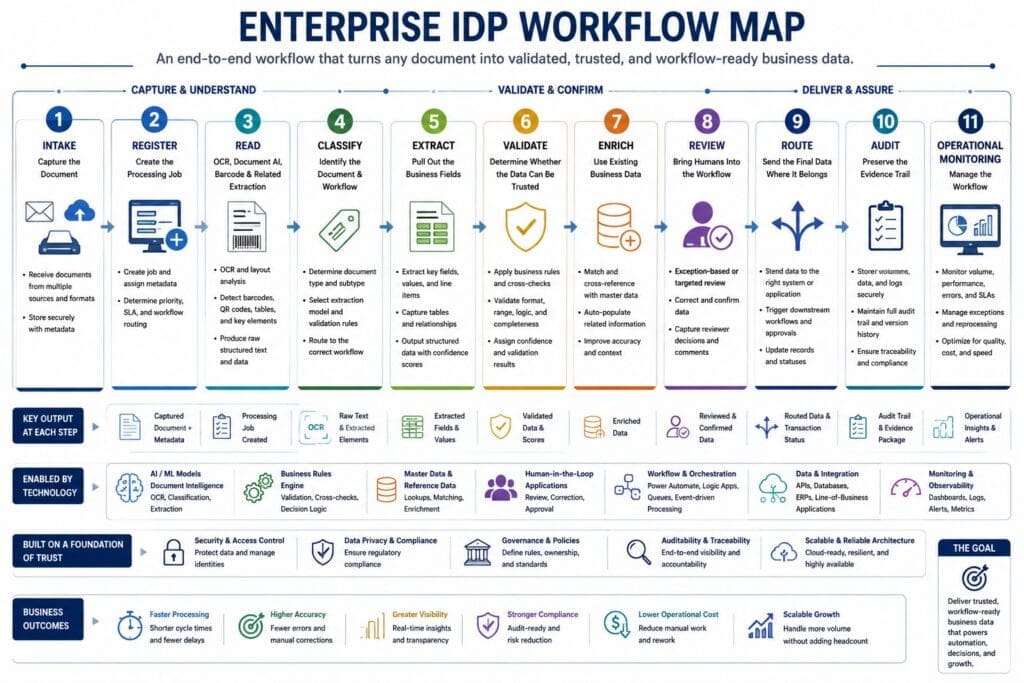
A production-oriented IDP system usually follows a staged workflow:
1. Intake
Documents may enter through:
- Outlook or Exchange
- SharePoint
- OneDrive
- Microsoft Teams
- web portals
- mobile applications
- scanners
- file shares
- APIs
- existing line-of-business systems
The intake process should preserve the original document and capture as much existing context as possible.
2. Register
The system creates a durable processing job containing information such as:
- source
- storage location
- workflow type
- submitting user or application
- business context
- current status
- priority
- timestamps
- retry count
- correlation ID
This job record becomes the backbone of traceability and operational control.
3. Read
OCR, document AI, barcode reading, handwriting recognition, layout analysis, transcription, or translation may be used to make the content machine-readable.
4. Classify
The system determines the document type, expected workflow, extraction rules, required fields, review queue, and downstream destination.
5. Extract
Relevant business values are identified and normalized.
Each extracted field should ideally retain:
- raw value
- normalized value
- confidence score
- source
- page number
- bounding box
- extraction method
- validation status
6. Validate
Extracted values are checked against known rules and business data.
Validation may determine whether:
- required fields are present
- dates and numbers are valid
- totals reconcile
- identifiers exist
- certifications remain active
- values fall within expected ranges
- the document matches the expected workflow
- the document is a duplicate
7. Enrich
The system supplements document data with information from existing systems, including:
- ERP platforms
- CRM systems
- vendor databases
- employee records
- contractor systems
- claims platforms
- case-management systems
- asset registries
- project records
8. Review
Documents or fields that are low-confidence, invalid, incomplete, high-risk, or suspicious are routed to a human reviewer.
9. Route
Validated data is sent to the appropriate downstream system, workflow, database, API, approval process, or reporting platform.
10. Audit
The system records what was received, extracted, validated, changed, approved, rejected, retried, and delivered.
11. Monitor
Operations teams need visibility into:
- document volume
- processing status
- backlog
- failures
- retries
- exception rates
- review workload
- throughput
- processing time
- system health
- cost per document
This complete lifecycle is what turns IDP into an enterprise business capability.
Human-in-the-Loop Is Not a Failure
Many organizations begin an AI project with the assumption that success means removing people entirely.
That is usually the wrong target for document processing.
The better objective is:
Automate the repetitive first pass and escalate the exceptions.
An IDP system can read documents, extract likely values, apply rules, retrieve related data, and identify uncertainty. Employees can then focus on work requiring judgment, accountability, policy knowledge, or investigation.
Human review may be required when:
- extraction confidence is low
- validation fails
- required information is missing
- the document is unreadable
- extracted values conflict with known records
- the transaction carries financial or regulatory risk
- policy requires approval
- the cost of an error is high
Review strategies can include:
- 100% human verification
- exception-only review
- field-level review
- risk-based review
- random quality sampling
- supervisor escalation
Human review should not recreate manual data entry inside a new screen. The interface should show the original document, extracted values, validation warnings, related business context, confidence indicators, and required actions in one focused workspace.
The machine handles repetition.
The person handles judgment.
Why IDP Demos Fail in Production
A clean IDP demonstration is relatively easy.
A document is uploaded. The extraction service reads it. Several fields appear on screen.
That proves technical possibility.
It does not prove production readiness.
Real documents may be:
- blurry
- incomplete
- rotated
- handwritten
- photographed at an angle
- inconsistent
- duplicated
- damaged
- multi-page
- submitted in the wrong workflow
- missing required information
- created from different form versions
Production systems also need capabilities that demonstrations frequently omit:
- durable processing state
- validation
- exception handling
- human review
- retries
- idempotency
- duplicate protection
- downstream integration
- security
- auditability
- monitoring
- operational support
The prototype proves that the technology can extract information.
Production must prove that the organization can trust and operate the entire workflow.
A Cost-Conscious Hybrid IDP Architecture
Because IDP involves AI, teams sometimes assume that every processing stage should use an AI service.
That is usually expensive and architecturally weak.
The more practical approach is hybrid:
Use AI where the input is unstructured, visual, variable, or language-heavy. Use conventional software where the logic is known, deterministic, and testable.
AI and document services may be appropriate for:
- OCR
- handwriting recognition
- layout analysis
- document classification
- variable field extraction
- table extraction
- narrative interpretation
- summarization
.NET, SQL, APIs, and deterministic business rules are usually better for:
- required-field validation
- date validation
- calculations
- total reconciliation
- identifier lookup
- vendor matching
- duplicate detection
- threshold-based routing
- state transitions
- retry handling
- audit-event creation
- downstream integration
This approach usually provides:
- lower operating cost
- more predictable behavior
- easier debugging
- stronger auditability
- greater architectural control
- better alignment with existing enterprise skills
The goal is not to maximize AI usage.
The goal is to produce trusted business results at a reasonable cost.
Where Microsoft Technologies Fit
Microsoft-centric organizations can build IDP using familiar development, cloud, workflow, data, and collaboration technologies.
Microsoft 365
Outlook, SharePoint, OneDrive, Teams, Forms, and business portals can act as document sources while also supplying valuable workflow metadata.
Azure AI Document Intelligence
Azure AI Document Intelligence can provide OCR, layout recognition, table extraction, key-value extraction, and prebuilt or custom document models.
Azure AI Vision
Azure AI Vision may support photographed documents, image-quality analysis, visual verification, and image-heavy workflows.
Azure OpenAI
Azure OpenAI may add value for selected language-heavy tasks such as summarization, flexible classification, narrative interpretation, and reviewer assistance.
It should not be used for deterministic calculations or straightforward database validation.
.NET and C#
.NET and C# are strong choices for:
- application services
- processing workflows
- validation
- enrichment
- confidence adjustment
- exception handling
- retries
- APIs
- auditing
- business-system integration
SQL Server and Azure SQL
SQL Server or Azure SQL can store:
- job state
- processing status
- extracted fields
- verified values
- confidence scores
- validation results
- review activity
- audit history
- downstream integration status
Azure Blob Storage, Azure Files, and SharePoint
Large PDFs, images, original documents, OCR artifacts, and supporting files generally belong in approved document or object storage rather than in the operational database.
Power Automate and Logic Apps
These technologies can support:
- intake triggers
- notifications
- approvals
- lightweight routing
- Microsoft 365 integration
- SaaS integration
- API orchestration
Blazor and Power Apps
Blazor is well suited to sophisticated custom review applications, particularly when keyboard-driven verification, image highlighting, custom validation, and deep .NET integration are required.
Power Apps may be appropriate for simpler departmental review workflows.
Power BI
Power BI can expose:
- throughput
- backlogs
- review rates
- exception rates
- processing times
- correction rates
- system failures
- estimated cost
- operational trends
Microsoft Entra ID and Azure Security Services
Microsoft Entra ID, managed identities, Azure Key Vault, role-based access, retention controls, encryption, and audit logging can help protect sensitive document workflows.
The whitepaper examines how these technologies can be combined selectively rather than forcing every use case into the same architecture.
Governance, Security, and Auditability
Document workflows frequently involve sensitive or regulated information.
A production IDP system should define:
- who owns the business process
- who may submit documents
- who may view source documents
- who may correct extracted values
- who may approve or reject records
- which validation failures may be overridden
- where documents and extracted data are stored
- which external services may process the content
- how long documents are retained
- what information may appear in logs
- how downstream actions are traced
The system should also preserve the distinction between:
- the value originally extracted by the system
- the value ultimately verified or approved
Overwriting extracted values destroys evidence.
A stronger design preserves both, along with reviewer identity, timestamps, validation results, comments, and status changes.
Auditability is not an optional reporting feature. In serious enterprise workflows, it is part of the data model.
Operational Realities Matter
Production IDP requires more than accurate extraction.
The system must manage work reliably across failures, delays, retries, service interruptions, and changing document volumes.
Important operational capabilities include:
- durable job state
- safe job claiming
- controlled retries
- stuck-job detection
- idempotency
- duplicate prevention
- permanent-failure handling
- queue prioritization
- stage-specific scaling
- service health monitoring
- support diagnostics
- operational runbooks
- cost monitoring
An IDP solution becomes valuable only when the organization can depend on it during normal operations—not just during a demonstration.
How to Choose the Right First IDP Project
The strongest first IDP projects usually have several of the following characteristics:
- meaningful document volume
- measurable manual labor
- repetitive processing steps
- clearly defined fields
- known validation rules
- available reference data
- identifiable downstream business value
- manageable document variation
- a realistic human-review process
- an engaged business owner
- measurable success criteria
Common starting points include:
- invoice processing
- receipt processing
- claims intake
- onboarding documentation
- contractor certification
- shipping and delivery documents
- compliance forms
- structured government applications
Avoid starting with the most chaotic document workflow in the organization.
The first project should be valuable enough to matter, but controlled enough to prove the model.
From Assessment to Production
A practical IDP roadmap has four stages.
1. Opportunity Assessment
Evaluate:
- document volume
- manual effort
- error cost
- processing delays
- document consistency
- required fields
- validation data
- exception scenarios
- audit requirements
- downstream value
2. Prototype
Use representative documents—including poor-quality and unusual examples—to determine:
- extraction feasibility
- field accuracy
- expected exception rate
- required validation
- likely review workload
- architectural risks
- approximate processing cost
The purpose of the prototype is to produce evidence, not pretend that production is finished.
3. Minimum Viable Product
The MVP processes real documents in a limited business workflow and measures actual operational value.
It should include enough production-like functionality to test:
- real intake
- job tracking
- validation
- human review
- audit history
- limited failure handling
- limited integration
- operational measurement
4. Production System
Production adds:
- full security
- role-based access
- resilient processing
- retry policies
- idempotency
- exception management
- dashboards
- support procedures
- complete integration
- cost tracking
- deployment discipline
- ongoing optimization
The recommended path is:
Assess → Prototype → MVP → Production → Expand
What This Whitepaper Covers
The complete whitepaper provides a detailed examination of:
- Why Intelligent Document Processing matters now
- What IDP actually is
- Why IDP is more than OCR
- The business problems IDP solves
- The complete enterprise IDP workflow
- Human-in-the-loop review strategies
- Why IDP demonstrations fail in production
- Cost-conscious hybrid architecture
- Microsoft and .NET technology choices
- Governance, security, and auditability
- Queues, retries, monitoring, and operational support
- How to select the right first IDP project
- Prototype, MVP, and production roadmaps
The central principle is straightforward:
Intelligent Document Processing is not about blindly replacing people with AI. It is about combining AI, software engineering, business rules, enterprise data, and human judgment to produce trusted automation.
Download the Whitepaper
Intelligent Document Processing for Enterprises is written for:
- CIOs
- CTOs
- enterprise architects
- AI and automation leaders
- IT directors
- software development leaders
- operations executives
- compliance leaders
- business process owners
- Microsoft and .NET development teams
Download the whitepaper to learn how to turn document-heavy workflows into structured, validated, auditable business processes.
Need Help Evaluating an IDP Opportunity?
Start with one document-heavy workflow.
Identify the documents involved, the fields the organization needs, the current manual effort, the validation rules, the exception scenarios, and the downstream systems that depend on the resulting data.
AI n Dot Net helps organizations:
- identify high-value IDP opportunities
- evaluate automation economics
- design practical IDP architectures
- determine where AI should and should not be used
- define validation and confidence strategies
- create human-review workflows
- integrate IDP with existing enterprise systems
- build prototypes, MVPs, and production-ready systems
The objective is not to chase document-AI hype.
The objective is to create a workflow the organization can trust, operate, and afford.
Schedule an IDP Workflow Assessment
More IDP Information?
Check out our main IDP hub for more information
Download the IDP Opportunity Assessment
Frequently Asked Questions
What is Intelligent Document Processing?
Intelligent Document Processing converts unstructured or semi-structured documents into structured, validated, workflow-ready business data. A complete IDP system may include document intake, OCR, classification, extraction, validation, enrichment, human review, routing, integration, and audit logging.
How is IDP different from OCR?
OCR reads text from documents or images. IDP uses that extracted information as one part of a larger business workflow. IDP determines which fields matter, validates the values, handles exceptions, supports human review, and delivers trusted data to downstream systems.
What Microsoft technologies can be used for IDP?
An IDP solution may use Azure AI Document Intelligence, Azure AI Vision, Azure OpenAI, .NET, C#, SQL Server, Azure SQL, Azure Blob Storage, SharePoint, OneDrive, Power Automate, Logic Apps, Blazor, Power Apps, Power BI, Microsoft Entra ID, and Azure monitoring and security services.
Does IDP eliminate the need for human review?
Not necessarily. The appropriate review model depends on risk, document quality, confidence, compliance requirements, and the cost of errors. Some workflows require complete verification, while others can use exception-only or risk-based review.
Why do IDP projects fail after successful demonstrations?
Demonstrations often use clean documents and focus only on extraction. Production workflows must handle inconsistent documents, missing fields, validation failures, exceptions, security, retries, auditability, human review, downstream integration, and operational support.
Is Intelligent Document Processing expensive?
It can be unnecessarily expensive when organizations use premium AI services for every processing step. A hybrid architecture uses AI for document understanding and conventional .NET code, databases, APIs, and business rules for deterministic processing.
What is a good first IDP project?
A good first project has meaningful volume, measurable manual effort, reasonably clear fields, available validation data, an engaged business owner, and a defined downstream business outcome. Invoices, receipts, claims, onboarding documents, and logistics records are common examples.
Should an IDP project begin with a prototype?
Usually. A focused prototype using representative documents can test extraction feasibility, validation requirements, exception rates, review needs, architecture risks, and approximate processing cost before the organization commits to an MVP or production build.