
Most AI projects do not fail because the demo was impossible.
They fail because the demo was mistaken for the system.
That is a major problem in AI assistant development. A team builds a clever proof of concept. The AI summarizes a document, answers a question, drafts a response, classifies a ticket, or extracts data from an invoice. Everyone sees the potential. Then the organization jumps too quickly into expectations the prototype was never designed to satisfy.
A prototype is not an MVP.
An MVP is not a production system.
A production system is not just a better demo.
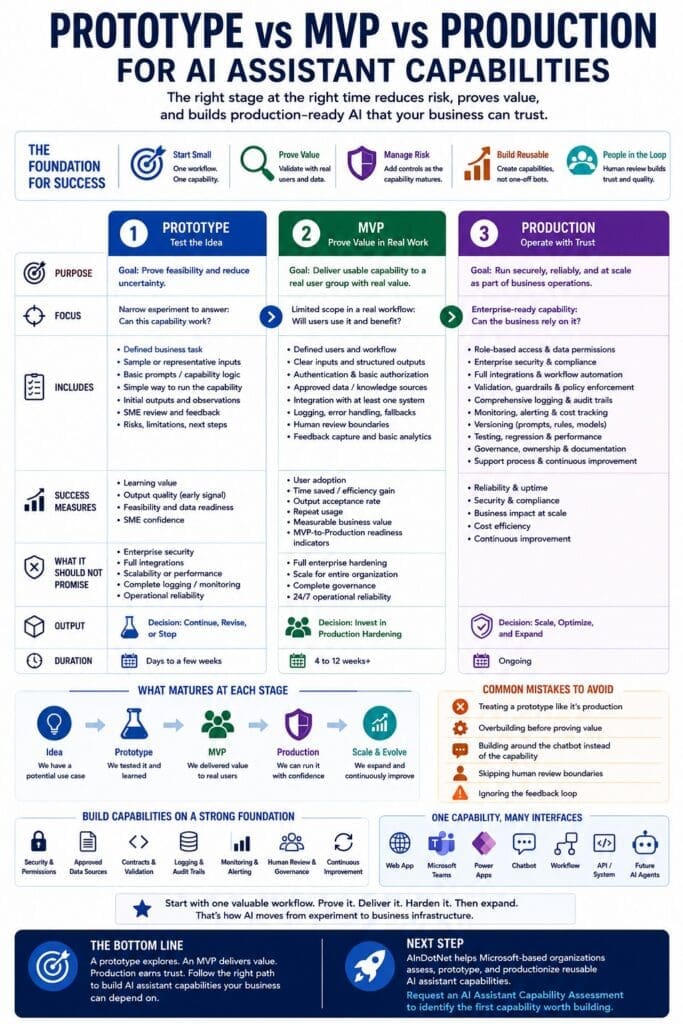
Each stage has a different purpose, different requirements, different risks, and different success criteria.
For Microsoft-based businesses building reusable AI assistant capabilities, understanding these stages is critical. It prevents overbuilding too early, underbuilding too late, and confusing experimentation with production readiness.
The goal is not to build a chatbot experiment.
The goal is to build reusable AI assistant capabilities that can eventually power web apps, Teams, Power Apps, chatbot interfaces, workflows, APIs, internal systems, and future AI agents.
The Core Problem: AI Demos Look Too Convincing
AI demos are unusually persuasive.
Traditional software demos usually reveal their limitations quickly. Screens are missing. Buttons do not work. Data is fake. Workflows are incomplete. Everyone understands the system is unfinished.
AI demos are different.
A user asks a question. The model gives a fluent answer. The response sounds polished. The output looks useful. The team imagines how much time could be saved.
The problem is that fluency creates a false sense of completeness.
A good AI response does not prove the system is ready for business use.
It does not prove the assistant has access to the right documents. It does not prove permissions are enforced. It does not prove the output is validated. It does not prove the workflow is bounded. It does not prove the system is logged, monitored, governed, tested, secured, or maintainable.
It only proves that the AI produced a useful-looking answer in a limited context.
That may be enough for a prototype.
It is not enough for production.
What Is an AI Assistant Capability?
An AI assistant capability is a reusable backend capability that performs a defined business task using software logic, AI reasoning, documents, data, business rules, permissions, structured outputs, and human review when needed.
Examples include:
- Classify an IT support ticket
- Summarize incident history
- Answer an HR policy question
- Extract invoice terms
- Summarize an operational issue
- Draft a professional customer response
- Compare two policy documents
- Generate a compliance checklist
- Route a request to the correct department
- Prepare a risk summary for human review
The important point is that the capability is not the interface.
A chatbot, web app, Teams app, Power App, workflow, API, or future AI agent may call the capability.
The capability is the asset.
That distinction matters because the stages of development should focus on maturing the capability, not merely improving the chat window.
Stage 1: AI Assistant Prototype
An AI assistant prototype is a focused experiment designed to answer one question:
Can this capability work well enough to justify further investment?
A prototype should be narrow. It should test one bounded capability for one workflow, department, document type, or business problem.
The purpose is not to build the complete system.
The purpose is to reduce uncertainty.
A prototype may test whether the assistant can:
- Summarize the right kind of document
- Extract useful structured fields
- Answer questions from approved knowledge sources
- Classify requests accurately enough
- Draft responses that humans can approve
- Identify missing information
- Compare documents meaningfully
- Route work to the correct process
- Use real or representative business context
- Produce outputs useful enough for subject matter experts to evaluate
A prototype should be judged by learning value, not polish.
It answers questions like:
- Is this workflow a good AI candidate?
- Are the available documents good enough?
- Is the data accessible enough?
- Are the business rules clear enough?
- Is the expected output definable?
- Can users evaluate whether the result is good?
- What failure patterns appear?
- What would need to change before MVP?
- Is the value worth pursuing?
A prototype does not need every production feature.
But it does need enough structure to generate useful evidence.
What a Prototype Should Include
A useful AI assistant capability prototype should include:
- A clearly defined business task
- Sample or representative inputs
- Basic prompt or capability logic
- A simple way to run the capability
- Initial expected outputs
- Basic success and failure observations
- Subject matter expert review
- Notes on risks and limitations
- A recommendation for whether to continue, revise, or stop
Depending on the workflow, the prototype may also include simple logging, basic retrieval, sample structured output, or a lightweight interface.
But the prototype should not be overloaded.
If the prototype tries to become a full platform, it will take too long, cost too much, and distract from the main question: is this capability worth pursuing?
What a Prototype Should Not Promise
A prototype should not be presented as production-ready.
It usually does not prove:
- Enterprise security
- Full access control
- Complete audit trails
- Production monitoring
- Full error handling
- Scalability
- Performance under load
- Complete governance
- Long-term maintainability
- Integration with every business system
- Full workflow adoption
- Agent-ready orchestration
A prototype proves potential.
It does not prove operational readiness.
That distinction protects both the business and the technical team.
Stage 2: AI Assistant MVP
An AI assistant MVP is a limited usable implementation for a defined user group, workflow, and interface.
The MVP answers a different question:
Can this capability create practical value in a real workflow for real users?
A prototype proves whether the idea can work.
An MVP proves whether the capability is useful enough to adopt.
This is where the system starts moving from experiment to business tool.
An MVP should be narrow enough to control risk but complete enough for users to test in a realistic workflow.
For example:
- An IT ticket triage MVP might classify tickets, summarize history, suggest next steps, and draft technician responses for one support team.
- An HR policy assistant MVP might answer questions from approved policy documents for a limited internal audience, with human review for sensitive cases.
- A finance invoice review MVP might extract invoice fields, compare them to purchase orders, flag discrepancies, and prepare exception summaries.
- An operations issue summary MVP might summarize daily issues, identify missing information, draft status updates, and route follow-up items.
The MVP should not try to solve every department’s AI needs.
It should prove one capability in one controlled workflow.
What an MVP Should Include
An AI assistant MVP should usually include:
- Defined user group
- Defined workflow scope
- Clear inputs and outputs
- Structured result format
- Authentication and basic authorization
- Approved knowledge sources or data sources
- Basic integration with at least one real system or workflow
- Logging of requests and responses
- Error handling and fallback behavior
- Human review boundaries
- Feedback capture
- Usage tracking
- Initial testing
- Documentation for users and stakeholders
- A path for improvement based on real use
The MVP should be usable.
It should not require a developer sitting beside every user to explain how it works.
It should be limited, but real.
What an MVP Should Prove
An MVP should help answer:
- Do users actually use the capability?
- Does it save time?
- Does it improve consistency?
- Does it reduce repetitive work?
- Does it produce outputs humans trust enough to review and use?
- Are the workflow boundaries correct?
- Are the documents and data sources sufficient?
- Are the risks manageable?
- Are the logging and feedback loops useful?
- Is the capability worth production hardening?
- What should be improved before broader deployment?
The MVP is the business-value test.
It is not merely a technical test.
A technically impressive assistant that users do not adopt is not a success.
Stage 3: Production AI Assistant Capability
A production AI assistant capability is a secure, monitored, governed, maintainable business system.
Production answers the most serious question:
Can this capability be trusted as part of the organization’s operational infrastructure?
Production is where engineering discipline becomes non-negotiable.
A production AI assistant capability should address:
- Security
- Authentication
- Authorization
- Data-level permissions
- Audit trails
- Logging
- Monitoring
- Error handling
- Cost tracking
- Model and prompt versioning
- Testing
- Deployment
- Governance
- Ownership
- Documentation
- Support
- Compliance requirements
- Human approval workflows
- Business continuity
- Maintenance and improvement
Production is not just “the MVP with more users.”
Production requires operational responsibility.
What Production Should Include
A production-ready AI assistant capability should include:
- Clear business owner
- Clear technical owner
- Defined support process
- Role-based access control
- Data-level security where needed
- Approved source management
- Versioned prompts, rules, and templates
- Structured input and output contracts
- Validation rules
- Audit trails
- Comprehensive logging
- Monitoring and alerting
- Error and exception handling
- Cost and usage tracking
- Human review and approval boundaries
- Test suites and regression testing
- Deployment process
- Documentation
- Training or adoption support
- Process for continuous improvement
This is the difference between AI experimentation and production AI.
Production AI must be operated, not merely demonstrated.
Prototype vs MVP vs Production: The Practical Difference
The difference between the three stages can be summarized simply.
A prototype proves feasibility.
An MVP proves workflow value.
Production proves operational trust.
Each stage should answer a different question.
A prototype asks: Can this work?
An MVP asks: Will users use it in a real workflow?
Production asks: Can the organization rely on it?
Those are not the same question.
Confusing them causes bad decisions.
Common Mistake #1: Treating the Prototype as Production
The most common mistake is taking a good prototype and pretending it is ready for production.
This creates predictable problems.
The assistant may not enforce permissions. It may use outdated documents. It may produce inconsistent outputs. It may lack logs. It may have no support owner. It may fail silently. It may expose sensitive information. It may be impossible to debug. It may not scale beyond the original demo.
This is not because the prototype was bad.
It is because the prototype was asked to do the wrong job.
A prototype is supposed to prove whether further investment makes sense.
It is not supposed to carry production responsibility.
Common Mistake #2: Overbuilding Before Proof
The opposite mistake is trying to build a full production platform before proving one valuable capability.
This is expensive and risky.
The organization may spend months building infrastructure before confirming whether users need the capability, whether the documents are usable, whether the workflow is bounded, whether the data is accessible, or whether the business value is measurable.
That is backwards.
The better approach is to identify one high-value workflow, prototype one capability, learn from the results, and then decide whether an MVP is justified.
Production discipline matters.
But timing matters too.
Do not overbuild before proof.
Do not underbuild after proof.
Common Mistake #3: Building Around the Chatbot Instead of the Capability
Many organizations start by asking, “Should we build a chatbot?”
That is usually the wrong starting point.
A chatbot is an interface.
The reusable AI assistant capability is the asset.
A better question is:
What capability should the business build first?
For example:
- Classify support tickets
- Answer policy questions
- Extract invoice terms
- Summarize operational issues
- Draft customer responses
- Compare documents
- Generate checklists
- Route requests
After the capability is defined, the organization can decide how users should access it.
Maybe the interface should be a chatbot.
Maybe it should be a Teams app.
Maybe it should be a Power App.
Maybe it should be a web app.
Maybe it should be an API.
Maybe it should be triggered by workflow automation.
The interface should call the capability.
The capability should not be trapped inside the interface.
Common Mistake #4: Skipping Human Review Boundaries
Many businesses think AI value requires full automation.
That is wrong.
A useful AI assistant capability can create value without being autonomous.
The assistant drafts. A human approves.
The assistant summarizes. A human verifies.
The assistant classifies. A human corrects.
The assistant recommends. A human decides.
This is especially important during prototype and MVP stages.
Human review reduces risk, creates feedback, builds trust, and helps the team understand failure patterns.
Over time, some low-risk actions may become more automated.
But autonomy should be earned.
It should not be assumed.
Common Mistake #5: Ignoring the Feedback Loop
AI assistant capabilities improve through use only if feedback is captured.
If users correct outputs but the system does not record the correction, the organization loses valuable learning.
If users reject answers but no one reviews why, the system does not improve.
If weak outputs are discussed verbally but not logged, the same problems repeat.
A good MVP or production system should capture:
- User request
- Input data
- Retrieved documents
- Prompt or rule version
- Model response
- Structured output
- User correction
- Approval or rejection
- Error or exception
- Outcome when available
This creates a trust-building loop.
Log. Learn. Improve. Repeat.
Without that loop, the assistant becomes a static tool.
With that loop, the capability can mature.
Why .NET Fits the Prototype-to-Production Path
For Microsoft-based businesses, .NET provides a strong foundation for moving AI assistant capabilities through prototype, MVP, and production stages.
A prototype can begin with a focused C# capability, simple prompt orchestration, test data, and a minimal interface or API.
An MVP can add structured models, validation, authentication, logging, feedback capture, workflow integration, and a controlled user group.
A production system can add stronger security, monitoring, audit trails, role-based permissions, DevOps pipelines, deployment discipline, cost tracking, support processes, and governance.
The Microsoft ecosystem also provides practical integration points:
- ASP.NET Core for APIs and services
- C# for structured capability logic
- SQL Server for operational data, logs, and audit trails
- Azure OpenAI or approved model providers for AI reasoning
- Semantic Kernel for orchestration where useful
- Microsoft Entra ID for identity and access control
- SharePoint and Microsoft 365 for governed knowledge sources
- Teams and Power Platform for user interfaces and workflows
- Azure services for hosting, monitoring, and deployment
This matters because production AI is still software.
It needs the same discipline businesses already expect from serious applications.
How to Choose the Right Stage
Not every idea deserves production investment.
Some ideas should stop after assessment.
Some should stop after prototype.
Some should become MVPs.
A few should become production systems.
The key is to be honest about the evidence at each stage.
A workflow may be a good prototype candidate if it is frequent, painful, bounded, and supported by available documents or data.
A prototype may be ready for MVP if it produces useful results, subject matter experts can evaluate the outputs, the risk is manageable, and users can test it in a real workflow.
An MVP may be ready for production if it demonstrates adoption, measurable value, manageable failure patterns, clear ownership, and a realistic path to security, monitoring, governance, and support.
Each stage should earn the next stage.
That is the discipline.
A Practical Maturity Path
A practical maturity path for AI assistant capabilities looks like this:
- Manual workflow
Humans perform the task manually with no AI assistance. - Prompt-assisted work
Employees use ChatGPT, Copilot, or another AI tool manually for pieces of the task. - Structured assistant capability
One task has defined inputs, structured outputs, and repeatable behavior. - Integrated assistant capability
The capability connects to documents, data, APIs, permissions, logs, and workflow context. - Multi-interface capability
The same backend capability supports web, Teams, Power Apps, chatbot, workflow, API, or internal application access. - Agent-ready capability
The capability is stable, tested, governed, and permission-aware enough for controlled future orchestration by an AI agent.
This path prevents the organization from jumping from manual work directly to agent hype.
Stable capabilities should come before agents.
Agents should orchestrate proven capabilities.
They should not be built on top of fragile prompts and disconnected demos.
What to Measure at Each Stage
Different stages require different measurements.
For a prototype, measure learning:
- Output quality
- Failure patterns
- Data readiness
- Document readiness
- Business rule clarity
- Subject matter expert confidence
- Feasibility of next step
For an MVP, measure user value:
- Usage
- Time saved
- Output acceptance rate
- Correction rate
- User feedback
- Workflow fit
- Human review effort
- Repeatability
- Measurable business benefit
For production, measure operational performance:
- Reliability
- Security incidents
- Auditability
- Cost per use
- Latency
- Error rate
- Adoption
- Support burden
- Compliance alignment
- Business impact
- Improvement over time
Using the wrong measurement creates wrong conclusions.
A prototype should not be judged like production.
Production should not be excused like a prototype.
Final Thought
Prototype, MVP, and production are not interchangeable labels.
They are different stages with different jobs.
A prototype proves feasibility.
An MVP proves usable workflow value.
Production proves operational trust.
For AI assistant capabilities, this distinction is especially important because demos can look deceptively complete.
A fluent AI response is not the same as a secure, governed, tested, monitored, maintainable business system.
The chatbot is not the product.
The reusable AI assistant capability behind the interface is the business asset.
For Microsoft-based organizations, the best path is to assess carefully, prototype one bounded capability, turn what works into an MVP, productionize what proves value, and then expand across departments, systems, interfaces, and eventually agent orchestration.
That is how AI moves from experiment to business infrastructure.
Next Step
Before building another AI demo, identify one workflow that is frequent, painful, bounded, valuable, and realistic to prototype.
AInDotNet helps Microsoft-based organizations assess, prototype, and productionize reusable AI assistant capabilities that can power web apps, Teams, Power Apps, chatbot interfaces, workflow automation, APIs, and future AI agents.
Request an AI Assistant Capability Assessment to identify the first reusable capability worth prototyping.
Frequently Asked Questions
What is the difference between an AI assistant prototype, MVP, and production system?
An AI assistant prototype proves whether a capability is feasible. An MVP proves whether the capability creates value in a real workflow for a limited user group. A production system proves the capability can be operated securely, reliably, and maintainably as part of the business.
Why is an AI prototype not production-ready?
A prototype is usually built to test feasibility, not operational trust. It may not include full security, logging, monitoring, governance, testing, audit trails, support processes, or enterprise integration.
What should an AI assistant MVP include?
An AI assistant MVP should include a defined user group, bounded workflow, structured inputs and outputs, basic authentication and authorization, approved knowledge sources, logging, human review boundaries, feedback capture, and enough integration for users to test it in a realistic workflow.
What makes an AI assistant capability production-ready?
A production-ready AI assistant capability includes security, role-based permissions, audit trails, logging, monitoring, validation, error handling, cost tracking, testing, governance, ownership, documentation, support, and a process for continuous improvement.
Should businesses build a chatbot first?
Usually, no. Businesses should define the reusable AI assistant capability first, then decide which interface makes sense. The interface could be a web app, Teams app, Power App, chatbot, workflow, API, or future AI agent.
Why should agents come after stable AI assistant capabilities?
Agents should orchestrate proven capabilities. If agents are built on top of fragile prompts, disconnected demos, and untested workflows, they become risky and hard to govern. Stable, tested, permission-aware capabilities should come first.
