
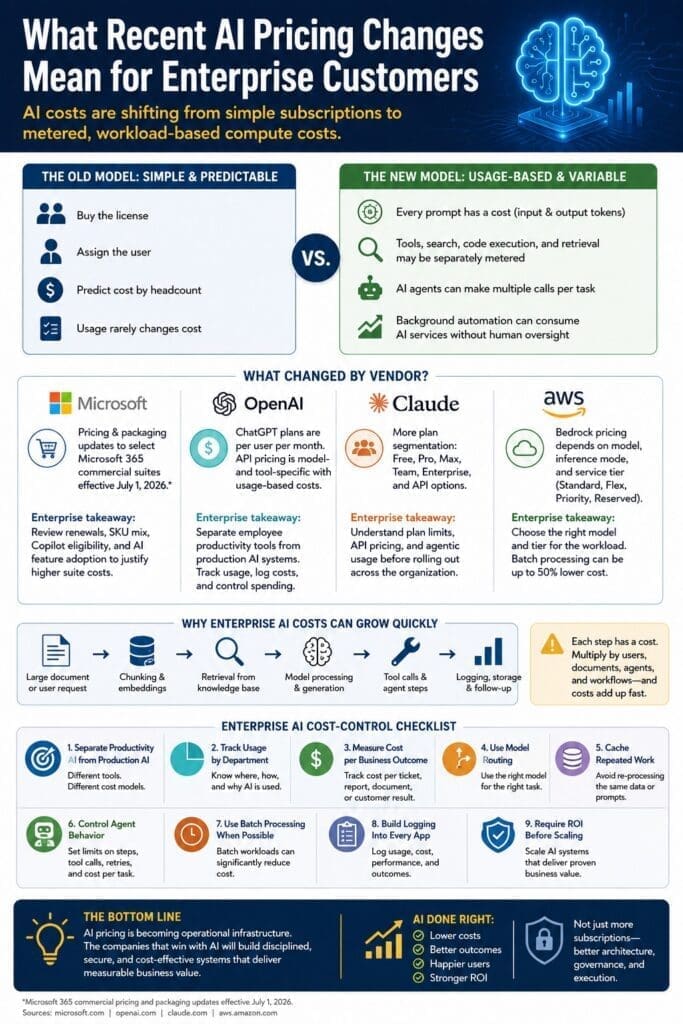
Recent AI pricing news has created a lot of confusion for enterprise customers.
Some announcements are real price increases. Some are packaging changes. Some are usage-limit changes. Some are not price increases at all, but they still change the economics of AI adoption.
The important point is this:
Enterprise AI costs are shifting from simple per-user subscriptions to metered, workload-based compute costs.
That distinction matters.
For the last few years, many business leaders thought about AI pricing the same way they thought about Microsoft Office, Adobe, Salesforce, or other business software:
Buy the license. Assign the user. Predict the cost by headcount.
That model still exists for many AI tools, especially chat-based productivity assistants. But it is no longer enough.
As businesses move from casual AI experimentation to production AI applications, the cost model changes. AI systems consume tokens, retrieve documents, call tools, search the web, run code, summarize files, generate content, and perform background tasks. Those activities can create variable costs that behave more like cloud infrastructure than traditional software licensing.
For enterprise customers, this is the real pricing story.
Not just “AI costs more.”
The bigger issue is:
AI is becoming a measurable, metered, operational cost.
And that means AI adoption now requires architecture, governance, logging, budgeting, and ROI discipline.
The Old AI Pricing Model Was Simple
The early AI adoption model was easy to understand.
An employee subscribed to ChatGPT, Claude, Microsoft Copilot, or another AI assistant. The company either reimbursed the employee or purchased business licenses.
The cost was mostly predictable:
- Number of users
- Monthly subscription price
- Annual renewal cost
- Optional enterprise features
- Administrative and security controls
This worked well for early adoption.
It allowed employees to experiment with writing, summarization, research, brainstorming, coding assistance, and productivity improvements.
But it also created a misleading assumption.
Many executives began thinking:
AI costs $20 or $30 per user per month.
That is only true for a narrow category of AI usage.
It is not true for custom AI applications, internal copilots, AI agents, workflow automation, large-scale document processing, customer-facing AI tools, software development assistants, or enterprise retrieval systems.
Those systems do not behave like fixed-price subscriptions.
They behave like compute workloads.
The New AI Pricing Model Is Workload-Based
Enterprise AI pricing is increasingly based on usage.
That usage can include:
- Input tokens
- Output tokens
- Cached tokens
- Model selection
- Web search calls
- Code execution
- File processing
- Vector search
- Embeddings
- Tool calls
- Agent steps
- Image, audio, or video generation
- Priority processing
- Batch processing
- Reserved capacity
- Cloud infrastructure
This means two employees can have the same AI subscription but generate very different costs if one is only asking simple questions while the other is running document-heavy workflows, code generation, or multi-step AI agents.
It also means two AI applications can produce very different costs even if they solve similar business problems.
For example:
- A simple FAQ chatbot may be inexpensive.
- A customer-support copilot that searches thousands of documents, summarizes case history, drafts responses, and calls backend systems may be much more expensive.
- A background agent that processes documents all day without human supervision can become expensive quickly if it is not designed carefully.
This is why enterprise AI pricing has to be evaluated at the workload level.
Microsoft: Pricing Changes Are More Than a Copilot Story
Microsoft has announced pricing and packaging updates for select Microsoft 365 commercial suites and standalone components, effective July 1, 2026. The affected areas include Enterprise, Business, Frontline, and Government commercial equivalents. Microsoft specifically says standalone Microsoft Teams and Copilot SKUs are not included in this particular update.
That distinction is important.
Many people hear “Microsoft pricing increase” and immediately assume “Copilot price increase.” That is not always accurate.
The bigger enterprise issue is that Microsoft is increasingly bundling productivity, security, management, compliance, and AI capabilities into broader Microsoft 365 offerings.
For organizations already standardized on Microsoft 365, Azure, SharePoint, Teams, Power Platform, SQL Server, and .NET, this creates both an opportunity and a budgeting challenge.
The opportunity is obvious:
Microsoft’s AI ecosystem is deeply connected to the tools many enterprises already use.
The challenge is also obvious:
Enterprises need to understand which AI capabilities are included, which require additional licensing, which are usage-based, and which provide enough business value to justify the cost.
Microsoft enterprise takeaway
Microsoft customers should review:
- Microsoft 365 renewal dates
- Current Microsoft 365 SKUs
- Copilot eligibility
- Copilot adoption rates
- Security and compliance requirements
- Power Platform usage
- Azure AI usage
- Custom .NET application opportunities
- Whether employees are actually using the AI features being paid for
For Microsoft-centered organizations, the best AI strategy is not simply buying more licenses.
The better strategy is identifying where Microsoft AI tools fit naturally into existing workflows and where custom AI applications should be built using .NET, Azure AI services, Semantic Kernel, ML.NET, SQL Server, and existing enterprise systems.
OpenAI: Subscription Pricing and API Pricing Are Different Conversations
OpenAI has both seat-based ChatGPT plans and usage-based API pricing.
That distinction matters.
ChatGPT plans are priced per user per month, while OpenAI API pricing is based on model usage and related services. OpenAI’s API pricing page lists pricing by model and includes additional tool-related pricing for capabilities such as web search and other platform services.
For enterprise buyers, this creates two separate questions.
The first question is:
Should employees have access to ChatGPT as a productivity tool?
The second question is:
Should we build business applications using OpenAI models through the API?
Those are not the same decision.
A ChatGPT business subscription may help employees write, summarize, brainstorm, analyze, code, and communicate more effectively.
An API-based system is different. It may power:
- Internal knowledge assistants
- Customer service automation
- Document analysis
- Contract review
- Proposal generation
- Data extraction
- Software development tools
- Workflow automation
- Custom copilots inside existing applications
Those systems require cost controls because API usage can vary dramatically based on model choice, prompt length, response length, document size, number of users, and agent behavior.
OpenAI enterprise takeaway
OpenAI can be extremely useful for enterprise productivity and custom application development, but companies need to separate human-facing subscription use from production API use.
For custom applications, companies should track:
- Cost per user
- Cost per department
- Cost per workflow
- Cost per transaction
- Cost per document
- Cost per customer interaction
- Cost per completed business outcome
That is the level of visibility required for enterprise AI ROI.
Anthropic Claude: Plan Segmentation and Agentic Usage Matter
Anthropic’s Claude pricing is organized across Free, Pro, Max, Team, Enterprise, and API options. Anthropic’s pricing page separates personal, team, enterprise, and developer/API usage, which reflects a broader industry trend toward segmenting AI products by user type, workload type, and usage intensity.
This is important because Claude is often used for writing, analysis, coding, research, long-context work, and increasingly agentic workflows.
The enterprise pricing concern is not simply the monthly subscription price.
The bigger concern is usage behavior.
AI agents can consume more resources than normal chat interactions because they may:
- Break a task into multiple steps
- Read files
- Search documentation
- Generate code
- Test outputs
- Revise responses
- Call tools
- Repeat attempts
- Continue working until a goal is completed
That makes agentic AI powerful, but it also makes cost control more important.
A human may ask one question.
An agent may perform twenty operations to answer the same question.
Claude enterprise takeaway
Claude can be valuable for enterprise knowledge work, software development, and complex reasoning tasks. But teams should understand plan limits, API pricing, agentic usage, and governance requirements before rolling it out broadly.
The more autonomous the AI becomes, the more important it is to monitor cost, quality, security, and business value.
AWS Bedrock: AI Pricing Already Looks Like Cloud Infrastructure
Amazon Bedrock is a good example of where enterprise AI pricing is heading.
AWS Bedrock pricing depends on the model, provider, inference mode, and service tier. AWS lists Standard, Flex, Priority, and Reserved tiers, and also states that select foundation models support batch inference at a 50% lower price than on-demand inference pricing.
This is classic cloud economics.
The customer chooses based on workload requirements:
- Does the workload need low latency?
- Can it run in batch?
- Is usage predictable?
- Does the business need reserved capacity?
- Is the task worth using a more expensive model?
- Can a cheaper model solve the problem?
- Does the workload require real-time response?
- Can processing happen overnight?
This is where enterprise AI starts to look less like buying software and more like designing cloud architecture.
AWS enterprise takeaway
AWS customers should not treat AI model selection as a one-time technical decision.
They should treat it as an architecture and cost-management decision.
For example:
- Use cheaper models for simple tasks.
- Use stronger models for complex reasoning.
- Use batch processing when real-time response is not required.
- Use reserved capacity when usage is predictable.
- Use logging and cost allocation to track business value.
- Avoid sending every task to the most expensive model by default.
That same thinking applies whether the company uses AWS, Azure, OpenAI, Anthropic, Google, or a hybrid AI architecture.
The Real Pricing Change: AI Is Becoming Operational Infrastructure
The biggest pricing change is not from any single vendor.
The biggest change is that AI is moving from an experimental tool to operational infrastructure.
That means AI now belongs in the same management category as:
- Cloud hosting
- Database usage
- Storage
- Networking
- Security tools
- Monitoring
- DevOps pipelines
- Business applications
- API integrations
This is especially important for medium-to-large businesses and government organizations.
These organizations cannot simply let every department buy AI tools independently without governance.
That creates problems:
- Duplicate subscriptions
- Uncontrolled API usage
- Shadow AI
- Data leakage risk
- No central logging
- No cost attribution
- No ROI measurement
- No consistent security review
- No architecture standards
- No reuse of successful patterns
AI adoption needs to become more disciplined.
Not slower.
More disciplined.
There is a difference.
Why Enterprise AI Costs Can Grow Quickly
AI costs can grow quickly because small design decisions multiply at scale.
Consider a basic document-analysis workflow.
A user uploads a 40-page document and asks for a summary.
That sounds simple.
But behind the scenes, the system may need to:
- Extract the document text.
- Split the document into chunks.
- Create embeddings.
- Store the document in a searchable index.
- Retrieve relevant sections.
- Send the retrieved context to a model.
- Generate a summary.
- Generate action items.
- Generate risks.
- Save the results.
- Log the transaction.
- Allow follow-up questions.
Each step may have a cost.
Now multiply that by hundreds of employees, thousands of documents, multiple departments, and repeated usage every month.
That is how a simple AI pilot becomes an operating expense.
This does not mean companies should avoid AI.
It means companies should design AI systems properly.
The Enterprise AI Cost-Control Checklist
Enterprise customers should evaluate AI pricing using a practical cost-control checklist.
1. Separate productivity AI from production AI
Employee productivity tools and production AI applications have different cost models.
A chat subscription for employees is not the same thing as an AI-powered application embedded inside a business process.
Treat them separately.
2. Track usage by department and workflow
Do not only track total AI spend.
Track AI cost by:
- Department
- Application
- User group
- Business process
- Customer interaction
- Document type
- Project
- Use case
This helps determine whether AI is producing measurable value or simply creating another software expense.
3. Measure cost per business outcome
The best AI metric is not cost per token.
Business leaders do not care about tokens.
They care about outcomes.
Track metrics such as:
- Cost per support ticket resolved
- Cost per proposal drafted
- Cost per contract reviewed
- Cost per report generated
- Cost per invoice processed
- Cost per hour saved
- Cost per defect found
- Cost per lead qualified
- Cost per compliance review completed
This converts AI from a technical expense into a business investment.
4. Use model routing
Not every task needs the most powerful model.
Many enterprise tasks can be handled by smaller or cheaper models:
- Classification
- Data extraction
- Simple summarization
- Formatting
- Sentiment detection
- Keyword extraction
- Routing
- Draft cleanup
More powerful models should be reserved for tasks that require deeper reasoning, complex synthesis, higher accuracy, or greater nuance.
5. Cache repeated work
Many enterprise AI systems repeat the same work unnecessarily.
Examples include:
- Re-summarizing the same policy document
- Re-processing the same knowledge base
- Re-answering common questions
- Re-generating standard explanations
- Re-running identical prompts
- Rebuilding context for the same user session
Caching can significantly reduce cost and improve performance.
6. Control agent behavior
AI agents need boundaries.
Without controls, agents may perform too many steps, call too many tools, or retry too often.
Enterprise systems should define:
- Maximum steps
- Maximum tool calls
- Maximum cost per task
- Maximum runtime
- Approval requirements
- Escalation rules
- Human review points
- Logging requirements
Agentic AI is powerful, but unbounded agentic AI is dangerous from both a cost and governance perspective.
7. Use batch processing when possible
Not every AI task needs to happen immediately.
Some workloads can run in batch:
- Document classification
- Report generation
- Data enrichment
- Compliance review
- Knowledge base processing
- Embedding generation
- Large-scale summarization
Batch processing can reduce cost, especially when cloud providers offer lower-cost batch inference options.
8. Build logging into every AI application
Every enterprise AI system should log:
- User
- Department
- Application
- Prompt
- Response
- Model used
- Token usage
- Tool calls
- Cost estimate
- Latency
- Errors
- User feedback
- Business outcome
Without logging, companies cannot evaluate cost, quality, adoption, or ROI.
9. Require ROI before scaling
AI pilots are easy.
Scaled enterprise AI is harder.
Before expanding an AI system, ask:
- What business problem does this solve?
- Who uses it?
- How often is it used?
- How much time does it save?
- What errors does it reduce?
- What revenue does it support?
- What risk does it lower?
- What does it cost per month?
- What would happen if we turned it off?
If those questions cannot be answered, the AI system is not ready to scale.
Why This Matters for .NET and Microsoft-Centered Organizations
For organizations already invested in Microsoft technologies, this pricing shift creates a major opportunity.
Many medium-to-large businesses already have:
- Microsoft 365
- Teams
- SharePoint
- SQL Server
- Azure
- Power BI
- Power Platform
- .NET applications
- Active Directory or Entra ID
- Existing business databases
- Existing workflows
- Existing security policies
That means AI does not have to be adopted as a disconnected tool.
It can be integrated into existing systems.
This is where custom AI application development becomes important.
A business may not need a dozen disconnected AI subscriptions.
It may need a carefully designed AI-enabled workflow inside an existing .NET application.
For example:
- A customer service dashboard that summarizes account history
- A proposal-generation tool connected to existing project data
- A compliance assistant that reviews documents against internal policies
- A reporting assistant connected to SQL Server
- A maintenance assistant that analyzes work orders
- An HR assistant that summarizes policy documents
- A sales assistant that prepares account briefings
- A finance assistant that explains budget variances
- A project management assistant that identifies risks and blockers
These systems can be designed with security, logging, cost controls, and business rules from the beginning.
That is very different from letting employees copy and paste sensitive information into random AI tools.
AI Pricing Changes Should Push Companies Toward Better Architecture
Recent AI pricing changes should not scare companies away from AI.
They should push companies toward better AI architecture.
The companies that win with AI will not simply be the companies that buy the most AI subscriptions.
They will be the companies that build disciplined AI systems.
Those systems will have:
- Clear business use cases
- Secure data access
- Cost tracking
- Usage logging
- Model routing
- Caching
- Human review
- Error handling
- Department-level reporting
- ROI measurement
- Integration with existing applications
- Governance that does not kill innovation
This is the mature phase of enterprise AI adoption.
The hype phase was about asking, “What can AI do?”
The next phase is about asking:
Which AI use cases produce measurable business value, and how do we implement them securely and cost-effectively?
That is the question enterprise customers should be asking now.
Final Thought
AI pricing is not just a purchasing issue.
It is an architecture issue.
It is a governance issue.
It is a budgeting issue.
It is a business-process issue.
It is an ROI issue.
Enterprise customers should stop thinking about AI only as another software subscription and start thinking about it as a new layer of business infrastructure.
That does not mean AI has to be expensive.
It means AI has to be designed.
For Microsoft-centered organizations, especially those already using .NET, SQL Server, Azure, Microsoft 365, SharePoint, Teams, and Power Platform, the opportunity is significant.
The organizations that succeed will be the ones that move beyond random AI experimentation and start building practical, secure, measurable AI systems that improve real business workflows.
That is where enterprise AI becomes valuable.
Not because it is trendy.
Because it produces results.
Want help?
Need help identifying where AI can produce measurable business value in your organization?
AInDotNet helps businesses evaluate, prototype, and build practical AI applications using Microsoft technologies, .NET, Azure, SQL Server, Semantic Kernel, ML.NET, and existing enterprise systems.
Explore our AI implementation resources, practical use cases, and development guidance at AInDotNet.com.
Frequently Asked Questions
Are AI prices going up for enterprise customers?
Some AI-related prices and packaging models are changing, but the bigger trend is that AI costs are becoming more usage-based. Enterprise customers need to evaluate both subscription pricing and metered costs such as tokens, model usage, tool calls, web search, document processing, and cloud infrastructure.
Is Microsoft Copilot getting more expensive?
Microsoft has announced pricing and packaging updates for select Microsoft 365 commercial suites and standalone components effective July 1, 2026. Microsoft says standalone Teams and Copilot SKUs are not included in that specific update. However, enterprise customers should still review Microsoft 365 renewals, Copilot adoption, and overall AI licensing strategy.
Why can OpenAI API costs vary so much?
OpenAI API costs depend on the model used, number of input and output tokens, tool usage, and application design. A simple chatbot may be inexpensive, while a document-heavy workflow or AI agent may use more tokens and tool calls, increasing cost.
How should businesses control AI costs?
Businesses should track AI usage by department, user, application, workflow, and business outcome. They should also use model routing, caching, batch processing, logging, budget limits, and ROI measurement before scaling AI pilots.
What is the biggest mistake companies make with AI pricing?
The biggest mistake is treating AI like a fixed software subscription when many enterprise AI systems behave more like cloud infrastructure. Production AI applications need cost controls, monitoring, architecture, and governance.
